LH HideMe
- By
Hide selected parts of the default WoW UI, including chat controls, minimap buttons, action bars, and frames, with individual settings or a Hide all option.
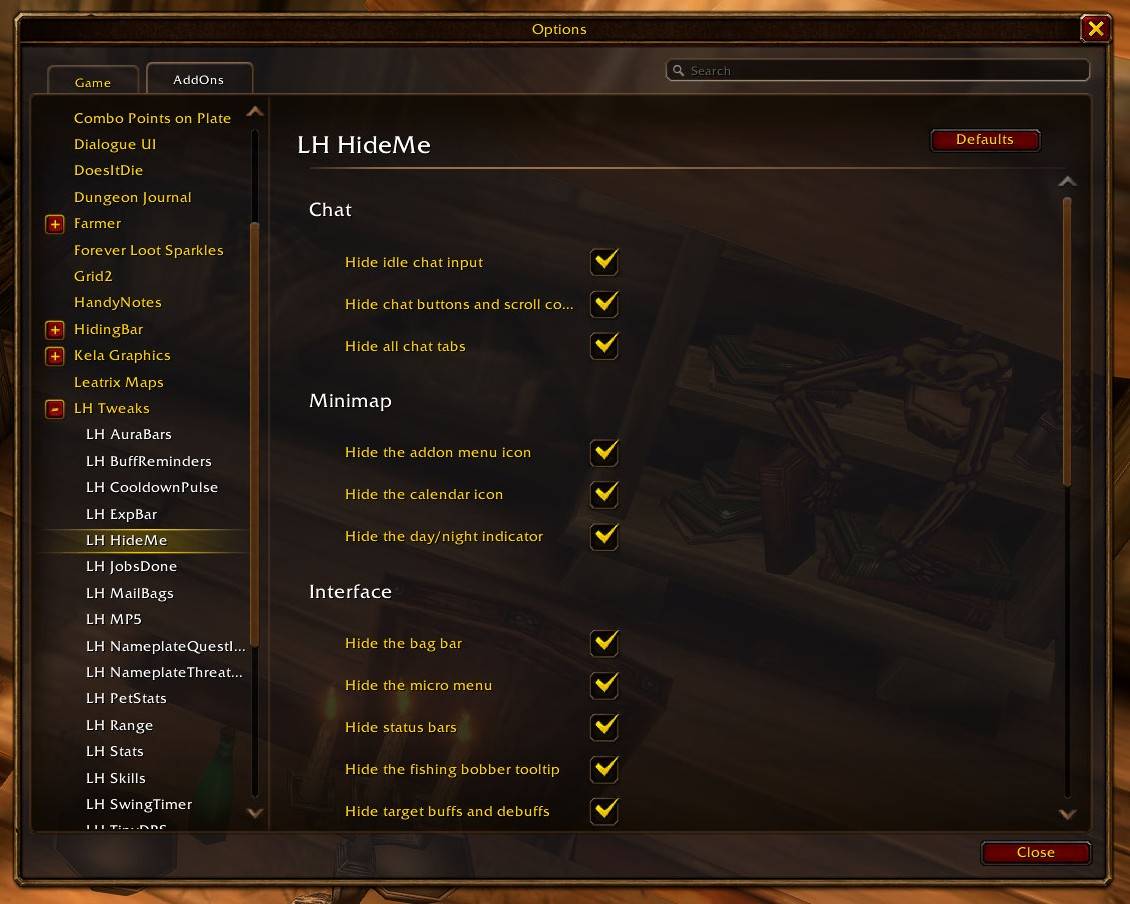
LH_HideMe.jpg
Description
LH HideMe
Hide selected parts of the default WoW UI, including chat controls, minimap buttons, action bars, and frames, with individual settings or a Hide all option.
Keep the familiar WoW interface, but clear away the pieces you don't need to see all the time. LH HideMe gives you individual controls for common UI elements and brings important frames back when you need them.
What it can hide
- Chat: Idle chat input, chat buttons and scroll controls, and chat tabs.
- Minimap: The addon menu, calendar icon and day/night indicator.
- Interface: Bag bar, micro menu, experience and other status bars, target buffs and debuffs, and the fishing bobber tooltip.
- When idle: The player frame at full health, and active action bars when you have no target and are out of combat. You can keep selected action bars visible when your health drops.
Press Enter to use chat while its idle input is hidden. Hidden action bars still keep their key bindings. Visibility changes made during combat are applied afterward.
Choose what stays
Open Options → AddOns → LH Tweaks → LH HideMe and choose individual options, or use Hide all and Show all. You can also type /lh_hideme help for chat commands. If you enable all LH Tweaks options and use Hide all here, you can arrange the remaining UI in WoW's Edit Mode and be ready to play.
More LH addons
Choose only the pieces you want. Each companion addon also requires LH Tweaks.
- LH AuraBars: Compact bars for buffs, debuffs and spell cooldowns.
- LH CooldownPulse: Flashes an ability icon when its cooldown finishes.
- LH ExpBar: A minimal experience bar with rested XP.
- LH JobsDone: Plays the Warcraft peasant voice when a quest is ready to turn in.
- LH MailBags: Opens your bags at the mailbox, with optional closing.
- LH MP5: Shows an estimated five-second timer on the player mana bar.
- LH NameplateQuestInfo: Adds quest markers and objective progress to nameplates.
- LH NameplateThreatColors: Colors Blizzard nameplates by threat and role.
- LH PetStats: Shows hunter pet loyalty beside the pet portrait.
- LH Range: Shows melee range and Shaman or Hunter spell-range zones.
- LH BuffReminders: Reminds you when selected class buffs are missing.
- LH Skills: Shows profession ranks in a movable compact bar.
- LH Stats: Shows money, free bag slots and remaining ammo below the minimap.
- LH SwingTimer: Shows main-hand and ranged swing timers below the player cast bar.
- LH TinyDPS: Shows built-in damage meter data in a compact separate window.
- LH Tweaks: Provides the shared settings hub plus chat, positioning, merchant and fishing tweaks.
Installation and feedback
LH Tweaks is required and must be installed alongside LH HideMe. I made this for my own UI first, but I hope you can make it yours too. Please post feedback, bugs and improvement ideas in the CurseForge comments.
* Implemented with the help of Codex and GPT-6-SOL and tested by me as thoroughly as I could in the WoW beta client. Some class or race combinations may still need work; please report anything you notice.
Changelog
- 0.20.0: Added a dedicated page beneath LH Tweaks for every hiding option and action bar health exceptions.
- Recent updates: Added fishing bobber tooltip, day/night indicator and target aura controls; improved chat tab hiding after login and included shaman totem bars.
- Visibility controls: Added action bar health exceptions, Hide all and Show all, permanent status bar hiding, and addon menu and calendar icon switches.
- Earlier updates: Added chat button and tab controls, conditional player frame and action bar visibility, and independent switches for the bag bar and micro menu.
LH HideMe Team