LFGMythicLocation
- By
Screenshot 2026-05-16 150652.png
Description
LFGMythicLocation (by Katzenhirn)
Ever signed up for multiple Mythic+ groups and forgotten which one actually invited you?
In the heat of the moment, especially when applying to several keys at once, it’s easy to lose track of where you are going. LFGMythicLocation is a lightweight, "zero-config" addon designed to solve this exact problem.
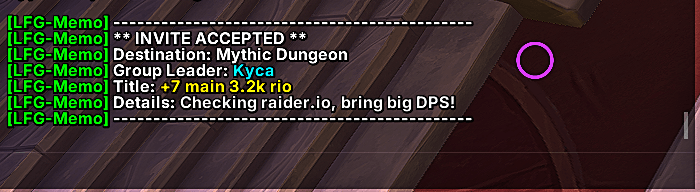
The moment you accept an invitation for a Mythic Dungeon, the addon identifies the destination and prints a clear, color-coded summary directly into your chat frame.
Key Features
-
Automatic Detection: Instantly identifies the dungeon name and key level as soon as you hit "Accept".
-
Leader Identification: Clearly displays the name of the group leader so you know who to whisper or follow.
-
Keystone Level Support: Displays the intended Mythic+ level (e.g., +10) if the leader has specified it in the LFG tool.
-
Visual Clarity: Uses high-contrast colors (Green prefix, White destination, Blue leader name) to make the information stand out from the usual chat noise.
-
Audio Notification: Plays a subtle sound alert to ensure you don't miss the confirmation while multitasking.
Commands
-
/lfgtest- Triggers a simulated invitation message so you can preview the addon's output and verify your chat settings.
Installation
-
Download the ZIP file.
-
Extract the
LFGMythicLocationfolder into yourWorld of Warcraft/_retail_/Interface/AddOns/directory. -
Restart or reload your game.
About the Author
Developed by Katzenhirn. This addon was built with performance in mind—it uses minimal memory and only runs when you are interacting with the Dungeon Finder.
LFGMythicLocation Team