


LFG Templates
- By
Save and reuse application notes and dungeon/raid listing templates beside Blizzard's Group Finder, with account-wide storage, quick manual copy-and-paste, customizable panels and Classic or Modern themes.
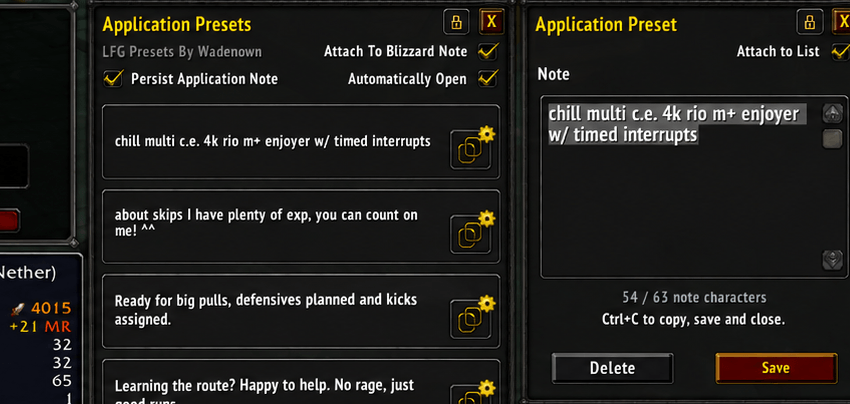
LFG Presets By Wadenown helps you save and reuse application notes, dungeon listings and raid listings—right beside Blizzard’s Group Finder.
Open settings with /lfp, /lfgpresets or the LFG Presets tab in Dungeons & Raids.
About autofill: Blizzard’s current UI restrictions prevent the addon from automatically filling the native text fields with your selected preset. Use the built-in Ctrl+C → manual paste workflow instead. We’ll monitor future API and restriction changes and explore autofill if a supported method becomes available.
Features
- Application Presets: Save notes to reuse across group applications.
- Dungeon & Raid Presets: Keep separate collections of listing titles and descriptions.
- Expandable lists: Start with five slots per category and add more whenever you need them.
- Quick copy workflow: Open a preset, edit it, then press Ctrl+C to copy your selection, save your changes and close the editor. Paste into Blizzard’s fields manually.
- Account-wide storage: Share your presets and settings across characters.
- Flexible positioning: Drag, lock or attach panels to the relevant Blizzard window. Keep the editor attached to its list or move it independently.
- Optional note persistence: Keep the current note in Blizzard’s application window between applications.
- Classic & Modern themes: Customize the appearance, panel scale and background opacity.
- English & Turkish: Switch the addon’s language instantly.
Panels can open automatically when creating a group or applying to one. Preview and configure them through the options window.
No additional addons required.
LFG Templates Team
