


LFG Alert
- By
LFGAlert — Sound alert + applicant log for your Premade Group listings: who queued, class/spec/ilvl/M+ score, key level, right-click whisper/invite, auto-decline and stats.
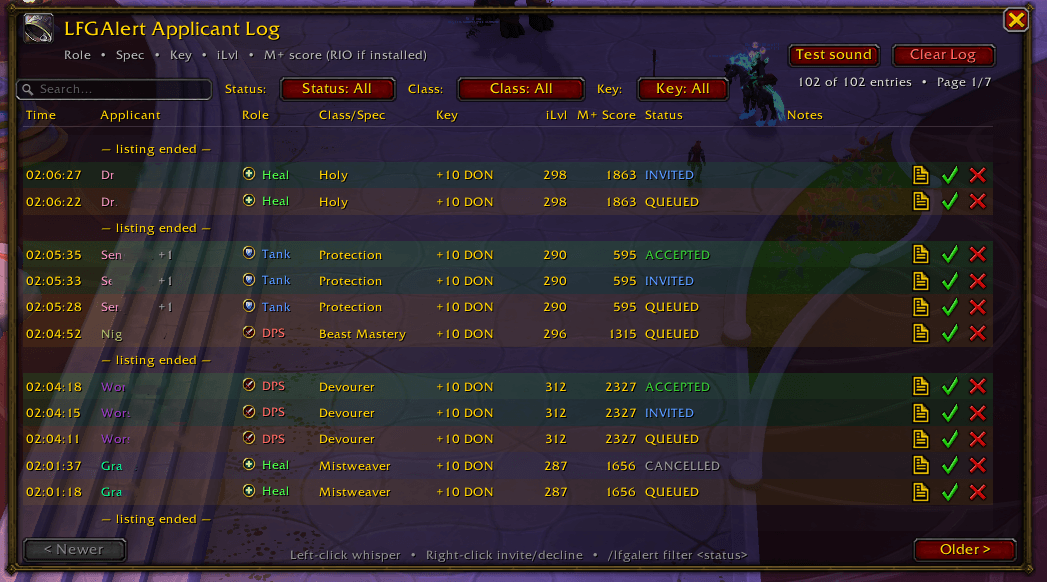
Screenshot 2026-09-16 034244.png
Description
LFGAlert — never miss an applicant. The moment someone signs up to your Premade Group you get a sound, a center-screen warning, a taskbar flash and a smart log that tells you who's worth inviting.
📝 One row per applicant with a lifecycle icon strip: queued → invited → accepted, plus ✕ for declined/left — stages that happened are colored, the rest greyed out, and cancellations show the moment someone withdraws. Hover for the full timeline, group members and both Blizzard + Raider.IO scores.
🔎 Find your best applicant fast — one scrollable, sortable list (click any column header), a resizable window that remembers its position, size and scale, Status/Class/Key filters, text search and one-click reset.
🧙 Know who you're inviting — class-colored names, spec, role, item level and Mythic+ score (Blizzard rating, or Raider.IO automatically when installed). Group applications list every member in the tooltip.
⚡ Fast, safe actions — one-click whisper / invite / decline buttons plus a right-click menu. Invite and decline only ever act on your current listing, so an old row can never hit the wrong person.
★ Requirements + auto-decline — set a min item level / M+ score: qualifying rows turn green with a star, and optional auto-decline removes the rest for you (always announced, always logged, never fires without real data).
🔔 Four alerts, your call — sound (Master channel, so you hear it even with game audio low), center-screen raid warning, chat message and taskbar flash. Each one toggles independently.
📊 Stats per listing and all-time (accept rate, accepted ilvl/M+ averages), custom sounds (.ogg/.mp3 or any SoundKit ID), a minimap button (left: open log, right: sound on/off, drag to move) and a full settings UI — Esc → Options → AddOns → LFGAlert.
Slash: /lfgalert show, test, sound, minilvl, minscore, autodecline, stats, config and more (/lfga shorthand).
Leader-only alerts • no dependencies (Raider.IO optional) • Midnight-ready • MIT licensed
The LFG Alert Team
