


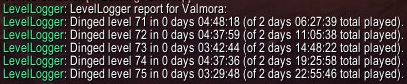
Example chat output from using the /lvlog command
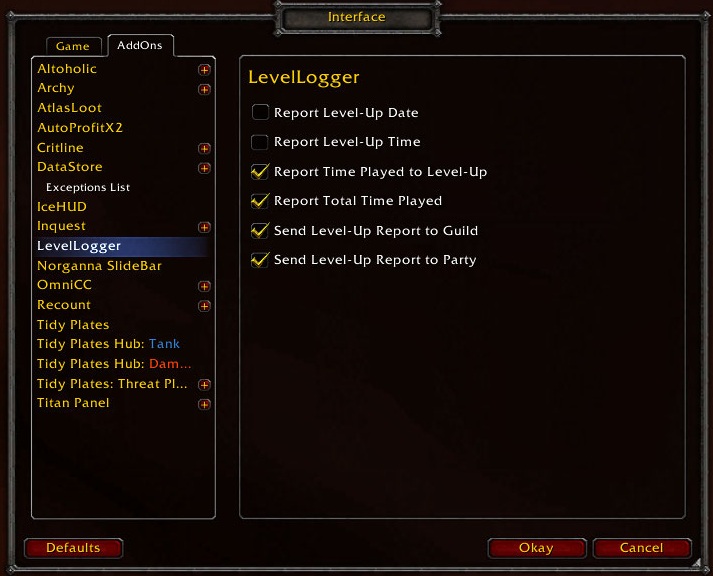
The options window
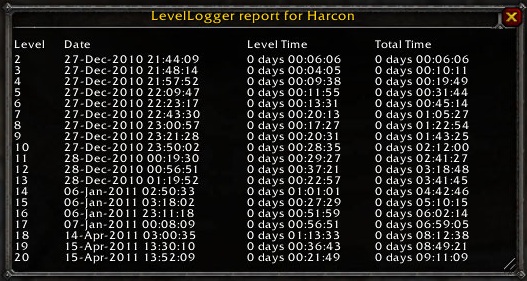
Example log report window showing all level log data. Use /lvlog with no arguments to view.
Description
This keeps a log of when you level and allows you to announce to your party and/or guild when you level-up. The log keeps track of the date and time when you leveled, your /played time, and how long it took to complete the level. You can review your leveling history using the /lvlog chat command. You can also use the interface options to customize the information included in the log reports.
Slash Command Usage
Use /lvlog with no arguments to display the log report window.
- Display Help
- /lvlog ?
- /lvlog h
- /lvlog help
- Log Current Level
- This command displays the data for your current level, and adds it to the log if missing
- /lvlog current
- Send Level Report To Chat
- /lvlog [number]
- /lvlog [number] [level]
- /lvlog [number] [level] [channel] [who]
- number = reports the last [number] levels up until [level], use zero to report all levels logged
- level = reports the log up until this level, default or "c" = current level
- channel = indicates a chat channel to report in, default = console output
- s = /say
- y = /yell
- p = /party
- r = /raid
- g = /guild
- w = /whisper
- who = if using channel w, this specifies the whisper target, default = current target
LevelLogger Team

