Levelbound
- By
Experience and progress bars with rested and quest XP overlays, XP rate and time-to-level estimates, and party member experience tracking.
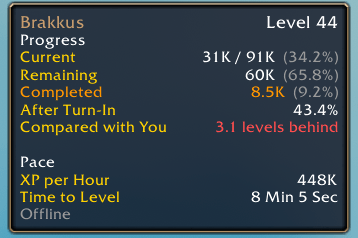
Party Member Tooltip

Description
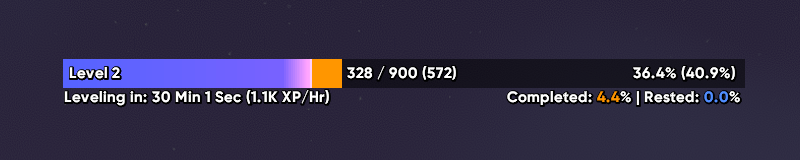
Levelbound replaces Blizzard's experience and reputation bars with its own. It shows how far you are through the level, how much rested and turn-in XP you have waiting, how fast you're levelling this session, and where the rest of your party is.
Experience bar
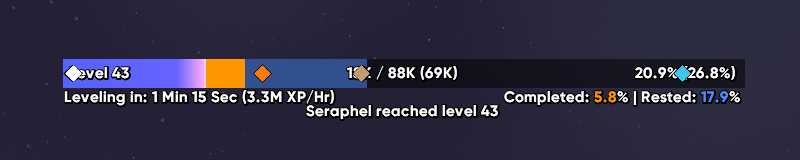
- Rested XP and XP from completed quests you haven't turned in are drawn on the bar in their own colors.
- The bar tracks your XP per hour for the current session and estimates your time to the next level, pausing while you AFK.
- Time played, time at this level and session time are all available as text or in the tooltip.
- Custom notice for gaining exp.
Other progress
Levelbound also tracks these, when your game version has them:
- Pet XP
- Reputation
- Honor
- House Favor
- Neighborhood Endeavors
- Trading Post
Put them all on one segmented bar, stack them as connected bars, or place each bar separately with its own size.
Party markers
Party members who also run Levelbound show up as markers on your XP bar, placed at their own progress toward their next level. Hover a marker for detailed information on their progress and rate. When a party member levels up, you get a notice on screen, a chat line and a sound. Each one can be turned off.
Markers work in 5-player groups, including dungeon finder groups, and hide automatically in raids.
Sharing
- Shift-click a bar to put a line like
[Levelbound] Level 42 · 63% · 18.4k to go · ~1h 12m at 48k XP/hrin your chat box. /lb share party(orinstance,raid,guild,say) sends the line directly.- Optionally announce your own level-ups to party or guild, and post an XP summary at the end of a dungeon or delve.
Customization
In-depth customization options so you can tailor the visuals to your liking.
Open settings with /lb, the minimap button or the addon compartment.
/lb edit opens edit mode, where you can drag the bars into place.
The Levelbound Team