Level Compass: Smart Leveling Guide
- By
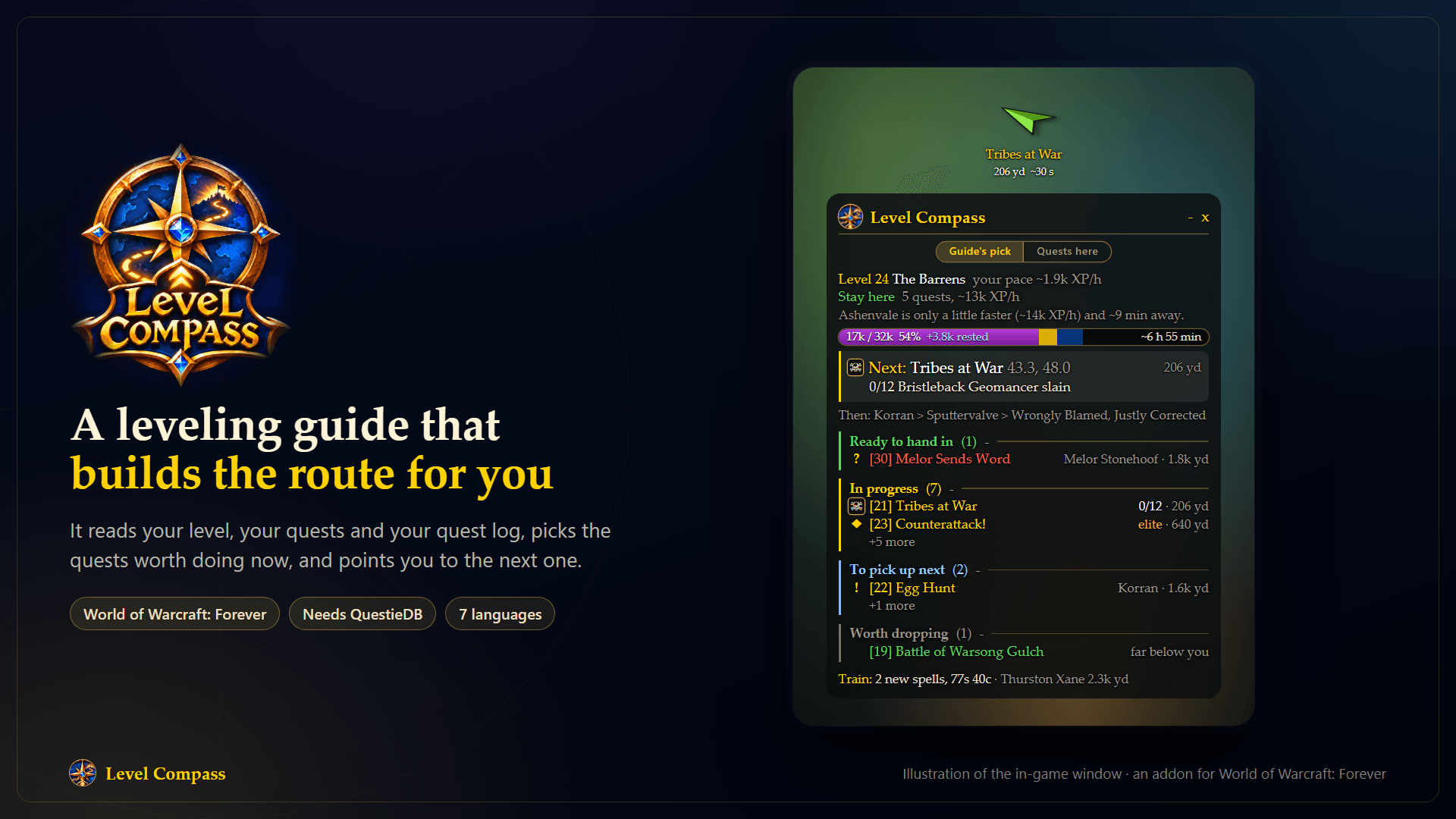
A leveling guide that builds the route for you: it reads your level, your quests and your quest log, and points you to the next stop. (Illustration made with AI help, not a screenshot.)
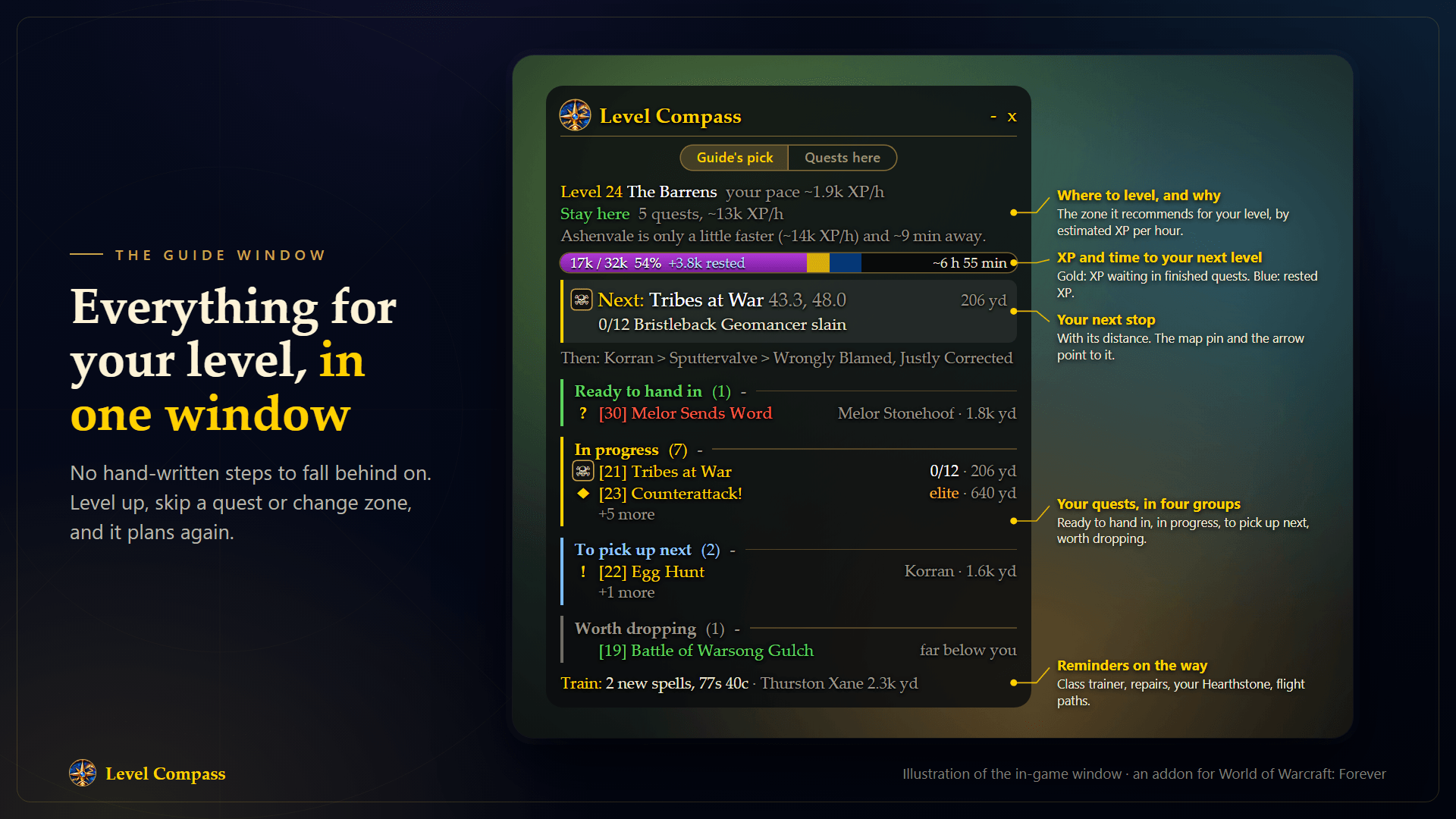
The zone it recommends and why, your XP and the time to your next level, your next stop, and your quests in four groups. (Illustration made with AI help, not a screenshot.)
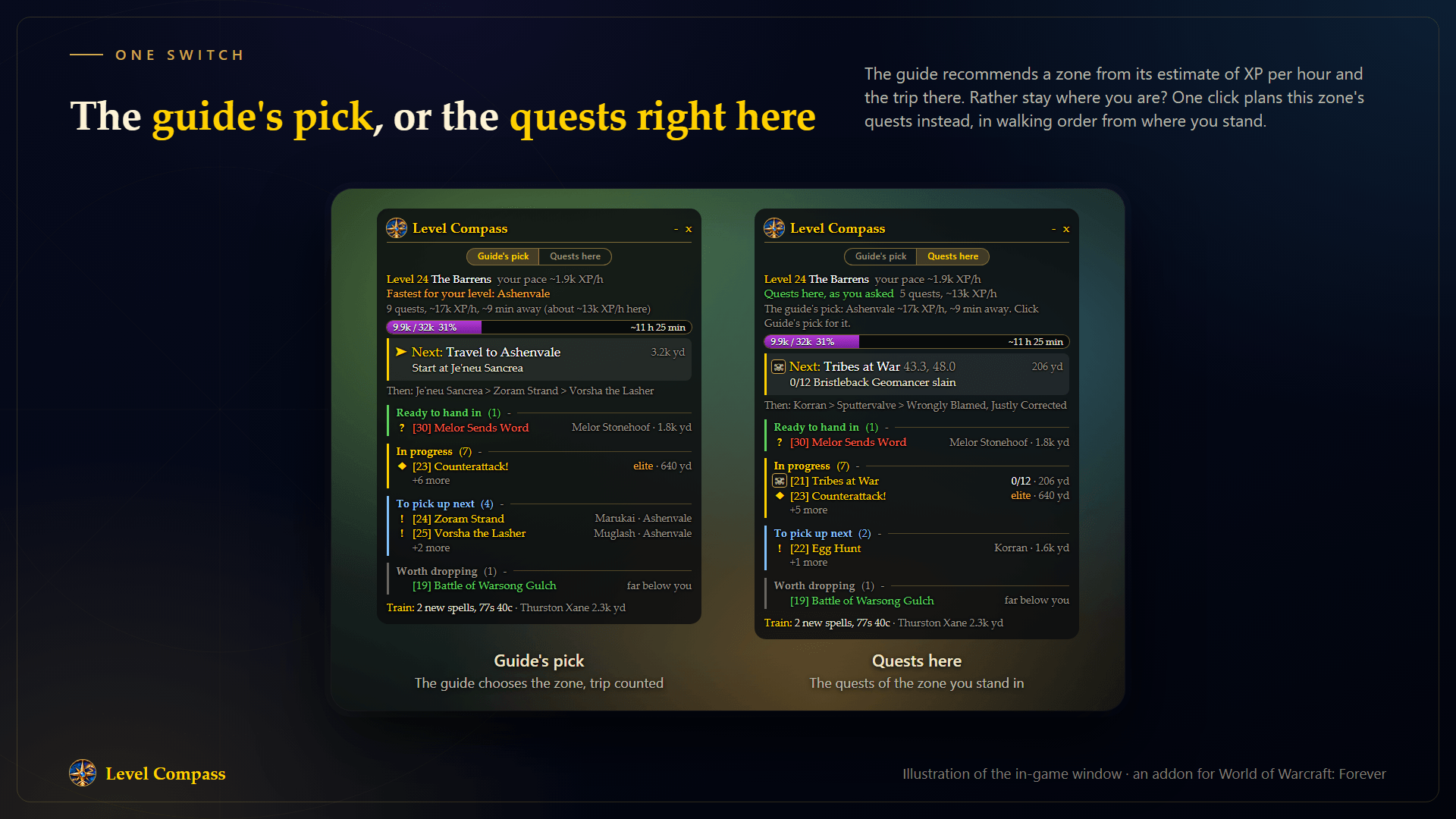
One switch: let the guide choose the zone, or list the quests of the zone you are standing in. (Illustration made with AI help, not a screenshot.)
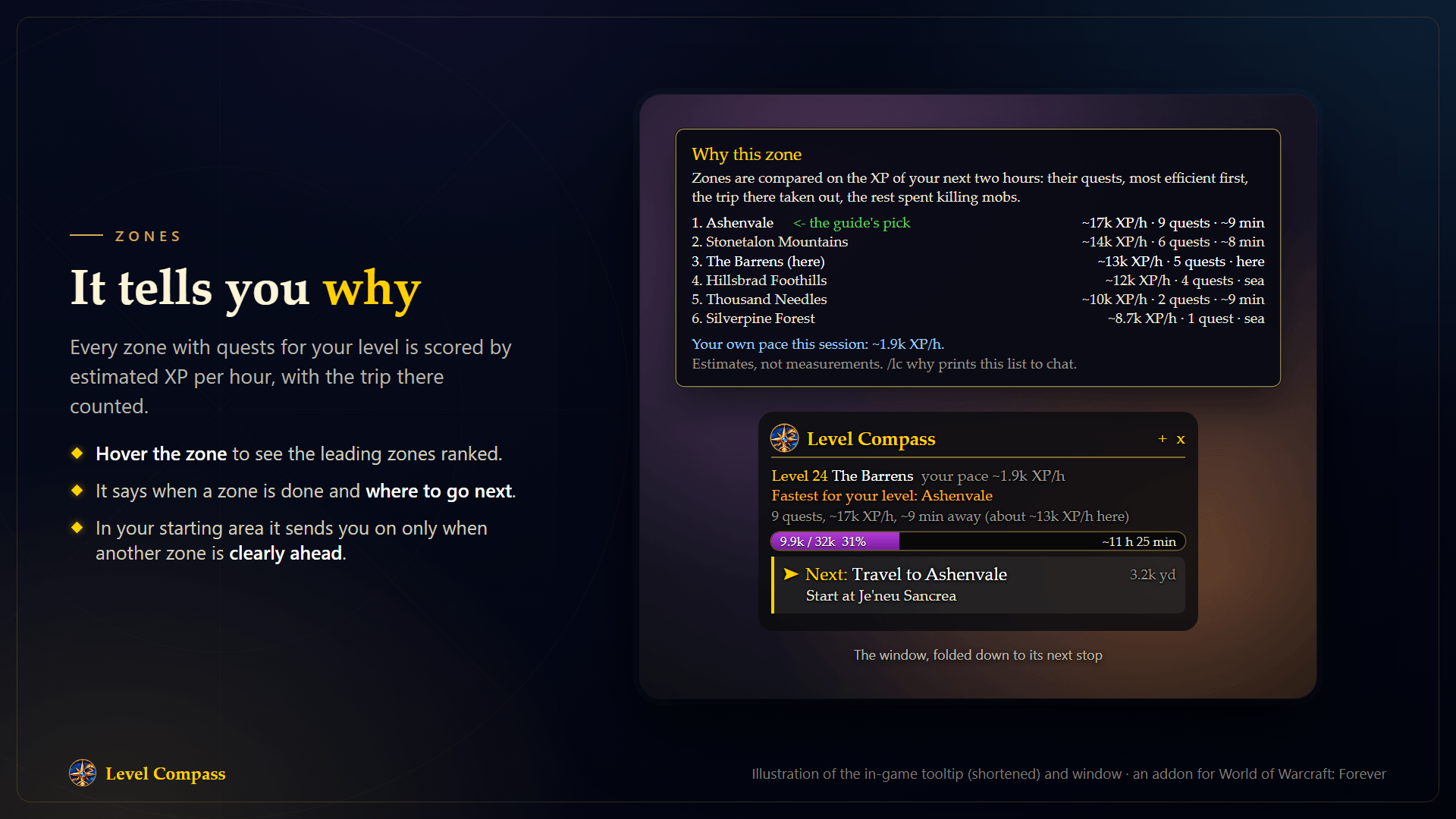
Hover the zone to see the leading zones for your level ranked by estimated XP per hour, with the trip counted (the tooltip is shortened here). Below it, the window folded to its next stop. (Illustration made with AI help, not a screenshot.)
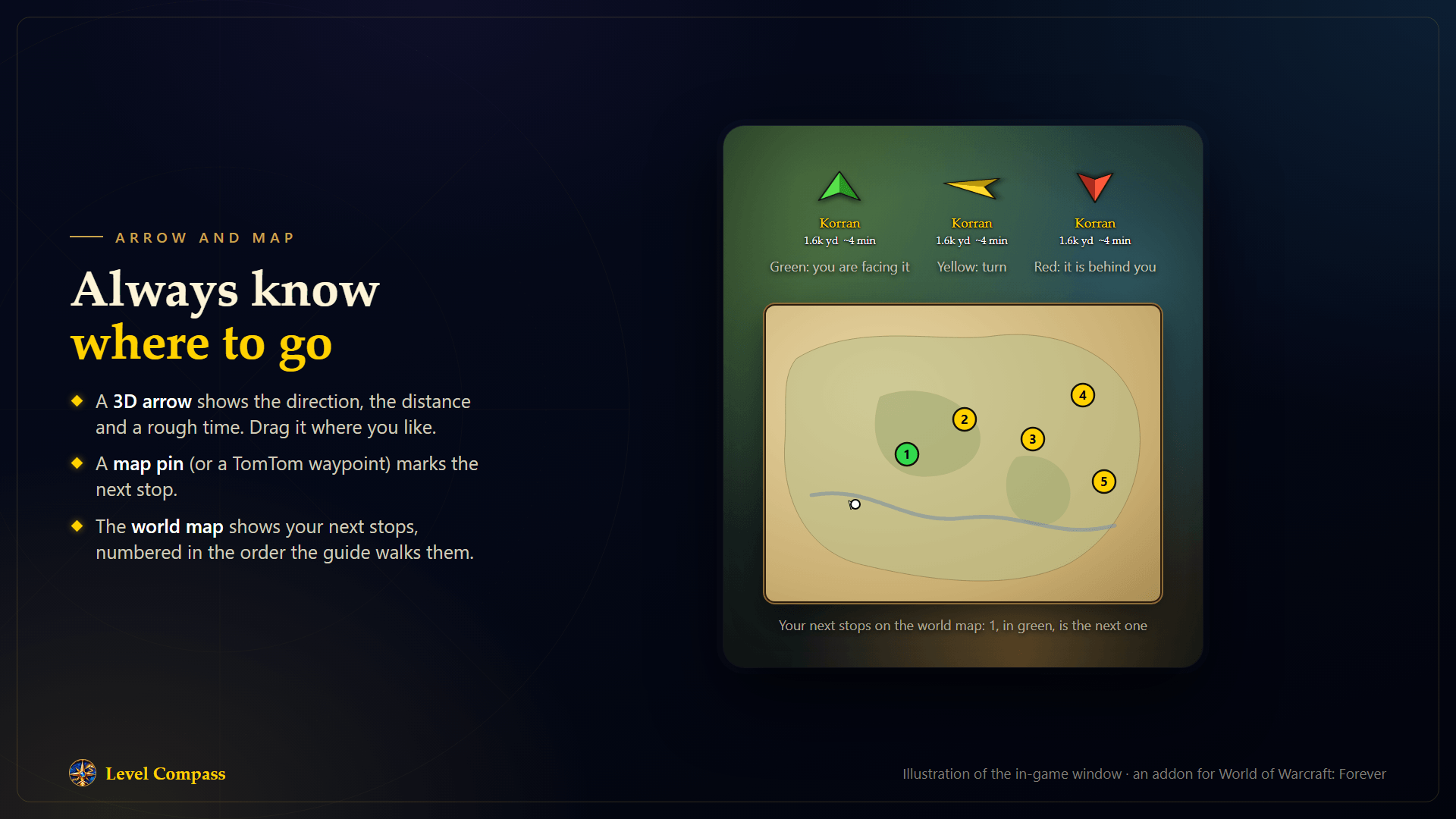
A 3D arrow with the distance and a rough time, and your next stops numbered on the world map. (Illustration made with AI help, not a screenshot.)
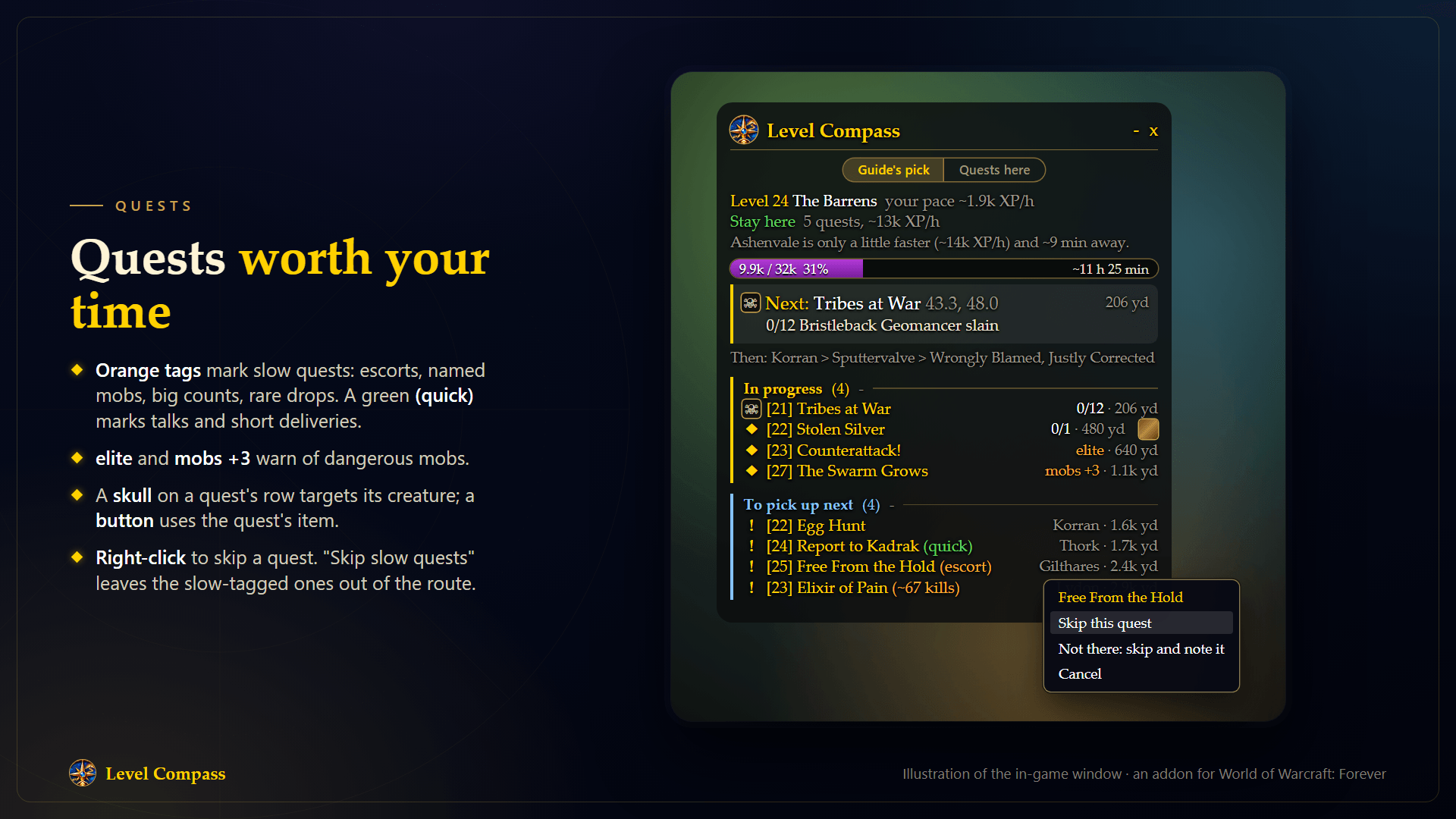
Orange tags for slow quests, a green one for quick ones, warnings for elites and mobs above you, a target mark and a quest item button on the quest's row, and right-click to skip. (Illustration made with AI help, not a screenshot.)
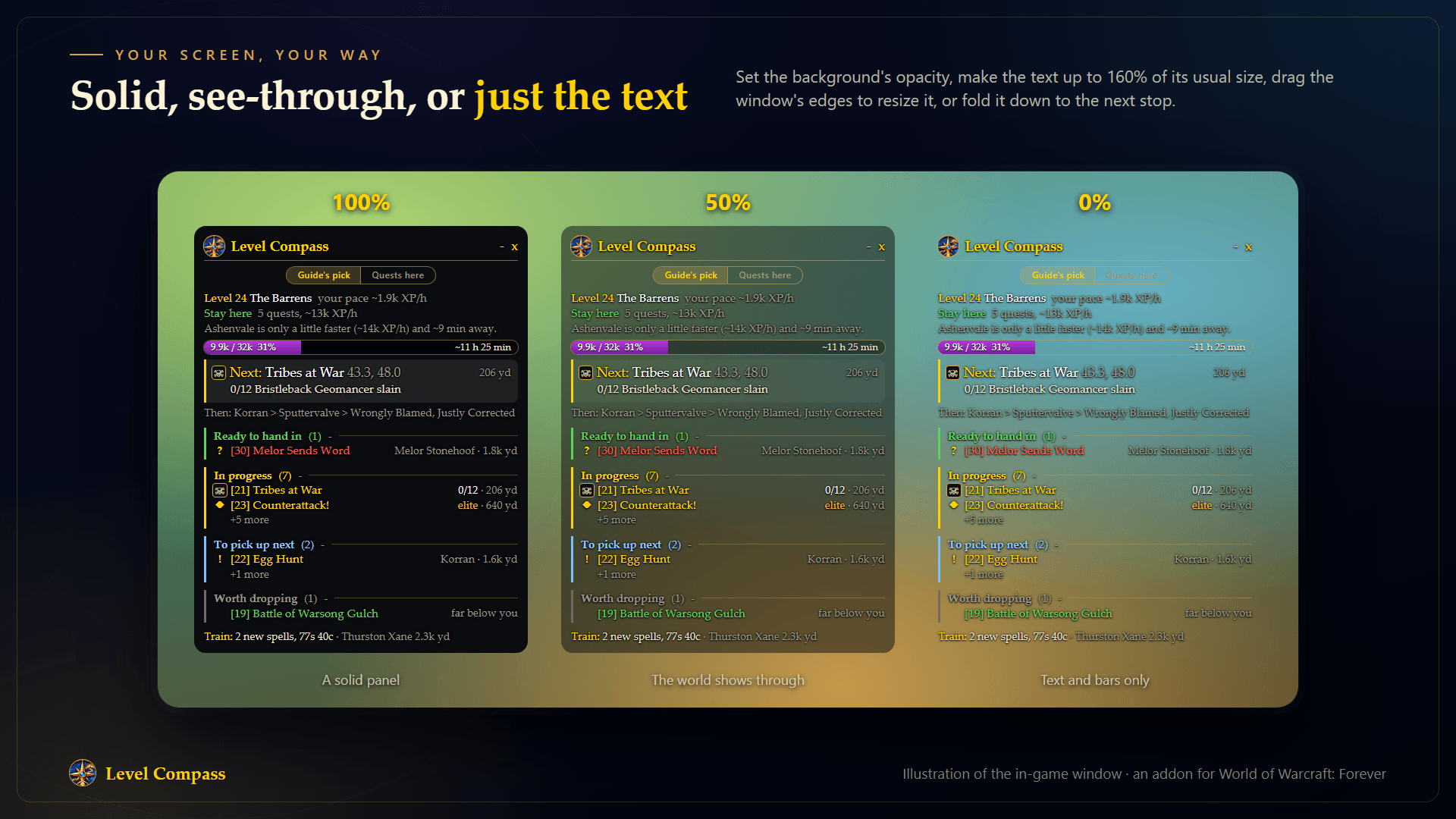
The window at 100%, 50% and 0% background opacity. Text size, window size and folding are options too. (Illustration made with AI help, not a screenshot.)
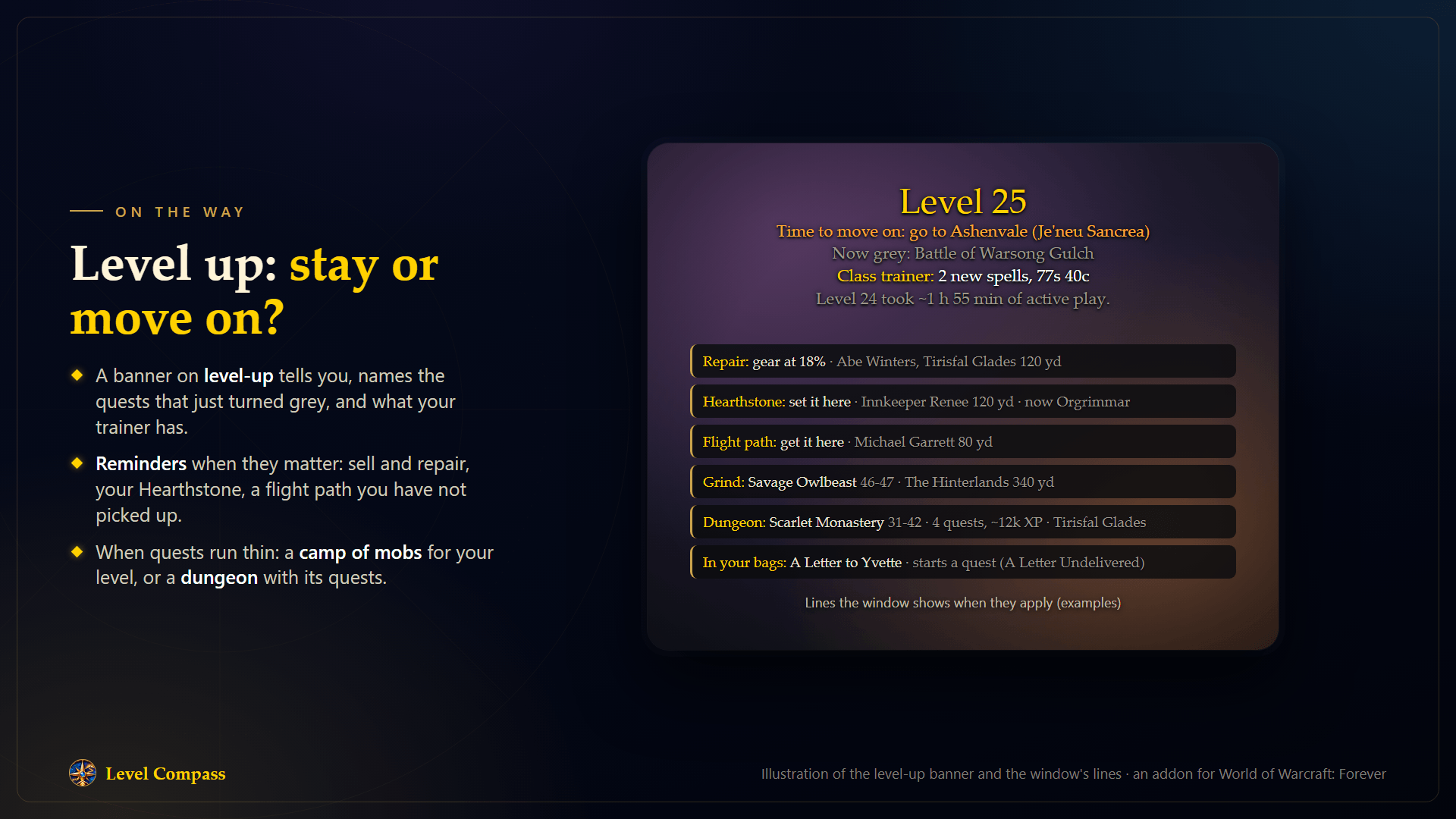
On level-up the guide says whether to stay or move on. Lines for repairs, your Hearthstone, flight paths, a grind spot or a dungeon show when they apply. (Illustration made with AI help, not a screenshot.)
Description
The leveling guide that plans from where you are
Level Compass is a free leveling guide for World of Warcraft: Forever that builds your route as you play, around your character and your quest log. It reads your race, class, level, finished quests and quest log, picks the quests worth doing now, and points you to the next one.
A fixed list of steps works until you leave it: a dungeon with friends, a skipped quest, a character that is already level 23. Level Compass has no list to fall behind on. Start at any level, in any zone, and it plans from there. Level up, skip a quest or change zone, and it plans again.
Needs QuestieDB. The CurseForge app installs it together with Level Compass; without it the addon will not load.
Optional: Shortest Path Forever, TomTom, What's Training.
Start in a minute: install it with the CurseForge app, log in, follow the arrow.
What makes it different
- Starts where you are. Any level from 1 to 60, any race and class, both factions, Forever's own quests and zones included. An empty quest log is fine: it knows which quests are open to you.
- Tells you where to level, and why. Zones are compared by estimated XP per hour with the trip counted. Hover the zone to see the ranking.
- Your call. One switch: the guide's pick, or the quests of the zone you are standing in.
- Shows the way. A 3D arrow, a map pin, and your next stops numbered on the world map.
- Respects your time. Slow quests are tagged and can be left out. Elites and mobs well above you carry a warning.
- Stays out of your way. One small window you can resize, fold, make see-through or scale up to 160% text.
- Free and open. MIT license, no account, nothing sent anywhere. In seven languages.
New in 0.26
- Kill Switch: a new mode (
/lc kill), off by default. It plans only mob clearing quests and the talks or deliveries leading to one. - Packs: clearing quests with mobs close together are tagged as a pack, so one trip earns several rewards.
- Settings shortcut: click the Level Compass logo in the corner of the guide window to open the settings.
Getting started
- Install Level Compass with the CurseForge app. QuestieDB comes with it.
- Log in. The guide window shows your next stops, and a short tips screen explains the basics.
- Follow the arrow. Left-click a row to point the arrow at it; right-click it for the Skip menu.
The minimap button shows or hides the window (right-click for the options). Key bindings are under AddOns in the game's Key Bindings.
Features
Route and arrow
- The window shows the next stop, the stops after it, and your quests in four groups: ready to hand in, in progress, to pick up next and worth dropping.
- A 3D arrow shows the direction, the distance and a rough time. It turns green when you face the next stop. Drag it where you like.
- A map pin or a TomTom waypoint points to the next stop.
- The world map shows your next stops (up to eight) as numbered marks. 1 is the next one.
- A quest in progress points to a good spot for it, usually a camp of the mobs you need.
- With Shortest Path Forever, trip times count your flight paths, boats and hearthstone, and you get step-by-step directions.
Zones
- Counts each zone's quests and the trip there, then recommends one. It says when a zone is done and where to go next.
- Hover the zone name to see why it was picked and which zones came next.
- Guide's pick / Quests here: the switch under the window's name. "Quests here" plans the quests of the zone you are standing in, whatever the guide would pick, and brings back quests you skipped there; "Guide's pick" gives the choice back. In a zone with nothing for your level it says so and the guide keeps choosing.
- In a starting area the trip out is counted for a new character on foot, and the guide recommends moving on once another zone scores clearly higher.
Quests worth your time
- An orange tag marks slow quests: escorts, named mobs, big counts, rare drops. A green tag marks quick talks and short deliveries.
- A quest's row says "elite" or "mobs +3" when its mobs are elite or three or more levels above you.
- Skip slow quests leaves tagged quests out of the route, except those already in your log.
- Kill Switch plans only mob clearing quests, for a character that clears fast: each only if it should beat grinding XP, walk included, and those with mobs close together are tagged as a pack. An estimate: the guide assumes about one kill a minute and doesn't measure yours.
- Right-click a quest to skip it; click the "Skipped" line to bring one back. The same menu offers Abandon for quests in your log, through the game's own dialog.
- Deliveries, errands and quest chains are part of the route, and trips back to hand in are made when they are worth it.
- At a reward choice, a line names the reward a vendor pays most for. Nothing is chosen for you.
Target mark and quest items
- A skull on a quest's row targets that quest's creature by name when it is near. Click it or bind a key.
- When a quest has you use an item, a button for it sits on that quest's row. Nothing is used for you.
- Both hide during a fight and come back after it; an option keeps them visible.
When quests run thin
- A Grind line names a camp of mobs for your level, with its zone and distance.
- A Dungeon line names a dungeon for your level, with its quests.
Reminders on the way
- Sell and repair when your bags are nearly full or your gear is worn, with the nearest vendor.
- Hearthstone: which inn to make your home, and when to use it.
- Flight path: can name a flight master close by whose path the guide has not seen among yours.
- Class trainer: can tell you when new spells wait, with the nearest trainer.
- In your bags: an item that starts a quest.
Progress
- The XP bar shows your XP, rested XP and the XP waiting in finished quests, with the time to your next level: from your own pace once ten minutes of play are measured, from the guide's estimate before that.
- A banner on level-up says whether to stay or move on, which quests just turned grey, and how long the level took.
/lc levelslists the levels you finished: time in active play, XP per hour, quests handed in.
Automatic quests (off by default)
- Accepts the quests the guide recommends and hands in finished ones.
- Stops for you at every reward choice. Hold Shift at a quest giver to do it yourself.
Good to know
- Travel times and XP per hour are estimates, and the window says so. Levels 30 to 60 have fewer quests per zone, so expect more moves.
- Group, elite and dungeon quests are off by default. The options turn them on.
- Quests that need a profession, a reputation, an item to start or a learned spell are not suggested.
- Grind spots need level 10, and leave out capitals, the other faction's home zones and other continents.
- The guide's own text follows your game's language: English, German, French, Spanish, Italian, Russian or Portuguese. The translations are machine-made and not yet read by native speakers: corrections are welcome in a comment. Quest, NPC and zone names come from the game.
- The green "quick" tag and some counts read from quest text need an English game client.
- The pictures in the gallery marked "Illustration" are drawings of the window made with AI help, not screenshots.
Feedback and bug reports
Found a bug, or a quest the guide gets wrong? Type /lc bug and paste the text into a comment here, with what you were doing. It has your addon versions, level, class and map, and the last problem. It doesn't collect your character's name or realm; read it before you post. I read every report.
Commands
| Command | What it does |
|---|---|
/lc |
Show or hide the guide window |
/lc arrow |
Show or hide the arrow |
/lc here |
Plan the quests where you are |
/lc grind |
Suggest a camp of mobs even when quests are not thin, on or off |
/lc auto |
Switch automatic pick-up and hand-in on or off |
/lc slow |
Skip slow quests, on or off |
/lc kill |
Kill Switch (only mob clearing quests), on or off |
/lc why |
Show the zone scores |
/lc levels |
List the levels you finished, with time and XP per hour |
/lc unskip |
Bring back skipped quests |
/lc reset |
Reset skipped quests, the window's size and positions |
/lc flights |
Read your flight paths afresh at the next flight master |
/lc options |
Open the settings |
/lc tips |
Show the tips screen again |
/lc news |
Show what changed in this version |
/lc bug |
Details for a bug report |
Credits
Quest data from QuestieDB and Questie by the Questie team, read at runtime; none of it is included. Shortest Path Forever by cjber is used through its public API when installed; none of its code is included. Level Compass is released under the MIT license.
Level Compass: Smart Leveling Guide Team