imsasa22age.png
Description
# ⚔️ Legion Dungeon Tracker & Stat Loot Filter (WoW 7.3.5)
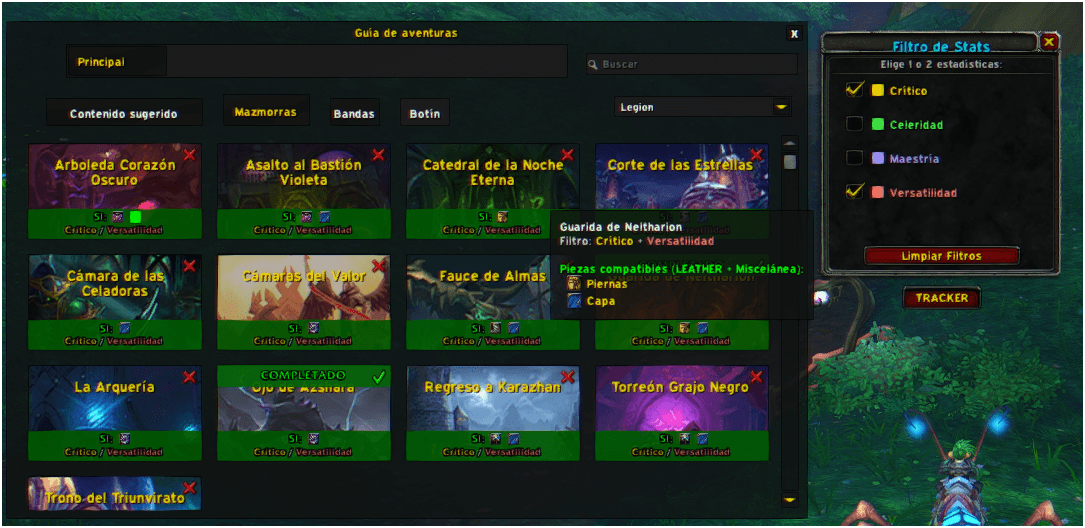
**LegionDungeonTracker** is a clean, lightweight, and powerful World of Warcraft addon for Patch 7.3.5 (Legion). It seamlessly enhances your **Adventure Journal** (*Encounter Journal*) by tracking your weekly dungeon lockouts per character and helping you target the exact dungeons that drop items with your preferred secondary stats!
---
## ✨ Key Features
### 1. 📅 Weekly Dungeon Lockout Tracking
* Automatically records which **Legion dungeons** you have completed on Mythic / Heroic difficulties this week.
* Displays a clear **`COMPLETADO`** (Completed) banner over each dungeon card in the Adventure Journal (`Shift + J`).
* Features an interactive toggle checkmark on each dungeon card to manually mark/unmark lockouts if needed.
* Automatically resets lockouts weekly according to your region's reset schedule (US / EU).
* **Per-Character Saved Data**: Lockouts and settings are independently saved for each of your alts (`SavedVariablesPerCharacter`).
### 2. 🎯 Secondary Stat Loot Filter (Single Item Compatibility)
* Choose 1 or 2 secondary stats: **Critical Strike**, **Haste**, **Mastery**, or **Versatility**.
* Automatically analyzes loot for your player class and armor type (*Plate, Mail, Leather, Cloth, plus Jewelry/Trinkets*).
* **Exact Item Match Check**: Instantly tells you if a dungeon drops an item with **BOTH selected stats together on the same piece**:
* 🟢 **`YES: Item with BOTH stats`**: Highlighting dungeons that drop armor/items combining both chosen stats in a single piece.
* 🟠 **`NO: Separate stats only`**: Indicates the dungeon drops items with Stat A and items with Stat B, but not together on one item.
* 🔴 **`NO: No stats found`**: The dungeon doesn't drop items with those stats for your class.
### 3. 🔘 Movable "TRACKER" Floating Action Button
* Sleek, native WoW UI button displaying gold text: **`TRACKER`**.
* **Left-Click**: Toggles the Stat Selection popup window.
* **Right-Click**: Quickly opens/closes the Adventure Journal (`Encounter Journal`).
* **Drag & Move**: Drag the button anywhere on your screen. The position is automatically saved per character.
### 4. ⚡ High Performance & Zero FPS Impact
* Optimized event handling with built-in throttles to eliminate UI stutter or frame rate drops.
* Overlay rendering runs strictly when the Adventure Journal is visible on screen, keeping CPU consumption at 0% during gameplay.
---
## ⌨️ Slash Commands
Use `/ldt` or `/legiondt` or `/dungeontracker` in chat:
* `/ldt stats` - Toggles the Stat Selector popup menu.
* `/ldt status` - Prints your current class, armor type, active stat filters, and completion count in the chat frame.
* `/ldt reset` - Manually resets weekly completion status.
* `/ldt show` - Shows the floating TRACKER button.
* `/ldt hide` - Hides the floating TRACKER button.
---
## 📦 Installation Instructions
1. Download the latest version of **LegionDungeonTracker**.
2. Extract the `LegionDungeonTracker` folder into your WoW AddOns directory:
`World of Warcraft/Interface/AddOns/LegionDungeonTracker/`
3. Launch World of Warcraft (or type `/reload` in-game).
4. Make sure **LegionDungeonTracker** is checked in your AddOn list on the character selection screen.
---
## 🌐 Localization & Compatibility
* **Client Version**: Patch 7.3.5 (Legion).
* **Supported Languages**: Spanish (`esES` / `esMX`) & English (`enUS` / `enGB`).
LegionDungeonTracker Team