
Legacy Vendor
- By
Screenshot 2026-08-30 121339.png
Description
Legacy Vendor
Clear years of old-expansion clutter out of your bags, without selling anything you meant to keep.
You farm old raids, delves, transmog, achievements. Your bags fill with Wrath gear you will never wear, MoP food you forgot about, and crafting leftovers from three expansions ago. Legacy Vendor sells that — and only that — when you are standing at a vendor.
It is not a junk seller. Scrap and Dejunk already do greys perfectly well, and Legacy Vendor works happily alongside them. This is for the pile of old but not worthless things they leave behind.
Set it up in about thirty seconds
Type /lv setup and answer three questions:
- Which expansions do you want to clear out?
- What kinds of items? — Gear only / Gear + old consumables / Everything
- How careful should it be? — Very careful / Balanced / Aggressive
The number of matching items in your bags updates live under every question, so you can see the effect of a choice while you are making it. Nothing is saved until you press Finish, and Cancel puts everything back exactly as it was.
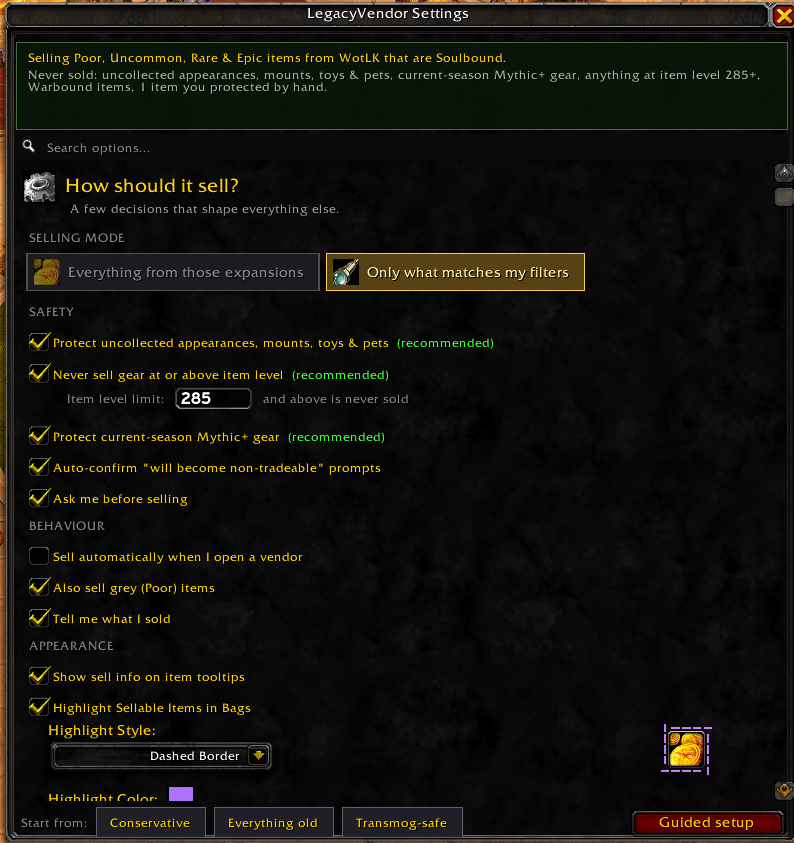
Prefer to do it by hand? The full panel walks you through the same decisions one step at a time, revealing the next question as you answer the last, and branching on your answers — picking "Gear" is what makes the gear-slot list appear.
It tells you what it is going to do
The thing that makes bag cleanup stressful is not knowing what a setting will actually sell. So Legacy Vendor answers that everywhere:
- A plain-English sentence at the top of the settings, rewritten as you click:
Selling Rare, Epic items from Burning Crusade that are Soulbound, but never from Professions. - A live count from your real bags: 23 items would sell right now (about 612g).
- Everything that is protected, listed right beside it — so the sentence is never mistaken for the whole story.
- On the item itself. Hover anything in your bags:
Legacy Vendor: will sell (2g 40s)
Legacy Vendor: keeping — uncollected appearance
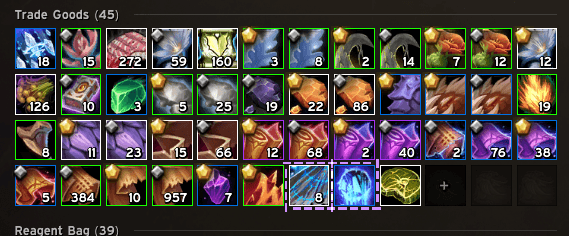
Legacy Vendor: keeping — Shadowlands is not selected - In your bags. Matching items are highlighted while a vendor is open. If some matches are scrolled out of view, a button jumps you to each one.
Bag highlighting, your way
While a vendor is open, every item that matches your rules is marked in your bags — so you can check the result before clicking anything.
Ten highlight styles, with a live animated preview in the settings so you can compare them without closing the panel:
Pulsing Glow · Marching Ants · Solid Border · Flash Pulse · Full Icon Wash · Soft Corners · Corner Brackets · Double Ring · Spinning Accent · Dashed Border
Any colour you want. A colour picker sits beside the style dropdown, and both the preview and the items already highlighted in your bags update the moment you change it — no reload, no reopening the vendor.
Pick something subtle that sits quietly behind a busy bag addon, or something loud you cannot miss. If highlighting is not for you at all, turn it off.
Safety
These run before every filter and override all of them. They are listed at the top of the filter flow so you always know they are on.
- Uncollected appearances, mounts, toys and pets are never sold. Appearances only count when your character could actually learn them, so this does not quietly stop the addon selling other armour types.
- An item level ceiling. Never sell gear at or above a level you choose. This one does not care which expansion an item is from or where it came from — it just asks how good the item is, which makes it the most dependable guard of the lot.
- Current-season Mythic+ gear is hard-protected. Legacy dungeons in the current rotation drop current-tier loot wearing an old expansion's label; that gear is never sold.
- Warbound items are their own category, off by default. They are shared by every character on your account, so selling one from here removes it for all of them.
- A never-sell list you can actually see. Drag an item onto it to protect it, review it any time, remove things individually.
- Manual by default. A Sell button appears at the vendor; nothing happens until you click it. Optional confirmation on top of that.
- Nothing sells that you did not enable. Crafting materials and quest items stay off until you deliberately turn them on.
Filtering, when you want the detail
Every filter below narrows the same rule, and the sentence at the top shows the combined result.
- Expansions — Classic through Midnight, or "sell everything from these expansions" for a fast pass
- Rarity — Poor through Legendary
- Bind type — Soulbound, Bind on Equip, Not Bound, Warbound
- Gear slots — every equipment slot, with the character sheet's own icons
- Item types — bags, quest items, keys, gems, reagents, trade goods, recipes, misc
- Sources to never sell from — consumables, dungeons, raids, world, professions, vendors, PvP, reputation, housing/delves
- Only sell lower item level than equipped — optional
- Per-expansion overrides — keep one expansion broad and another strict, under Advanced
All / None buttons on every large group, and three one-click presets: Conservative, Everything old, Transmog-safe.
Profiles and sharing
- Named profiles. Save a setup, switch between them, and star one to load automatically on a given character — a leveling alt and a transmog main want different rules.
- Share your setup as a string. Export it for a friend or a guide, import theirs, or keep one as a backup before experimenting. An imported config can only ever tighten your protections, never switch them off.
Track what you have cleared
/lv stats shows how much gold you have reclaimed and from which expansions:
Reclaimed 4,182g from 118 old item(s).
WotLK 1,904g (41 items)
Cata 887g (26 items)
MoP 612g (19 items)
Slash commands
- /lv setup — guided setup, three questions instead of forty options
- /lv config — open the settings panel
- /lv scan — preview what would be sold
- /lv sell — sell matching items (at a vendor)
- /lv protected — manage the never-sell list
- /lv exclude — protect the item you are hovering
- /lv profiles — save and switch between named setups
- /lv export and /lv import — share your filter setup as a string
- /lv stats — gold reclaimed, by expansion
- /lv find — scroll your bags to the next matching item
- /lv highlight — toggle bag highlighting
- /lv strict — toggle current-season protection
- /lv auto — toggle auto-sell
- /lv toggle — enable or disable the addon
- /lv minimap and /lv resetbutton — minimap button
- /lv debug and /lv exportlog — record a diagnostic log and open it to copy
- /lv reset — reset all settings
Supported versions
Retail (The War Within / Midnight) · Mists of Pandaria Classic · Burning Crusade Classic Anniversary · Classic Era / Season of Discovery
Reporting a problem
Turn on Debug mode in the settings, reproduce the issue, then /lv exportlog and copy the text into a comment. That log says exactly which rule made the decision for every item in your bags, which usually pins the cause immediately.
Legacy Vendor Team
