Capture d'écran 2026-11-05 133738.png
Description
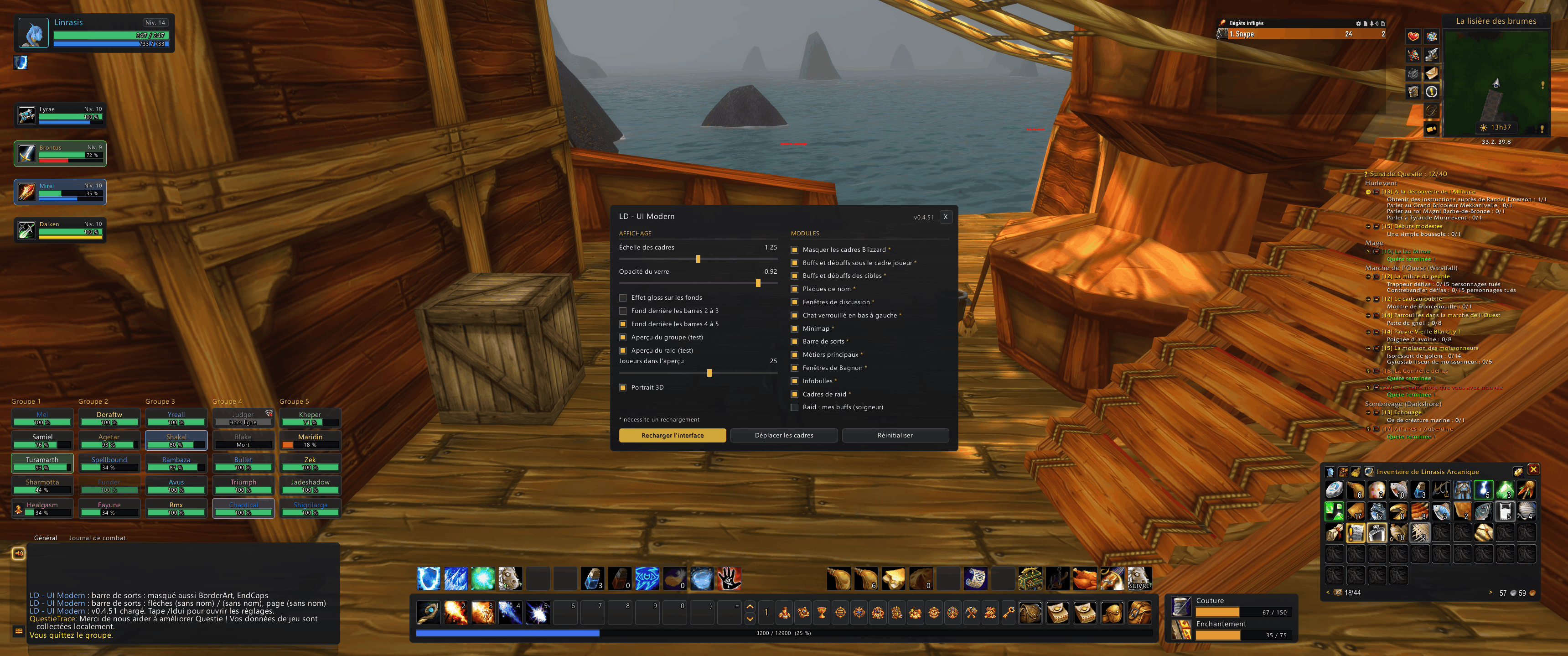
UI Modern replaces Blizzard’s default interface with a flat, dark aesthetic, featuring rounded-corner frames, thin borders, and gold accents.
- Player, target, and target-of-target frames, with rounded portraits (3D or 2D) outlined in the player's class color.
- Level displayed in a small badge; health and resource bars; an "offline" icon for disconnected players.
- Buffs and debuffs positioned below the frames. Right-click any of your own buffs to cancel them.
- Pet frame, located below your debuffs, which shifts the group frames downward.
- Compact group frames with auras, color-coding for dispellable debuffs, and a "dummy" mode to help you adjust the layout.
- Cast bar, with an option to reposition it.
- Raid frames organized by group, displaying dispellable debuffs and your own buffs on each unit.
"Dummy" player frames for layout adjustments outside of a raid. - Group frames that can be moved individually.
- Main action bar, including experience and reputation bars, page numbers, and keybind indicators.
- Action bars 2 and 3 positioned at the bottom; bars 4 and 5 arranged in columns on the right—each with an optional "glass" panel background.
- Class-specific forms (Paladin, Druid, Warrior, etc.) and the pet bar displayed as tabs above the panel.
- Micro-buttons featuring custom icons, including "Player" and "Social" menus.
- Dark-themed panels, smaller font size, and 12pt text for tabs.
- The input field expands the panel only while you are typing, then returns to its original size.
- Fixed position at the bottom-left, or freely movable.
- Circular minimap, with an adjacent column to organize buttons from other addons.
- Redesigned Group Finder button.
- If you disable the module, a circular button remains to provide access to the settings. Settings can also be found within Blizzard’s interface options.
- Restyled nameplates, including their cast bars.
- Dark, glass-style tooltips.
- Themed profession windows.
- Themed Bagnon bags (if the Bagnon addon is installed).
- Global scale and opacity settings.
- All frames can be moved using the mouse when unlocked; a reset button allows you to restore their original positions.
- Each module can be enabled or disabled individually; a "Reload" button applies your changes.
- Replaced Blizzard frames (player, target, party, pet, auras, cast bar) are hidden.
- Several modules have not yet been tested in-game: raid frames, tooltips, stance/pet tabs, nameplates, buff cancellation, chat expansion, the "Looking for Group" button, and the pet frame (with party-offset positioning).
LD - UI Modern Team