LayerHelper
- By
LayerHelper detects and displays your current layer in WoW TBC Classic using NPC GUIDs. Easily track where you are and streamline your layer swapping with a customizable, automated Autoinvite toggle. Minimalist and light.
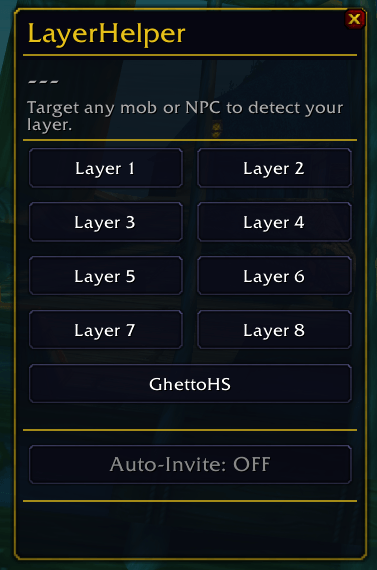
GUI
Description
About LayerHelper
LayerHelper is a lightweight addon for WoW TBC Classic Anniversary that detects your current layer and automates the layer-swapping process between players — no chat spam, no manual invites.
Because Blizzard does not expose layer numbers through the API, LayerHelper reads NPC GUIDs (ServerIDs) from your targets, mouseovers, and nameplates to identify which layer you are on. Three successful detections within two minutes are required before the layer is marked as Confirmed — auto-invite will not trigger until this threshold is met.
Key Features
- Layer Detection — Automatically detects your layer by targeting or hovering over any nearby mob or NPC. Works on hostile mobs too, not just friendly NPCs.
- Confidence System — Displays Detecting... while gathering data, and Confirmed (green) once your layer is verified. Auto-invite is blocked until Confirmed.
- Auto-Invite — When enabled, automatically invites players broadcasting a layer request on your layer, and sends them a whisper with layer info.
- GhettoHS Support — Dedicated GhettoHS button for players stuck in a dungeon with hearthstone on cooldown. Anyone with Auto-Invite enabled can respond — no layer matching required.
- Quarantine System — Each player you invite enters a 10-minute quarantine, preventing repeat invites and spam. A live list of active quarantines with countdown timers is shown in the addon window.
- Request Cooldown — Layer request buttons have a 10-second cooldown with a live countdown displayed on the button.
- Shared Channel — All communication happens silently over a hidden shared channel (
LH_TBC), automatically joined on login. No visible chat spam.
How It Works
- Target or hover any mob or NPC — your layer is detected automatically.
- Wait for status to show Confirmed (green).
- Enable Auto-Invite to start accepting layer requests from other LayerHelper users.
- To request a layer yourself, click the desired layer button — a request is broadcast and nearby users on that layer will auto-invite you.
Slash Commands
| Command | Description |
|---|---|
/lh |
Toggle the main window |
/lh show / /lh hide |
Show or hide the window |
/lh layer |
Print current layer to chat |
/lh status |
Full status output (layer, confidence, channel, quarantine) |
/lh clear |
Clear the quarantine list |
/lh reset |
Reset window position |
/lh debug |
Open debug log (for bug reports) |
Please Note
Layer numbers (Layer 1, Layer 2, etc.) are relative to your current session — they are not absolute Blizzard-internal IDs. Two players comparing ServerIDs via /lh status can verify if they are on the same layer.
The LayerHelper Team