


Layer Anarchy
- By
Swap layers through every layer network at once (LayerSwap, AutoLayer, VoidNet, Layer Hop) and host for all of them.
hero.png
Description
Every layer addon on Forever runs its own network, so you only reach the hosts who use the same addon you do. The most popular one also decides when you're allowed to swap: not in combat, not while dead, not right after a fight, and only as many times an hour as the addon thinks you should.
I wanted one that talks to all of them and stays out of my way, so I made Layer Anarchy.
How it works
- Swap asks for an invite on LayerSwap's network (Bulo Layer Forever and Forever Simple Layer use it too), VoidNet and Forever Layer Hop at the same time, then keeps asking more players every few seconds until it finds a host or runs out of people. It takes the first invite that can move you, checks that your layer actually changed, and leaves the group.
- AutoLayer hosts only listen to public chat, and Forever doesn't let addons post there. After about 12 seconds an Ask AutoLayer button puts the request in your chat box; you press Enter to send it.
- Hosting is on by default for all of those networks, flight paths included. Both can be turned off.
Going back to a layer
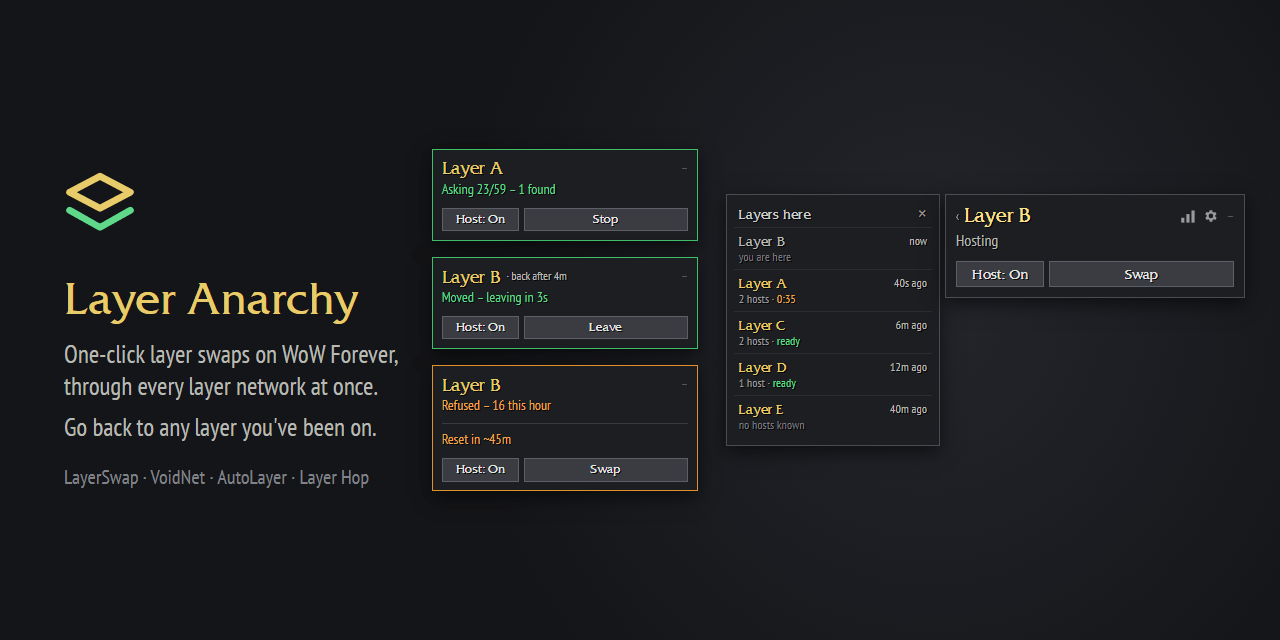
- Layer Anarchy recognises layers from the creatures around you, so a layer you come back to keeps its letter: Layer B · back after 4m. A "?" means it hasn't confirmed which layer yet. While it shows, nameplates flash on for a moment now and then to read the creatures around you.
- Click the layer name for a list of the layers in your zone, when you were last on each, and the hosts known to be there. Pick one to swap straight back to it.
Swap limits
- Nothing is blocked. Swap in combat, while dead or right after a fight.
- The game has its own hourly limit. When it refuses a move, the window tells you and counts down to when you can go again. The count comes from your own swaps, not a number I picked.
- If you want to cap how many invites you send per hour as a host, there's a slider for it, off by default.
The window
- One status line for what's happening right now: Hosting, Asking 23/59 – 1 found, Refused – 16 this hour. The border colour follows it.
- Bars: how many players each network has, and how your swaps and hosting have gone, for the last hour or the session.
- Cog: options.
- Minimize: a small HUD.
- Controller: bind Controller focus to put the controller on the box.
Commands
/lashows or hides the window/la swapswaps/la focusputs the controller on the window/la diagprints a report, handy for bug reports
Key bindings are under Layer Anarchy.
Other layer addons
Layer Anarchy switches itself off if another layer addon that sends or accepts invites is loaded, so the two don't fight over invites. Turn the other one off to use it.
Source
GPL-3.0, written from scratch. Bugs and ideas go to GitHub.
Layer Anarchy Team
