


Lawkh's Talent Merger
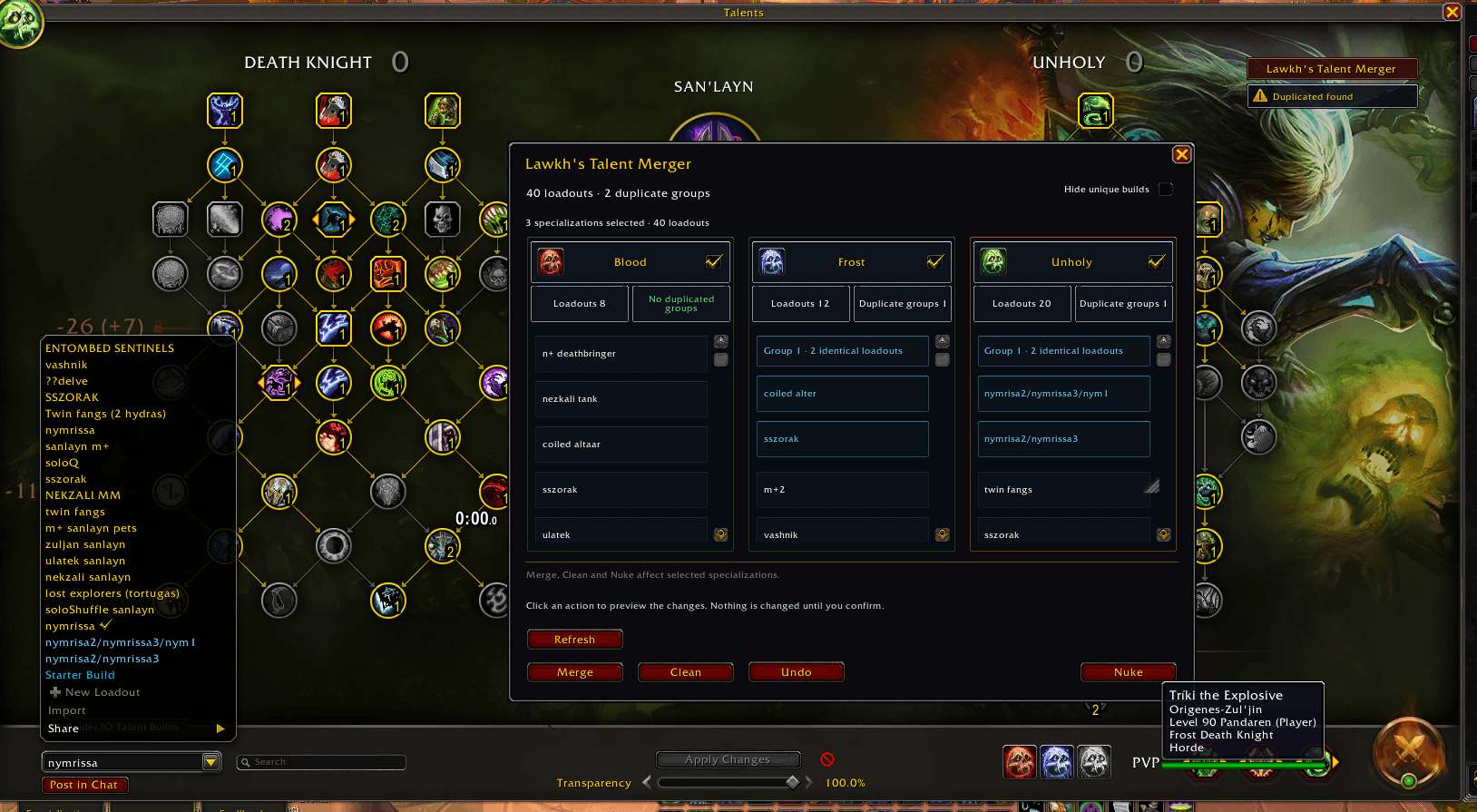
Select specializations, review duplicate groups, hide unique builds and preview Merge, Clean or Nuke before confirming changes.
Description
Lawkh's Talent Merger
Find and manage duplicate talent loadouts in World of Warcraft Retail.
Lawkh's Talent Merger compares selected talents and ranks, including Hero Talents, and groups identical loadouts using matching colors. The same colors appear in the talent loadout dropdown.
Features
- Merge: select specializations and enter a resulting name for each duplicate group. The addon suggests a combined name such as
Raid/Mythic+/PvP. It renames the first loadout and removes the other identical copies, preserving the first loadout's settings. - Clean: review exactly which loadouts will be kept and deleted. The first loadout in each duplicate group is kept, along with all unique loadouts.
- Main window: specialization columns with native icons, duplicate groups, spaced build cards and independent scrolling. Centered spec headers have a checkbox on the right and separate loadout/duplicate count cells. Select the specializations for Merge, Clean and Nuke; each Merge group has an editable resulting name in the preview. Hide unique builds filters the view without changing action scope.
- Nuke: preview the saved loadouts in the selected specializations and type exactly
NUKEor123123to confirm. Unchecked specializations and active talents are preserved. - One window: the list, previews, confirmations, progress and errors share the same window.
- Controlled deletion: loadouts are deleted one at a time, waiting for WoW confirmation. Additional operations are blocked while deletion is in progress. Use Stop to stop further requests.
- Checks before changing loadouts: operations are blocked during combat, while dead or a ghost, and while talent changes are pending. The confirmed loadouts are checked again before each deletion.
- Undo: browse the last 10 operations and restore the missing loadouts per specialization, with a preview. Activate the specialization and open your talent tree first. Restores names and talents, preserves existing copies, and can undo the Merge rename when its survivor is unchanged. Action bars and equipment sets are not included in backups. Completed restores leave the history, while unfinished scopes remain available. Older backups remain usable.
How to use
Open the panel with the Lawkh's Talent Merger button on the right of your talent window, or type /tm. The native loadout dropdown highlights duplicate groups using the last analysis and preserves its original actions. A badge beneath the button shows the last check: green for no duplicates, yellow when duplicates were found, or not checked / incomplete. Analysis runs once when opening the panel or pressing Refresh, once after a saved loadout is created or imported, and once when first opening talents if no check has been attempted.
Commands: /tm, /lawkhtm, /tm merge, /tm clean, /tm nuke, /tm status, /tm memory, /tm launcher.
Languages
English, Spanish, German, French, Italian, Brazilian Portuguese, Russian, Korean, Simplified Chinese and Traditional Chinese. The interface automatically follows your WoW client language. Loadout names and the NUKE confirmation word are preserved.
Compatibility and removal
Targets WoW Retail 12.1.0. No external libraries are required. TalentTreeTweaks and RaiderIO are optional, not required dependencies.
Disable the addon or remove its LawkhsTalentMerger folder and reload the UI. Removing the addon does not undo loadouts you have already renamed or deleted. WoW writes backup SavedVariables when you log out or reload the UI.
Source code and issue reports: GitHub.
Lawkh's Talent Merger Team
