LatteChatBar
- By
A customizable chat shortcut bar for WoW Forever with quick channel switching, per-tab message controls, custom colors, and horizontal or vertical layouts.
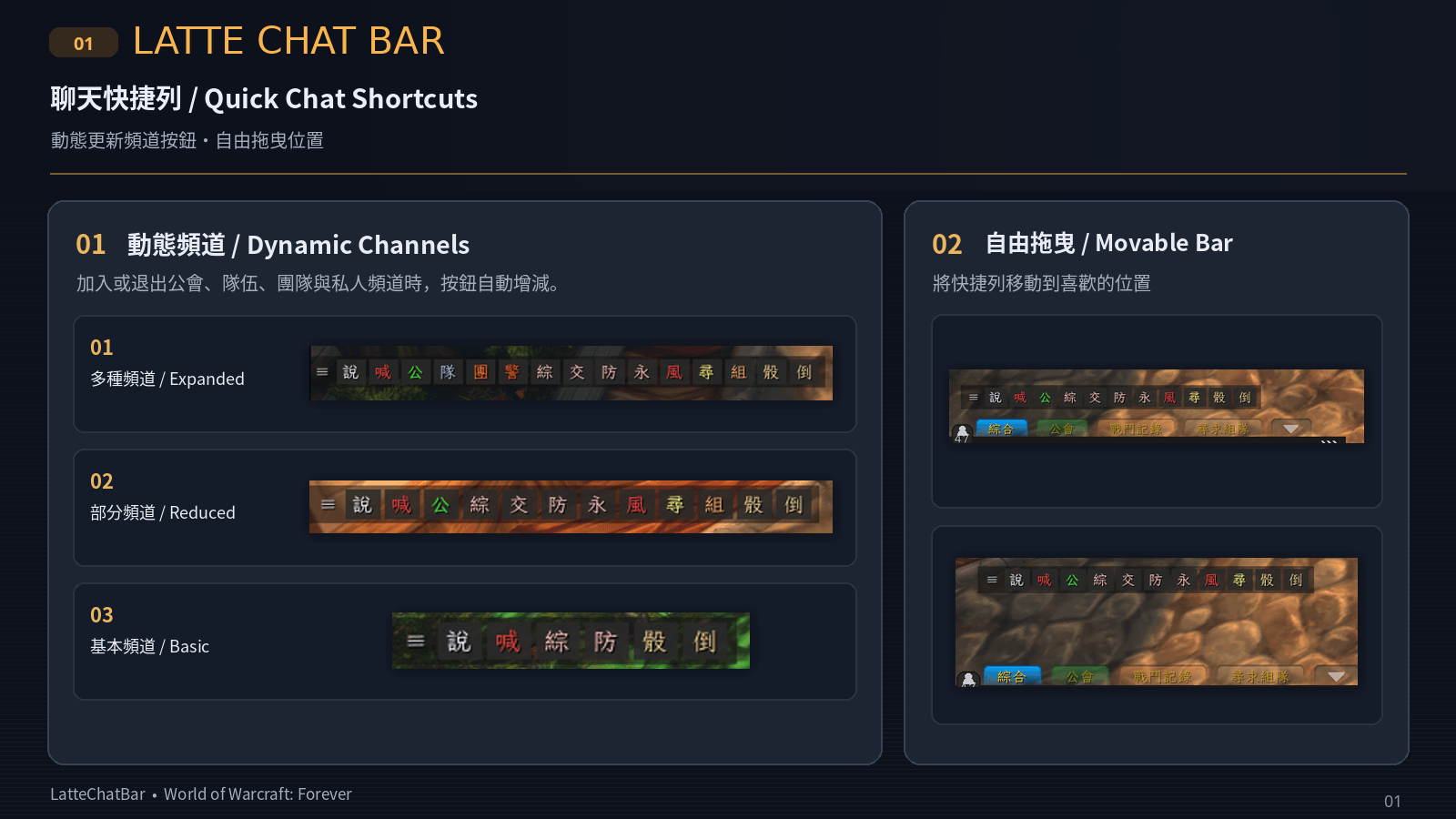
動態顯示可用聊天頻道,快捷列可自由拖曳至喜歡的位置。 Dynamically displays available chat channels with a freely movable shortcut bar.
Description
LatteChatBar — Chat Shortcuts, Emoji & Custom Themes
Version 1.0.3 | World of Warcraft: Forever | Interface 16001
LatteChatBar is a lightweight, customizable chat shortcut bar for World of Warcraft: Forever.
Quickly switch chat channels, control incoming messages independently for each chat tab, access favorite emotes and emoji, and personalize your toolbar with twelve appearance styles, including three new animated themes.
Supports English and Traditional Chinese. No additional addons are required.
Features
1. Chat Channels & Per-Tab Controls
(A) Dynamic Channel Buttons
Automatically shows or hides available channel shortcuts based on your current group, guild, raid, battleground, and chat channel status.
(B) Quick Channel Switching
Left-click a channel button to prepare a message in that channel without sending it immediately.
Supports channel switching during combat and improved instance chat channel detection.
(C) Independent Chat Tab Controls
Right-click a channel button to enable or disable incoming messages for the currently selected chat tab.
Each chat tab maintains its own settings. Disabling a channel in one tab does not affect other tabs or leave the channel.
2. Customizable Chat Toolbar
(A) Movable Bar & Layout
Unlock the toolbar and drag its handle to reposition it. Right-click the handle to switch between horizontal and vertical layouts.
(B) Custom Button Ordering
Hold Alt and left-drag buttons to rearrange them. A gold insertion marker indicates the new position, and the order is saved.
(C) Visibility & Display Options
Choose which buttons appear, lock the toolbar position, enable mouseover-only display, or switch to text-only mode.
Temporarily unavailable channel buttons retain their saved order when they reappear.
3. Favorite Emotes & Custom Text
(A) Favorite Actions
Search built-in emote commands and save up to 20 favorites, including custom text entries and the native SIT action.
(B) Custom Emote Messages
Create personalized chat actions that automatically include your character name.
Use %t or {target} to insert your selected target's full name.
(C) Preview & Management
Preview custom text before using it, reorder favorite entries, and manage them through the Actions settings page.
Custom text does not create new character animations.
4. Chat Emoji & Raid Icons
(A) 48 Custom Emoji
Open the emoji panel directly from the toolbar and insert emoji codes into your current chat message.
(B) 8 Native Raid Icons
Includes eight built-in World of Warcraft raid chat icons. These insert chat markers without placing markers on targets.
(C) Movable Pop-up Menus
The emoji and favorite actions panels can be dragged independently. Selecting an emoji keeps the panel open.
Click an emoji to insert its code, then press Enter to send the message. Your selected chat channel is preserved.
IMPORTANT — CUSTOM EMOJI COMPATIBILITY
Both the sender and recipient must have LatteChatBar installed to see LatteChatBar's custom emoji as images.
If the recipient does not have the addon or compatible emoji support, they will see text codes instead of images.
Native World of Warcraft raid icons do not have this custom emoji requirement.
5. Appearance Themes & Additional Tools
(A) Twelve Appearance Styles
Choose from twelve designs with live preview:
-
Minimal
-
Alliance
-
Horde
-
Golden Laurel
-
Feather
-
Vine and Flowers
-
Moon and Stars
-
Dragon Wings
-
Coffee Latte
-
Icecrown Frost
-
Frost Knight
-
Soulguide Wings
The three new themes introduced in v1.0.3 feature animated frost effects, glowing runes, luminous wings, and floating soul particles.
(B) Color Customization
Minimal mode supports customizable RGB colors and opacity for the toolbar and buttons.
Decorative themes use their own fixed color palettes. Text-only mode hides button artwork and ornaments.
(C) Roll & Pull Countdown
Roll a number from 1 to 100 or start a customizable 5–30 second pull countdown.
The countdown uses available built-in functionality or optional DBM/BigWigs support.
Settings & Commands
Open Options > AddOns > LatteChatBar, or enter /lattebar.
/lattebar — Open settings
/lattebar v — Vertical layout
/lattebar h — Horizontal layout
/lattebar lock — Toggle position lock
/lattebar hover — Toggle mouseover-only display
/lattebar text — Toggle text-only mode
/lattebar hide — Hide the toolbar
/lattebar show — Show the toolbar
/lattebar reset — Reset toolbar position without clearing other settings
/lattebar 10 — Set a pull countdown duration (5–30 seconds)
Additional command aliases and detailed instructions are included in README.md.
Compatibility & Notes
(A) Designed for World of Warcraft: Forever (Interface 16001).
(B) Supports Blizzard's default chat interface and optional Chattynator integration.
(C) Custom emoji visibility depends on the recipient having compatible addon support.
(D) Pop-up menu positions are retained during the current game session; toolbar position and button order are saved.
(E) Restoring the original appearance preserves toolbar position, button ordering, and favorite actions.
(F) Game Controller Beta Compatibility: When using Blizzard's built-in Game Controller Beta feature, protected-action errors (ADDON_ACTION_BLOCKED / ADDON_ACTION_FORBIDDEN) may occur, potentially limiting certain chat channel switching or button interactions. The underlying compatibility issues have yet to be clarified.
AI-Assisted Development
This addon was developed with AI assistance, with design, adjustments, review, and testing performed by the author.
Credits
Developed by Latte & Pipi.
Addon code © 2026 Latte & Pipi. All rights reserved.
Twemoji graphics are licensed under CC BY 4.0. See CREDITS-Emoji.txt and LICENSE-Twemoji-Graphics.txt for attribution.
Appearance artwork credits are listed in CREDITS-Skins.txt.
LatteChatBar — 拿鐵聊天快捷列
版本 1.0.3|魔獸世界:永恆|Interface 16001
LatteChatBar 是專為《魔獸世界:永恆》設計的輕量化聊天快捷列插件。
提供快速聊天頻道切換、各聊天分頁獨立訊息控制、常用動作、自訂聊天表情,以及十二種外觀主題,包含三款全新動態外觀,讓玩家依照自己的習慣打造專屬聊天介面。
支援繁體中文及英文,不需要安裝其他插件即可使用。
主要功能
1. 聊天頻道與分頁獨立控制
(A) 動態頻道按鈕
依照目前公會、隊伍、團隊、戰場及聊天頻道狀態,自動顯示或隱藏可用的快捷按鈕。
(B) 快速切換發話頻道
左鍵點擊頻道按鈕,即可開啟對應頻道的輸入框,不會立即送出訊息。
支援戰鬥中切換聊天頻道,並改善副本頻道的辨識與切換。
(C) 聊天分頁獨立控制
右鍵點擊頻道按鈕,可開啟或關閉目前聊天分頁的後續頻道訊息顯示。
各聊天分頁保留獨立設定,在綜合分頁關閉頻道訊息,不會影響其他分頁,也不會退出該頻道。
2. 自訂聊天快捷列
(A) 自由移動與排列
解除位置鎖定後,可拖曳快捷列把手調整位置,右鍵點擊把手則可切換橫向或直向排列。
(B) 自訂按鈕順序
按住 Alt 並以滑鼠左鍵拖曳按鈕,即可自由調整排列順序。
拖曳時會顯示金色插入位置提示,完成後自動保存排列順序。
(C) 按鈕與顯示設定
可自行選擇顯示哪些頻道按鈕、鎖定快捷列位置、啟用滑鼠移入顯示,或切換純文字模式。
暫時不可使用的頻道再次出現時,仍會沿用原先保存的按鈕順序。
3. 常用動作與自訂文字
(A) 常用動作清單
提供內建動作搜尋功能,可將喜愛的動作加入常用清單,包含自訂文字合計最多 20 個項目,並新增原生「坐下(SIT)」動作。
(B) 自訂動作文字
玩家可自行編輯聊天動作文字,系統會自動加入自己的角色名稱。
支援使用 %t 或 {target} 代入目前選取目標的完整名稱。
(C) 預覽與清單管理
可預覽自訂文字的實際效果,並調整常用動作順序、新增或移除項目。
自訂文字僅產生聊天訊息,不會新增角色動畫。
4. 聊天表情與團隊標記
(A) 48 個自訂聊天表情
透過快捷列開啟聊天表情選單,快速將表情代碼插入目前的聊天輸入框。
(B) 8 個暴雪原生團隊標記
提供八種原生團隊聊天標記,可插入聊天訊息,不會對目標實際標記圖示。
(C) 自由拖曳選單
聊天表情與常用動作選單皆可獨立拖曳位置,點選表情後選單仍會保持開啟。
點擊表情只會插入代碼,按下 Enter 才會送出,且不會改變原本選擇的發話頻道。
重要提醒:自訂表情顯示條件
聊天雙方都必須安裝 LatteChatBar,才能正常看到 LatteChatBar 的自訂表情圖案。
如果接收訊息的玩家沒有安裝插件或相容的表情支援,看到的會是文字代碼,而不是表情圖片。
暴雪原生團隊標記不受此自訂表情限制。
5. 外觀主題與其他工具
(A) 十二種外觀選擇
提供即時外觀預覽,可選擇:
-
簡約
-
聯盟
-
部落
-
月桂金葉
-
羽翼
-
藤蔓花葉
-
月牙星辰
-
龍翼龍鱗
-
咖啡拿鐵
-
冰冠寒霜
-
冰霜騎士
-
引魂之翼
v1.0.3 新增三款動態主題,包含寒霜流光、符文光效、羽翼發光及靈魂粒子等動畫效果。
(B) 自訂配色
簡約模式可調整聊天列與按鈕的 RGB 顏色及透明度。
裝飾主題使用各自的固定配色;純文字模式則可隱藏按鈕材質與主題裝飾。
(C) 擲骰與倒數工具
提供 1~100 擲骰功能,以及可設定 5~30 秒的開怪倒數。
倒數功能會使用可用的遊戲內建機制,或選用 DBM/BigWigs 支援。
設定與指令
可從 選項 > 插件 > 拿鐵聊天快捷列 開啟設定,或輸入 /lattebar。
/lattebar — 開啟設定
/lattebar v — 直向排列
/lattebar h — 橫向排列
/lattebar lock — 切換位置鎖定
/lattebar hover — 切換滑鼠移入顯示
/lattebar text — 切換純文字模式
/lattebar hide — 隱藏快捷列
/lattebar show — 顯示快捷列
/lattebar reset — 重設快捷列位置,不清除其他設定
/lattebar 10 — 設定倒數秒數(5~30 秒)
其他指令別名及詳細操作方式請參閱 README.md。
相容性與注意事項
(A) 適用於《魔獸世界:永恆》(Interface 16001)。
(B) 支援暴雪原生聊天介面,亦可搭配 Chattynator 使用。
(C) 自訂表情需要接收方具備相容插件支援,才能正常顯示圖案。
(D) 動作與表情選單的拖曳位置僅於本次遊戲登入期間保留;聊天快捷列位置及按鈕順序則會保存。
(E) 還原原始外觀時,會保留快捷列位置、按鈕排序及常用動作資料。
(F) 控制器 Beta 相容性: 使用暴雪內建「遊戲控制器 Beta」功能時,可能觸發受保護動作錯誤(ADDON_ACTION_BLOCKED/ADDON_ACTION_FORBIDDEN),導致部分聊天頻道切換或按鈕操作受限。相關相容性問題仍待釐清。
AI 輔助開發說明
本插件使用 AI 輔助開發,並由作者進行設計、調整、審查與測試。
作者與素材授權
開發者:Latte & Pipi
插件程式碼 © 2026 Latte & Pipi,保留所有權利。
Twemoji 表情圖案採用 CC BY 4.0 授權,詳細來源及授權資訊請參閱 CREDITS-Emoji.txt 與 LICENSE-Twemoji-Graphics.txt。
外觀主題素材來源請參閱 CREDITS-Skins.txt。
LatteChatBar Team