promotional bannermobile promotional banner

LastSeen

Harvests source data on items looted by your characters to simplify item tracking in the future.

You can hover on the items in your chat window!

You can hover on the items in your chat window!

item image

Description


Features

  • Tracks collection information (available below) about any item within the parameters (filters) defined by the player. (The filters are defined below.)
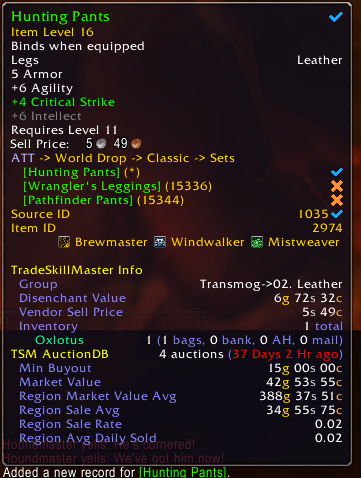
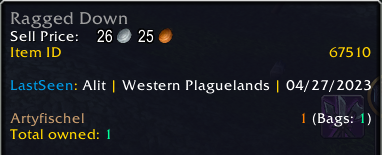
  • Appends noteworthy information to the tooltip of all collected items. (The tooltip information can be seen below.)
  • Items are automatically updated when new and relevant information is discovered.
  • The player can select between four distinct modes. (These modes are defined below.)
  • A modern search window to pull information from the item table. (This is a convenient and helpful way to share information with other players.)

Collected Information

The information collected about every item is the following:

  • ID
  • Link
  • Rarity
  • Type
  • Icon
  • Source ID (This is the ID associated with the appearance of an item.)
  • Looted Date
  • Looted By (The faction, class, and level of the character you were on when you looted the item.)
  • Map (The map you were in when you looted the item.)
  • Coordinates
  • Source (The thing you looted the item from. See the supported sources below.)

Supported Sources

  • Creatures
  • Quests
  • Chests
  • Gathering (Archaeology Fragments, Mining, Herbalism, Skinning, and Fishing)

Filters

  • Rarity (Poor, Common, Uncommon, Rare, and Epic)
  • Armor
  • Weapon
  • Recipe
  • Quest
  • Tradeskill
  • Gem
  • Consumable
  • Keys
  • Profession
  • Miscellaneous
  • Container

Tooltips

Output Modes

  • Silent - No output is sent to the chat window.
  • New Only - Only items added to the table are sent to the chat window.
  • Updates (Once Per Day) - Items added to the table and items updated for the first time that day are sent to the chat window.
  • Normal - All items added and updated are sent to the chat window.

Supported Localizations

  • enUS (US English)
  • enGB (EU English)

Data is stored in the client's language, but UI elements are presented in US English.

The LastSeen Team

profile avatar
  • 3
    Followers
  • 8
    Projects
  • 94.2K
    Downloads

More from LightskyGGView all

  • EventQ project image

    EventQ

    • 632
    • Addons

    Queue for dungeon and PvP events directly from the interface, search for events, add custom events, and an optional portable mode for a smaller visual footprint and quick queues.

    • 632
    • March 10, 2026
    • Addons
    • +1
  • AutoGamma project image

    AutoGamma

    • 30
    • Addons

    An accessibility addon for map-by-map gamma override.

    • 30
    • February 8, 2026
    • Addons
  • TradeSkill Reagent Click project image

    TradeSkill Reagent Click

    • 291
    • Addons

    TradeSkill Reagent Click is an addon that lets you quickly control-click reagents in the profession window to open their crafting page (if known).

    • 291
    • August 3, 2025
    • Addons
  • TradeSkill Browsing History project image

    TradeSkill Browsing History

    • 148
    • Addons

    Adds a dropdown to the professions window that tracks and allows you to quickly reopen your most recently viewed recipes. Easily revisit up to 30 recent recipes with two clicks.

    • 148
    • August 3, 2025
    • Addons
  • EventQ project image

    EventQ

    • 632
    • Addons

    Queue for dungeon and PvP events directly from the interface, search for events, add custom events, and an optional portable mode for a smaller visual footprint and quick queues.

    • 632
    • March 10, 2026
    • Addons
    • +1
  • AutoGamma project image

    AutoGamma

    • 30
    • Addons

    An accessibility addon for map-by-map gamma override.

    • 30
    • February 8, 2026
    • Addons
  • TradeSkill Reagent Click project image

    TradeSkill Reagent Click

    • 291
    • Addons

    TradeSkill Reagent Click is an addon that lets you quickly control-click reagents in the profession window to open their crafting page (if known).

    • 291
    • August 3, 2025
    • Addons
  • TradeSkill Browsing History project image

    TradeSkill Browsing History

    • 148
    • Addons

    Adds a dropdown to the professions window that tracks and allows you to quickly reopen your most recently viewed recipes. Easily revisit up to 30 recent recipes with two clicks.

    • 148
    • August 3, 2025
    • Addons