
1111.jpg
Description
Summary
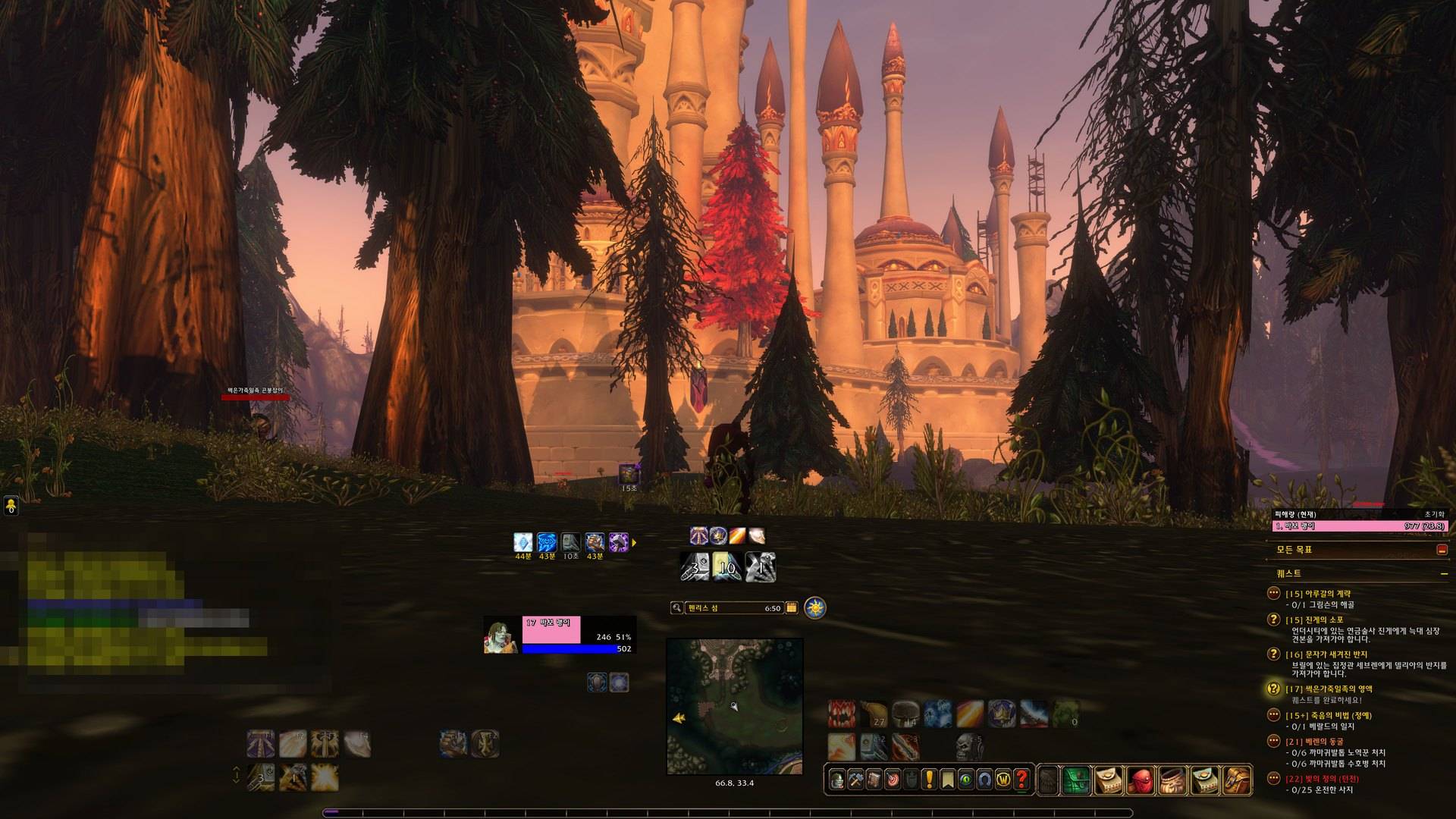
A dark, square, bottom-anchored UI for WoW Forever. / WoW Forever용 어두운 네모 UI. 하단 배치, 네모 유닛 프레임, 딜·위협 미터, 레이드에서도 안전하게.
Categories
Unit Frames, Action Bars, Map & Minimap, Combat, Damage Dealer
Description
Kumsung UI (English)
An open-source UI for WoW Forever (interface 16001). It redraws the default UI in a dark, square style and gathers what you look at most along the bottom of the screen. It is built on Blizzard's own frames, so it keeps working under instance and raid combat restrictions (secret values).
Features
- Square unit frames for player, target, focus and party, with animated 3D portraits, class-colored health, shield (absorb) bars and a threat glow when mobs attack you. The party frames include you and show group roles. Clicks, menus and auras stay Blizzard's.
- Bottom layout: experience bar, minimap, cast bar and cooldown manager stacked in the middle, action bars on both sides of the minimap. Applied with
/ksui layout. - Clickable cooldown manager: click an icon in Blizzard's cooldown manager to cast that spell.
- Quest guide arrow on the minimap pointing at your tracked quest, with the distance, and optional auto-tracking of the nearest quest.
- Damage meter built on Blizzard's combat data: damage, healing or damage taken, the latest fights to pick from, per-spell detail and a reset button.
- Party threat meter with threat % on your target and the current tank marked.
- Interrupt helper next to the target frame: your interrupt, the target's cast bar, and a highlight when the cast can be interrupted.
- Quality of life: auto-accept and turn in quests (hold Shift to skip), fast looting, class-colored names and targets in tooltips, auto-accept invites from friends and guild, experience left on the XP bar, skip cutscenes you've seen
- Chat: short channel names, clickable web addresses to copy, whisper sound
- Flat nameplates with the mob's level (a skull for bosses), square minimap, gray chat timestamps, cooldown numbers, out-of-range buttons in red
- Screen-relative positions, so the layout keeps its shape across resolutions and UI scales, re-applied automatically after an update
- Quality of life: auto-sell junk, auto-repair, missing buff check on ready check, better gear notices, gathering tracking
Usage
- Settings:
/ksuior Options > AddOns > 검성UI. Every feature has its own toggle, and the top of the panel has buttons to apply the layout and reload the UI. - Reset the damage meter: the reset button on its title, or
/ksui reset. - Apply the layout: the button at the top of the settings, or
/ksui layout(creates theKSUIEdit Mode layout and reloads the UI).
Works well with
- Questie (Forever edition) for quest givers and objectives on the map and minimap. Install both
QuestieandQuestieDB.
Source
GitHub: https://github.com/SpaceDLFactory/ksui — please report bugs and ideas as issues. License: GPL-3.0-or-later
검성UI (Kumsung UI)
WoW Forever(인터페이스 16001)용 오픈소스 UI입니다. 기본 UI를 어둡고 네모난 모양으로 다시 그리고, 자주 보는 정보를 화면 아래쪽에 모읍니다. 블리자드 프레임을 바탕으로 동작하기 때문에 인던·레이드의 전투 제한(비밀값)에서도 오류 없이 돌아갑니다.
주요 기능
- 네모 유닛 프레임 — 내·대상·주시·파티 프레임을 네모 초상화(움직이는 3D)와 직업색 체력바로, 보호막은 하늘색 막대로, 어그로를 받으면 테두리가 빛남. 파티 프레임에 나와 역할 아이콘도 표시. 클릭·메뉴·버프는 블리자드 그대로.
- 하단 배치 — 경험치바, 미니맵, 시전바, 쿨다운 관리자를 가운데 아래로 쌓고, 단축바를 미니맵 양옆에 배치. 명령어 한 줄(
/ksui layout)로 적용. - 누르는 쿨다운 관리자 — 쿨다운 관리자 아이콘을 누르면 그 스킬을 씁니다.
- 퀘스트 길안내 화살표 — 미니맵 모서리에서 추적 중인 퀘스트 방향과 거리를 가리키고, 가장 가까운 퀘스트를 자동으로 추적할 수도 있습니다.
- 딜미터 — 블리자드 전투 데이터를 쓰는 딜미터. 피해량·치유량·받은 피해, 최근 전투 선택, 스킬별 상세, 초기화 버튼.
- 파티 위협 미터 — 파티일 때 대상에 대한 파티원 위협 %와 탱커 표시.
- 차단 보조 — 대상 프레임 옆에 내 차단기와 대상 시전바, 끊을 수 있는 시전이면 노란 테두리.
- 편의 기능 — 퀘스트 자동 수락·완료(Shift로 건너뜀), 빠른 전리품, 툴팁에 직업색 이름과 대상, 친구·길드 초대 자동 수락, 경험치바에 남은 경험치, 본 영상 넘기기.
- 채팅 — 짧은 채널 이름, 웹 주소 눌러 복사, 귓속말 알림음.
- 납작한 이름표 — 평평한 체력바와 얇은 검은 테두리, 몹 레벨(우두머리는 해골).
- 네모 미니맵, 채팅 시간 표시(회색), 쿨다운 숫자, 사거리 밖 버튼 빨갛게
- 화면 비율 배치 — 위치를 화면 대비 %로 저장해서 해상도·UI 크기가 달라도 같은 모양, 업데이트 후 자동 재적용
- 편의 기능 — 잡템 자동 판매, 자동 수리, 준비 확인 때 빠진 버프 알림, 더 좋은 장비 알림, 채집 추적 자동 켜기
사용법
- 설정:
/ksui또는 설정 > 애드온 > 검성UI. 모든 기능을 하나씩 켜고 끌 수 있고, 맨 위에 화면 배치 적용과 UI 다시 불러오기 버튼이 있습니다. - 딜미터 초기화: 딜미터 제목의
초기화버튼 또는/ksui reset - 화면 배치 적용: 설정 맨 위
화면 배치 적용버튼 또는/ksui layout(편집 모드 레이아웃KSUI를 새로 만들고 UI를 다시 불러옵니다.)
같이 쓰면 좋은 애드온
- Questie (Forever판): 퀘스트 주는 NPC와 목표 위치를 지도·미니맵에 표시합니다.
Questie와QuestieDB를 같이 설치하세요.
소스와 문의
GitHub: https://github.com/SpaceDLFactory/ksui — 버그나 아이디어는 이슈로 남겨주세요. 라이선스: GPL-3.0-or-later
KSUI-KumsungUI Team
