Krowi's World Map Buttons
- By
A library for World of Warcraft addon development that simplifies adding custom buttons to the world map interface with automatic positioning and dynamic layout management
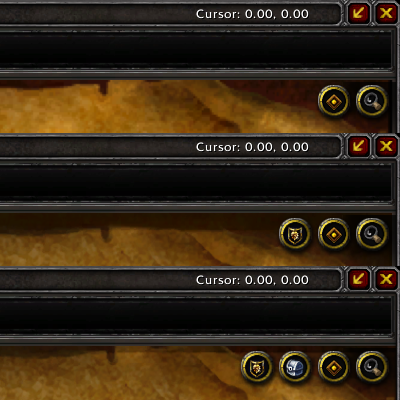
1. Default WoW buttons 2. Two additional buttons added but 1 is hidden 3. Two additional buttons but hidden one is now also shown
Description
A library for World of Warcraft addon development that simplifies adding custom buttons to the world map interface with automatic positioning and dynamic layout management.
Features
World Map Button Library (Krowi_WorldMapButtons-1.4)
- Easy Button Integration: Add custom buttons to the world map with a single function call
- Automatic Positioning: Buttons are automatically positioned in the top-right corner of the map
- Dynamic Layout: Automatically adjusts layout when buttons are shown or hidden
- Multi-Version Support: Works across Retail (Mainline) and Classic variants (Wrath, Classic, TBC)
- Default Button Integration: Automatically manages default Blizzard buttons (tracking, options)
- Independent: No dependency on other addons for world map modifications
- LibStub Support: Standard LibStub library structure for dependency management
Usage Examples
Basic Button Setup
local _, addon = ...
addon.Gui.WorldMapButton = {}
local worldMapButton = addon.Gui.WorldMapButton

-- Get the library instance
addon.WorldMapButtons = LibStub("Krowi_WorldMapButtons-1.4")

function worldMapButton.Load()
    -- Add button using your custom template
    worldMapButton = addon.WorldMapButtons:Add("YourAddon_WorldMapButton_Template", "BUTTON")
    addon.Gui.WorldMapButton = worldMapButton
end
Button Mixin Example
YourAddon_WorldMapButtonMixin = {}

function YourAddon_WorldMapButtonMixin:OnLoad()
    -- Initialize your button
end

function YourAddon_WorldMapButtonMixin:OnMouseDown(button)
    -- Handle mouse down event
end

function YourAddon_WorldMapButtonMixin:OnMouseUp()
    -- Handle mouse up event
end

function YourAddon_WorldMapButtonMixin:OnClick()
    -- Handle click event
end

function YourAddon_WorldMapButtonMixin:OnEnter()
    -- Show tooltip or highlight
end

function YourAddon_WorldMapButtonMixin:OnHide()
    -- Clean up when hidden
end

function YourAddon_WorldMapButtonMixin:Refresh()
    -- Called when map opens or changes
    -- Use this to update button state:
    -- self:Enable(), self:Disable(), self:Show(), self:Hide()
end
Button Template Example (XML)
See ButtonTemplate.xml for a complete example template.
Custom Offset Configuration
local WorldMapButtons = LibStub("Krowi_WorldMapButtons-1.4")

-- Customize button positioning offsets
WorldMapButtons:SetOffsets(8, -4)  -- xOffset, yOffset
API Reference
Library Functions
| Function | Parameters | Returns | Description |
|---|---|---|---|
Add(templateName, templateType) |
templateName (string), templateType (string) |
frame | Creates and adds a button to the world map using the specified XML template |
SetOffsets(xOffset, yOffset) |
xOffset (number, optional), yOffset (number, optional) |
- | Sets custom positioning offsets for buttons. Defaults: xOffset=4, yOffset=-2 |
SetPoints() |
- | - | Internal function that recalculates and updates button positions |
Add() Parameters
| Parameter | Type | Required | Description |
|---|---|---|---|
templateName |
string | Yes | The name of your button template defined in XML |
templateType |
string | Yes | The frame type, typically "BUTTON" |
Returns: The created button frame object
Button Mixin Methods
Your button mixin should implement these methods:
| Method | Parameters | Description |
|---|---|---|
OnLoad() |
- | Called when button is first created |
OnMouseDown(button) |
button (string) |
Called when mouse button is pressed down |
OnMouseUp() |
- | Called when mouse button is released |
OnClick() |
- | Called when button is clicked |
OnEnter() |
- | Called when mouse enters button area (show tooltip) |
OnHide() |
- | Called when button is hidden |
Refresh() |
- | Called when map opens or changes. Update button state here |
Library Properties
| Property | Type | Description |
|---|---|---|
HasNoOverlay |
boolean | True if running WoW version without overlay frame system (Classic variants) |
IsMainline |
boolean | True if running Retail/Mainline version (11.x+) |
XOffset |
number | Horizontal offset for button positioning (default: 4) |
YOffset |
number | Vertical offset for button positioning (default: -2) |
Buttons |
table | Array of all registered buttons |
Positioning Behavior
Retail (Mainline)
- Buttons are stacked vertically from top to bottom
- Position: Top-right corner of the map
- Each button is 32 pixels below the previous one
Classic Variants (Wrath, Classic, TBC)
- Buttons are arranged horizontally from right to left
- Position: Top-right corner of the map
- Each button is 32 pixels to the left of the previous one
Dynamic Layout
- When a button is hidden, remaining buttons automatically shift to fill the gap
- Buttons maintain their relative order based on addon load order
- Default Blizzard buttons (tracking, options) are integrated into the layout system
Technical Details
Version Detection
The library automatically detects the WoW version and adjusts behavior:
- Classic Era / TBC Classic / Wrath Classic: Uses
WorldMapFrame.ScrollContainerparent - Retail/Mainline: Uses
WorldMapFramewith overlay frame system
Refresh Hook
The library hooks into the appropriate map refresh event:
- Classic variants:
WorldMapFrame.OnMapChanged - Retail:
WorldMapFrame.RefreshOverlayFrames
This ensures buttons update correctly when:
- Opening the world map
- Switching between different maps
- Zooming in/out
- Changing continents or zones
Use Cases
- Quick access to addon features from the world map
- Toggle visibility of custom map overlays or pins
- Open addon configuration panels
- Display addon-specific information
- Navigate to addon-related content
- Filter or search map data
- Any functionality requiring map-context interaction
Requirements
- LibStub
The Krowi's World Map Buttons Team


Owner

![Krowi's Brokers [Currency] project image](https://media.forgecdn.net/avatars/thumbnails/1551/799/256/256/639007160001345767.jpg)