Krakenchat
- By
Finally a chat addon that doesn't disappoint: Foldable chat-panel, whispers as conversations, unread badges, folded loot spam, all kept in a WoW-theme. See for yourself!
Screenshot 2026-10-18 011643.png
Screenshot 2026-10-18 011602.png
Description
Krakenchat
Finally, a chat window that doesn't disappoint.
The default chat is one of the most annoying pieces of the WoW interface. Rumour has it, it has been linked to even cause eye cancer. Krakenchat deals with that. It sorts everything said around you into streams: open what you want to read, fold away what you don't, and see at a glance where something new is waiting.
Made for World of Warcraft: Forever, in the game's own look.
What it does
Conversations, not a scroll
- Every whisper partner and Battle.net friend gets their own conversation, including your replies and their AFK auto-replies.
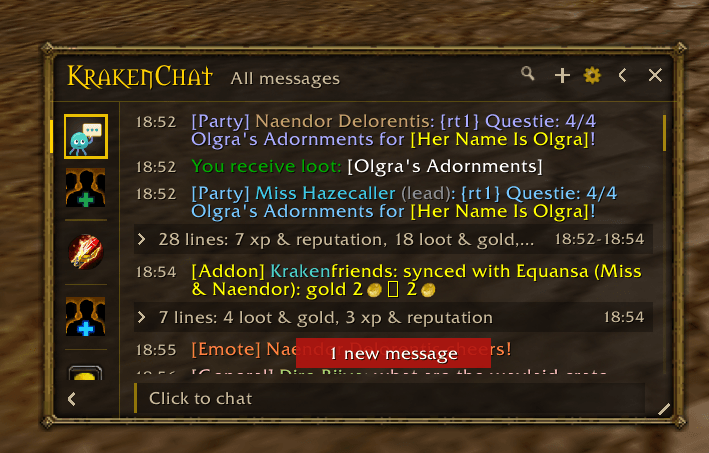
- A sidebar with Conversations, Group & Guild, Nearby, Channels and Game. Click one to see only that, or "All messages" for everything.
Views: several streams in one feed
- Click the + in the header, tick the streams you want together, give it a name and a symbol. Done.
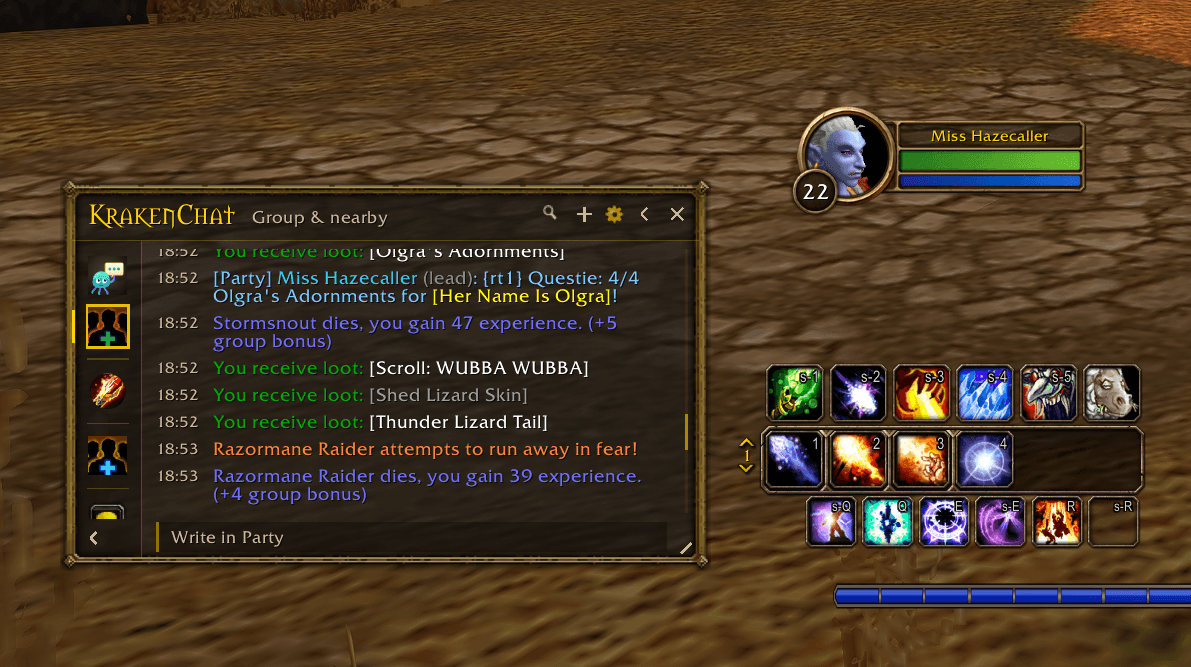
- Comes with Group & nearby: party, raid, guild, say, yell and the game's own lines in one feed, without channel spam and whispers. Made for dungeons and questing together.
- Right-click a stream → "Show together with…" to start a view from it. Right-click a view to edit or delete it.
See what's new at a glance
- Red badge: whispers and your party or raid.
- Dark-gold badge: guild chat.
- Quiet grey count: Say, Yell and channels.
- Loot, XP and system messages never count.
- A view counts only its most urgent kind: one party line among forty Trade posts shows a red 1.
Less noise
- Runs of loot, gold, XP, crafting and NPC lines fold into one line. Click to open it.
- The same Trade post again within 10 minutes is counted (x3) instead of repeated.
- Several lines from one person show their name once.
- Group news (joins, leaves, loot method, instance resets, dice rolls) also shows under Party or Raid, where you look for it.
Small when you want it
- Fold the chat in and only the stream list with its badges is left, like a buddy list.
- A whisper brings the chat back by itself, open on that conversation, even from a closed window. After 5 seconds it goes back on its own (a thin gold line counts down), unless you point at it, click or type. Party and raid messages can do the same if you like.
- Or fold the sidebar in and give the chat the whole width.
Works like the normal chat
- Replaces the game's chat window. The chat input appears under Krakenchat only while you type.
- Right-click a name for the game's own menu: invite, add friend, ignore, report.
- Item tooltips, clickable web addresses, copy any line, search.
- History per character, kept across /reload and logging out.
Your look
- Gold border, dark stone, the title in the game's fantasy font.
- Streams by name or as symbols (square or round), with the name on hover.
- Settings for text size, background transparency, timestamps, auto-open and more.
Getting started
- Install and log in. Krakenchat opens at the bottom left and asks once: symbols or names in the sidebar?
- Type /kc demo to fill it with sample messages and see everything it can do. /kc demo again removes them.
- Open the settings with the gear in the header (or right-click the minimap button).
Commands
| Command | What it does |
|---|---|
| /kc | Open or close the window |
| /kc settings | Settings |
| /kc compact | Fold the chat in (stream list only) |
| /kc side | Fold the sidebar in |
| /kc symbols | Names or symbols in the sidebar |
| /kc welcome | The first-start choice again |
| /kc groupview | Bring back the "Group & nearby" view |
| /kc blizzard | Show the game's own chat window again |
| /kc resetwindow | Default size and position |
| /kc cpu | How much CPU each of your addons uses |
| /kc demo | Sample messages |
| /kc clear | Erase this character's chat history |
Good to know
- Want the normal chat back? Type /kc blizzard, or untick "Hide the game's own chat window" in the settings.
- Inside instances during boss fights, the game can hide chat text from addons. Krakenchat still shows those lines, but can't search or save them.
- New addon: tested on WoW: Forever, but not yet in every situation. Please report anything odd in the comments or the issue tracker.
From the maker of Krakenfriends, the duo journey tracker: everything you and a friend do together, counted.
Krakenchat Team