KondoBags
- By
A backpack for World of Warcraft that lets you organize your items neatly, the way you would in the real world — or at least the way Marie Kondo would.
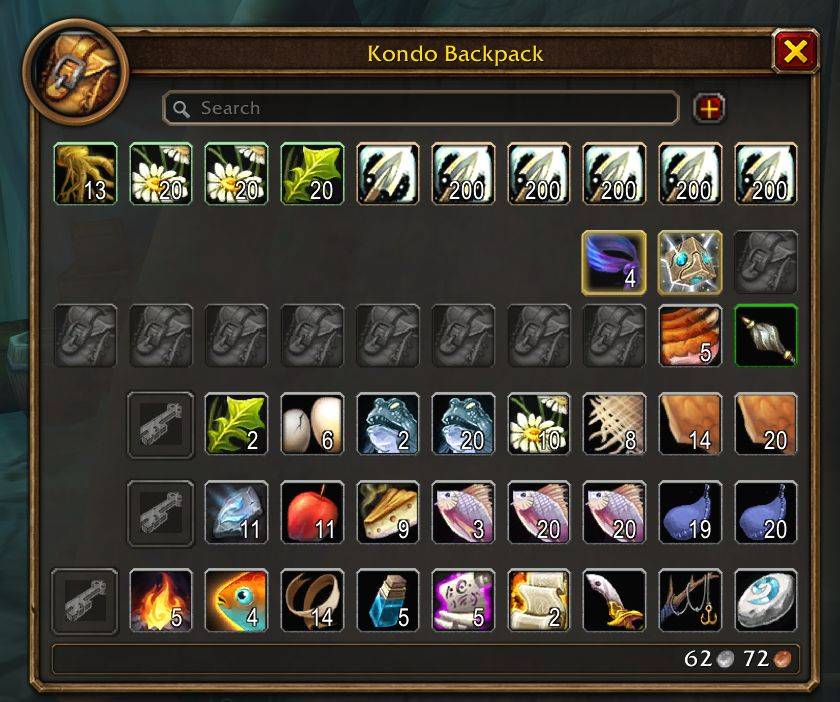
KondoBags_Screenshot_Classic.jpg
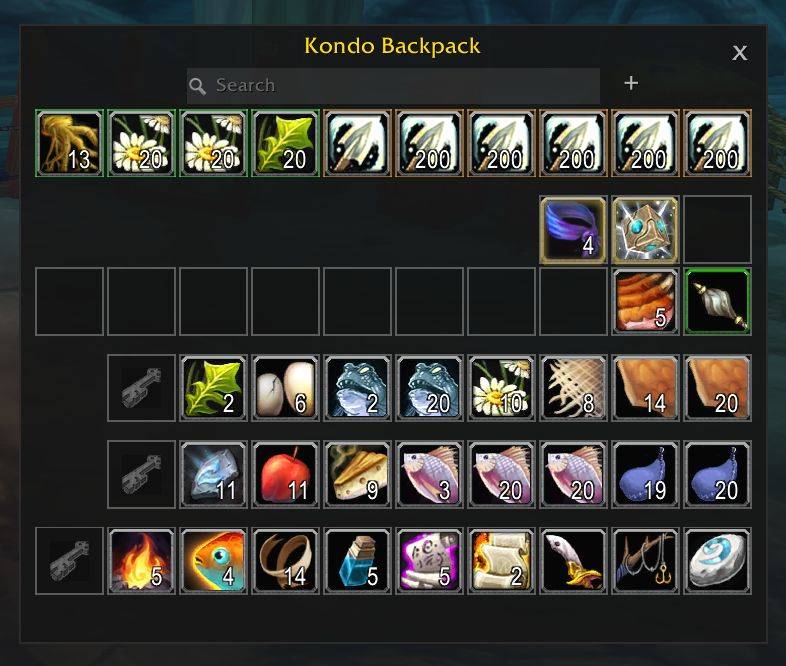
KondoBags_Screenshot_Modern.jpg
Description
KondoBags
by Kurobon (aka Kuro, aka David Jeske)
A backpack for World of Warcraft that lets you organize your items neatly, the way you would in the real world — or at least the way Marie Kondo would.
The idea
Most bag addons organize for you: they sort by category, by quality, by rules you write and then forget. KondoBags does the opposite. It keeps the one backpack you already know — the stock Classic grid, same art, same loot order — and gives you better tools to tidy it yourself. Nothing moves unless you move it. There are no rules to write and no automation to fight. What you put somewhere stays there.
The window is the stock bag plus Keep:
- Incoming — everything you loot, drawn exactly where the stock bag would draw it. New loot fills the next free cell; nothing already there moves.
- Keep — one or more rows at the bottom, each led by a lock cell. Drop an item on a lock to keep it; drag it back up to let it go; hold Shift while dragging to choose its exact spot. Your Hearthstone starts there.
The + button next to the search box adds another Keep row; right-click a lock to remove one. Everything the addon remembers about how you sort is per character, so each character's backpack is its own.
What you get
- Replaces the stock bags.
B, the bag-bar buttons, vendors, mail, bank and auction house all open KondoBags; the Blizzard bag windows never show. No option to run both — disable the addon to get the stock bags back. - Special bags in their own row. Quiver, ammo pouch, herb, soul, enchanting, mining and other profession bags are drawn as one row above your items, with a colour tint per bag type. Empty cells show the equipped bag's own icon (or the item-type art, your choice).
- Drop guidance. While you carry an item, special-bag cells that will not take it show a circle-X; occupied ones dim. General cells accept anything and are never marked.
- Quest items stand out. Quest items get the stock yellow border (and the
!for quest starters), gently pulsing so they catch the eye — on Classic Era too, where the stock bags hide it. - Search that dims everything but the match.
- Two themes. Classic is the stock backpack look of whatever client you are on; Modern is a flat dark panel with square cells. Same grid, same Keep.
- Edit Mode. Position, scale and column count live in Blizzard's Edit Mode (drag the frame; drag its corner grip to set columns). The window opens where the stock bags open on a fresh install.
- Combat-safe. Item cells are Blizzard's own secure buttons, so right-click to use, drag, split, sell and trade all work in combat exactly as they do in the stock bags.
Settings
Kept deliberately short. Esc › Options › AddOns › Kondo Bags, or /kondo options.
| Setting | Where |
|---|---|
| Theme: Classic / Modern | Settings |
| Tint special-bag slots by bag type | Settings |
| Empty special-bag slots show the equipped bag's icon / item-type art | Settings |
| Lock window position | Settings and the Edit Mode dialog |
| Window position, scale, columns | Edit Mode |
| Reset all settings (with confirm) | Settings, or /kondo reset |
/kondo toggles the window. /kondo status prints version, provider and a summary of your bags.
Clients
Classic Era / Hardcore and WoW: Forever are the tested targets. Other flavours are listed in the TOC and share the same code through a per-client provider layer; they are untested until noted in the changelog.
Status
Alpha, in daily use by the author on Forever. See SPECS/00_KondoBags_Core.md for the design and SPECS/01_Stock_Bag_Replacement.md for how the stock bags are replaced. Bank support is planned; nothing here touches the bank yet.
Repository layout
KondoBags/            the addon (what gets installed)
SPECS/                design specs
Assets/               screenshots for this README
docs/                 notes and screenshots
spec/                 off-client tests, run with  lua5.1 spec/run.lua
License
MIT. Bundled libraries keep their own licences in KondoBags/Libs/*.
KondoBags Team