Kingshard Meter (KSM)
- By
Kingshard Meter (KSM) is a combat meter for World of Warcraft. It tracks damage, healing, threat, interrupts, dispels, absorbs, and deaths for everyone in your group.
kingshardpic1.png
kingshardpic2.png
kingshardpic3.png
kingshardpic4.png
kingshardpic5.png
Description
Features added since release
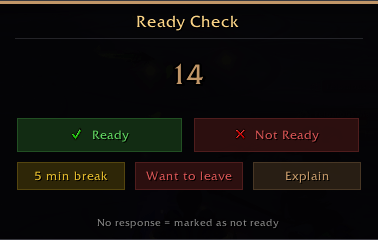
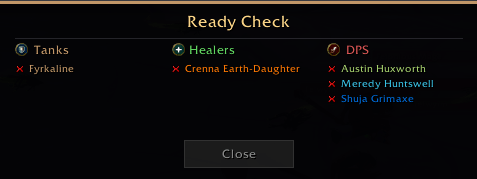
- 1.3.2 - Readycheck
The promised Bosstimer is still under development, but is taking longer time due to api restrictions from blizzard. it might be scrapped altogether, so at this point i can´t say if it actual will be implemented
-----------------------------------------------------------------------------------------------------------------------
Kingshard Meter is a combat meter for World of Warcraft. It tracks damage, healing, threat, interrupts, dispels, absorbs, and deaths for everyone in your group. It uses Blizzard's built-in C_DamageMeter system so it never causes taint or blocked action errors.
More lightweight than Details meter and provides more accurate numbers since it reads directly from Blizzard's own tracking system rather than parsing combat log text. The numbers have been tested extensively across dungeons, raids, and world content to make sure they match what actually happened in the fight.
What does it do?
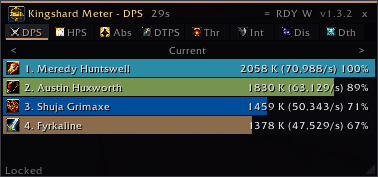
When you fight monsters with your friends, Kingshard Meter shows colored bars on your screen. The person doing the most damage has the biggest bar. The person doing the least has the smallest bar. You can see everyone's numbers right there while you play.
What can you see?
You pick what you want to look at by clicking the tabs at the top:
- DPS — Who's hitting the hardest
- HPS — Who's healing the most
- Absorbs — Who's shielding the most
- DTPS — Who's getting hit the most
- Threat — Who the boss is angry at (updates live while fighting)
- Interrupts — Who stopped the bad guy from casting
- Dispels — Who removed bad stuff from friends
- Deaths — Who died and how many times
Click on someone's bar
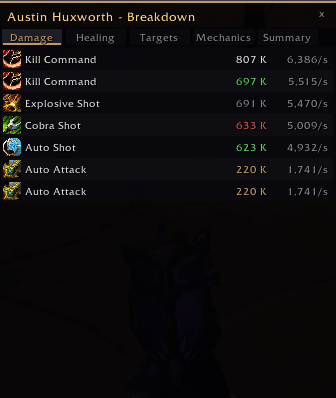
Right-click any player's bar and a window pops up showing everything about what they did. What spells they used, how much each one hit for, which enemies they attacked, and whether they dodged the bad stuff on the ground or got hit by it.
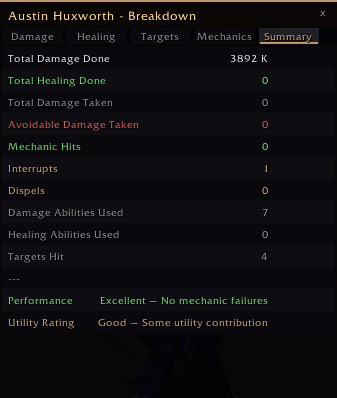
The Mechanics tab is like a report card. Green means they did good (interrupted spells, removed debuffs). Red means they messed up (stood in fire, got hit by things they should have dodged).
What killed you?
Type /ksm death and a window shows you exactly what killed you — every hit leading up to your death, color-coded so you can see if it was fire, shadow, frost, or physical damage. It points out the final blow that finished you off.
It remembers your fights
The addon saves your last 50 fights even when you log out. Open the Fight History window to look back at old boss kills. See who did well, who used their potions, who ate food buffs, and who kept standing in bad stuff. Each player gets a grade from S (perfect) to D (needs work).
Tell your group
Click report in the menu or press your keybind, and the meter posts the results to your party or raid chat. It shows the same numbers you see on your bars.
Announcements
Turn on announcements and the addon tells your group when someone dies, uses a potion, or interrupts a cast. Helpful for keeping track without having to watch everything yourself.
Multiple windows
Want to see damage AND healing at the same time? Open a second meter window. Each one works on its own with its own mode.
Settings
Everything is customizable. Show or hide rank numbers, percentages, class colors. Change how many bars show up. Lock the window so you don't accidentally move it. Pick which chat channel reports go to. Bind keys so you can toggle the meter or report with one button press.
How to use it
Type /ksm to show or hide the meter. That's it. Everything else is optional.
Type /ksm options to open all the settings. Right-click the menu button on the meter for quick access to common stuff.
It won't break your game
This addon uses the official Blizzard damage meter system (C_DamageMeter). It doesn't read the combat log the old way. That means no "action blocked" errors, no taint, no conflicts with other addons. It just works.
No other addons required. Install it, load the game, and you're done.
FAQ
Q: Why is someone in my group not showing up on the meter in PvP battlegrounds?
A: If a player is not listed on the meter in battlegrounds, they are either doing too little damage or healing to register, or they are too far away from the rest of the group. Blizzard's system only tracks players within a certain range. This also applies to you — if you don't see yourself on the meter, the same reasons apply.
Q: Will there be more customization and features in the future?
A: Yes. The addon will be fully customizable in future updates, and new features will be added within the limits of Blizzard's API system.
Q: How were the numbers tested?
A: Both the Details damage meter and Blizzard's own built-in meter were used side by side to verify that Kingshard Meter reports the correct values. The damage tracking has been tested the most. Other features like healing, interrupts, and mechanics have not been tested as extensively, so if you run into errors or incorrect numbers, please report them in the comments or the issues page.
Q: Are you trying to replace Details or other meters?
A: No. We don't aim to replace Details or any other meter. If you like them, keep using them. Kingshard Meter is just another option for people who want something lightweight and taint-free.
The Kingshard Meter (KSM) Team