


Screenshot 2026-02-14 173445.png
Screenshot 2026-02-14 164936.png
Description
KillTracker (Swiftyy Edition)
KillTracker is a lightweight, high-performance mob kill counter designed for WoW Classic. Whether you are grinding for experience, farming specific loot, or just curious about your total kill count, this addon provides a clean UI and detailed logs to keep you informed.
✨ Features
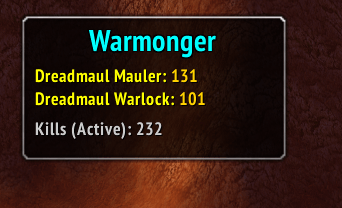
- Live Overlay: A draggable, minimalist window that shows kills for your current farm targets in real-time.
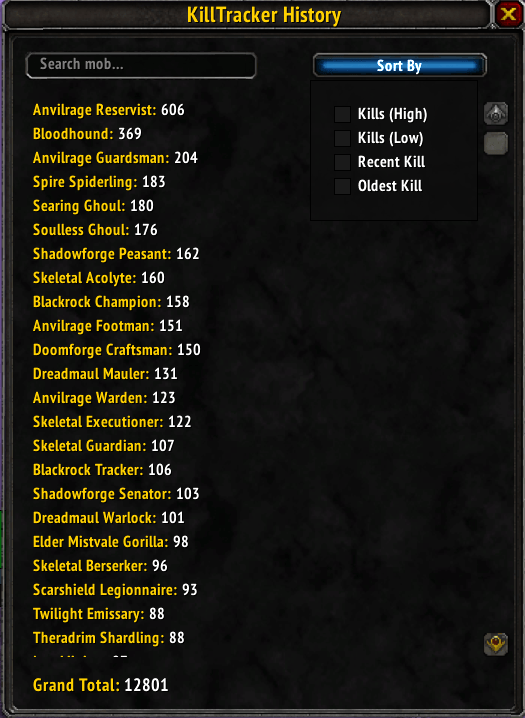
- Detailed History: A searchable and sortable history menu that tracks every mob you've ever killed.
- Advanced Search & Sort: Filter your kill logs by name, total kills, or the most recent/oldest kill date.
- Minimap Button: Quick access to your logs (Left-Click) or toggle the overlay visibility (Right-Click).
- Customization: Set custom titles for your overlay to organize different farming sessions.
- Native Feel: Designed to blend in with the Classic WoW interface.
🔄 Automatic Data Import
Upgrading from the old "Kill Counter" addon? KillTracker features a built-in migration tool. Simply keep your old "Kill Counter" enabled during the first launch, and KillTracker will automatically import all your creature and player kill statistics!
⌨️ Slash Commands
Use /kt to see the help menu or one of the following commands:
| Command | Action |
|---|---|
/kt history |
Opens the full History and Search menu. |
/kt add |
Adds your current target to the Live Overlay. |
/kt remove |
Removes your current target from the Live Overlay. |
/kt plus [number] |
Adds a specific amount of kills to your current target. |
/kt addmob [num] [name] |
Manually adds kills to any mob in your history. |
/kt title [text] |
Sets a custom header title for the overlay. |
/kt cleartitle |
Removes the custom header title. |
/kt on / off |
Shows or hides the live tracking overlay. |
🛠 Installation
- Download the latest release.
- Extract the
KillTrackerfolder into yourWorld of Warcraft/_classic_/Interface/AddOnsdirectory. - Restart the game or type
/reload.
📝 About the Project
This addon was created to provide a more modern and responsive alternative to aging kill counters, featuring optimized memory usage and a focus on "Quality of Life" features for dedicated grinders.
Created by Swiftyy
The KillTracker (Swiftyy) Team
