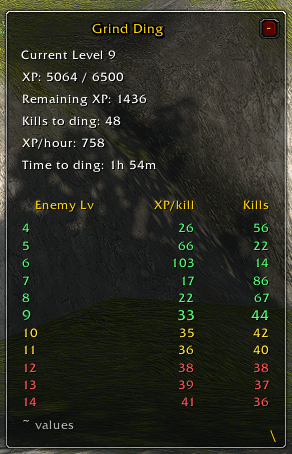
The add-on will calculate the number of mobs you need to kill in order to level. It will also calculate the amount of time it will take based on your current kill rate.
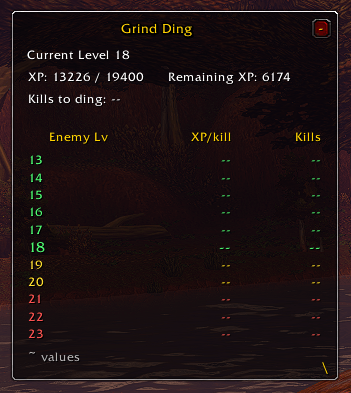
Upon your first login the addon will be blank. This is expected. It will not calculate until you kill something that grants an experience.
Description
Grind Ding is a lightweight, customizable experience and leveling tracker designed for World of Warcraft Forever. It calculates how many enemy kills are needed to reach your next level, tracks experience gained per hour, and estimates your remaining leveling time.
Featuring an enemy-level comparison calculator, Grind Ding displays estimated kills required for enemies ranging from five levels below to five levels above your character. Its movable, resizable interface provides real-time leveling statistics while keeping your screen organized.
Key Features
-
Kills to Level: Estimates how many additional enemies you need to defeat before leveling up.
-
Enemy Level Calculator (±5): Compares XP rewards and estimated kills across 11 enemy levels.
-
XP Per Kill Tracking: Records experience earned from enemy kills and calculates averages to improve estimates.
-
XP Per Hour: Tracks your experience gains throughout the current play session, including quests and enemy kills.
-
Time to Level: Estimates how long until your next level based on your current XP/hour rate.
-
Live XP Updates: Automatically updates your experience progress, remaining XP, kill estimates, and leveling time.
-
Color-Coded Enemy Levels:
-
Green: Five levels below through your current level.
-
Yellow: One to two levels above your current level.
-
Red: Three to five levels above your current level.
-
-
Resizable Interface: Adjust the window dimensions while keeping text and columns aligned.
-
Collapsible Window: Minimize the tracker into a compact, movable GD bar and expand it whenever needed.
-
Saved Settings: Remembers window position, size, minimized state, and configuration.
-
Session Timer Reset: Restart XP/hour calculations independently of your saved kill history.
Slash Commands
| Command | Function |
|---|---|
/gd |
Display available commands |
/gd show |
Show the tracker |
/gd hide |
Hide the tracker |
/gd minimize |
Collapse to the GD bar |
/gd maximize |
Restore the full window |
/gd size 350 |
Adjust window width |
/gd levels |
Toggle enemy-level comparison |
/gd range 5 |
Set the enemy-level range |
/gd samples 50 |
Adjust recent kill sample size |
/gd timer reset |
Reset XP/hour tracking |
/gd reset |
Clear recorded kill history |
/gd center |
Reset window position |
Alternative commands: /grindding, /ktd, and /ktl.
Compatibility
-
Game: World of Warcraft Forever
-
Version: 1.6.0
-
Interface: 16001
-
Installation: Extract
GrindDinginto yourInterface/AddOnsdirectory.
XP and kill estimates are approximations based on observed experience gains and available enemy-level information. Actual results may vary due to rested XP, server rates, and other modifiers.
Grind Ding Team