KillOrder
- By
Identifies NPCs by class, visually displaying attack priority so your group always knows who to focus first.
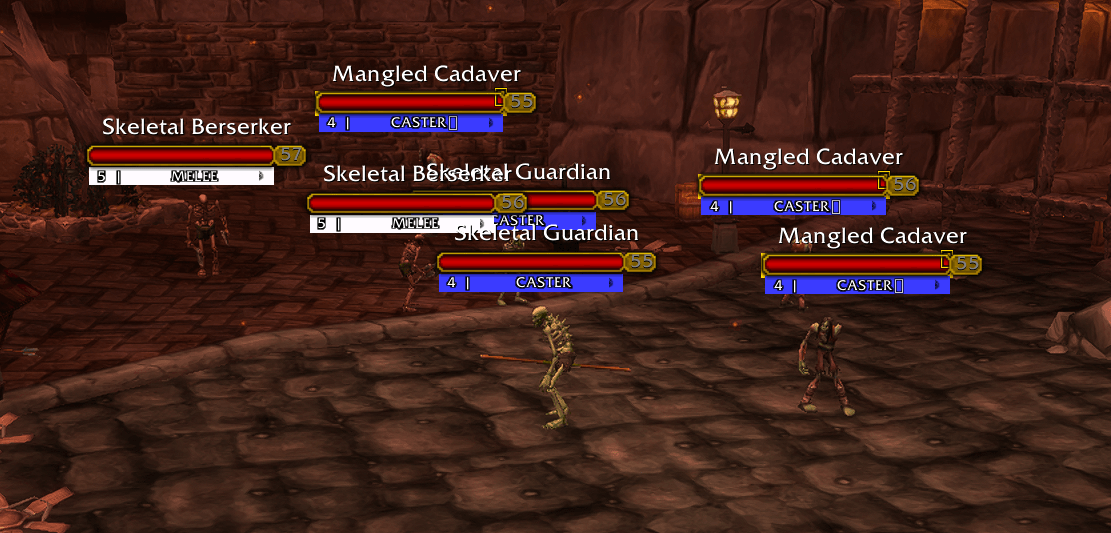
Mobs_NamebarEffects.png
Description
KillOrder — Smart Kill Priority for WoW Classic
Color-coded (Role) nameplates, auto classifying mobs into Roles to reveal the KillOrder. Prioritize Healers, Casters, Ranged, dim the rest, fully customizable.
Works across Classic Era, TBC Anniversary, Wrath, Cata, and MoP Classic through retail-shared UI.
━━━━━━━━━━━━━━━━━━━━━━━━━━━━━━━━━━━━━━
CORE FEATURES
━━━━━━━━━━━━━━━━━━━━━━━━━━━━━━━━━━━━━━
13 ROLE TYPES — each with its own configurable color
Boss · World Boss · Elite Healer · Healer
Elite Caster · Caster · Elite Ranged · Ranged
Elite Melee · Melee · Elite Tank · Tank · Unknown
Elites automatically promote to their sub-role the moment
they appear — no teaching required. Real dungeon/raid bosses
are detected live and always sort to the top, separate from
rare open-world World Bosses.
ROLE BAR — colored bar beneath every mob's health bar
Shows role name and kill priority number.
Elites and Bosses get their own distinct ring highlight.
Everything else can dim to invisible so you focus on what
matters — your current target always stays at full brightness.
AUTO ROLE DETECTION — works out of the box
Layer 1 — Static database: 200+ hand-curated dungeon NPCs
built in
Layer 2 — Mana bar check: mana = caster bucket,
no mana = melee bucket. Instant, no cast needed.
Layer 3 — Cast observation: sees a heal → Healer (high
confidence), including instant casts with no
visible cast bar. Sees a damage spell → Caster.
Sees a shot → Ranged. Saved permanently.
Layer 4 — Creature type and name keyword fallback.
250+ named abilities are classified across healer, caster,
ranged, melee, and tank spell tables. The addon learns a mob
once and never asks again — reset anytime from Options.
TARGET ROLE BAR — floating popup for your current target
Shows role name, mob name, and kill priority on screen the
moment you target a hostile. Banner-style colored ends
matched to the mob's role. Fully draggable, position saved.
PRIORITY WINDOW — 13 draggable rows
Drag to reorder your kill priority. Double-click to recolor,
right-click to rename. Live update — nameplates reflect
changes instantly.
Dim divider separates bright roles from fully-hidden ones.
Six illustrated background themes to choose from.
GROUP SYNC
/ko mt — broadcasts your target to the group;
highlighted on all members' nameplates
/ko sync — pushes your full priority order to the group
MINIMAP BUTTON
Left-click — toggle Priority Window
Right-click — toggle Options
━━━━━━━━━━━━━━━━━━━━━━━━━━━━━━━━━━━━━━
OPTIONS
━━━━━━━━━━━━━━━━━━━━━━━━━━━━━━━━━━━━━━
KillOrder's own Options window (type /ko or click Options):
Theme · Appearance (window scale, opacity, role bar color)
Session Management (reset, rescan) · Tips
Quick behavior toggles live in WoW's own settings panel:
Esc → Options → AddOns → KillOrder
Enable · Instance-only · Dim low priority · Nameplate
display toggles · Target Role Bar on/off
━━━━━━━━━━━━━━━━━━━━━━━━━━━━━━━━━━━━━━
SLASH COMMANDS
━━━━━━━━━━━━━━━━━━━━━━━━━━━━━━━━━━━━━━
/ko Open Priority Window
/ko options Open Options
/ko teach <role> Assign role to current target
/ko alertbar Toggle the Target Role Bar
/ko mt Toggle MT target broadcast
/ko sync Push priority order to group
/ko list List visible hostile priorities
/ko reset Clear learned NPC cache
/ko scan Force nameplate rescan
/ko debug Print diagnostics to chat
━━━━━━━━━━━━━━━━━━━━━━━━━━━━━━━━━━━━━━
INSTALLATION
━━━━━━━━━━━━━━━━━━━━━━━━━━━━━━━━━━━━━━
1. Extract KillOrder into Interface\AddOns\
2. Enable at character select
3. Enter a dungeon — done
Tip: type /ko and enable Show Nameplates on first launch.
The addon handles everything else automatically.
━━━━━━━━━━━━━━━━━━━━━━━━━━━━━━━━━━━━━━
DUNGEONS COVERED (static database)
━━━━━━━━━━━━━━━━━━━━━━━━━━━━━━━━━━━━━━
Hellfire Ramparts · Blood Furnace · Shattered Halls
Slave Pens · Underbog · Steamvault
Mechanar · Botanica · Arcatraz
Mana-Tombs · Auchenai Crypts · Sethekk Halls
Shadow Labyrinth · Old Hillsbrad · Black Morass
Magister's Terrace · Karazhan trash
Auto Role Detection (mana bar + cast observation) covers
every other mob in every other expansion automatically —
the static list above just gives those specific dungeons a
head start with zero learning time.
KillOrder Team