KickRotate
- By
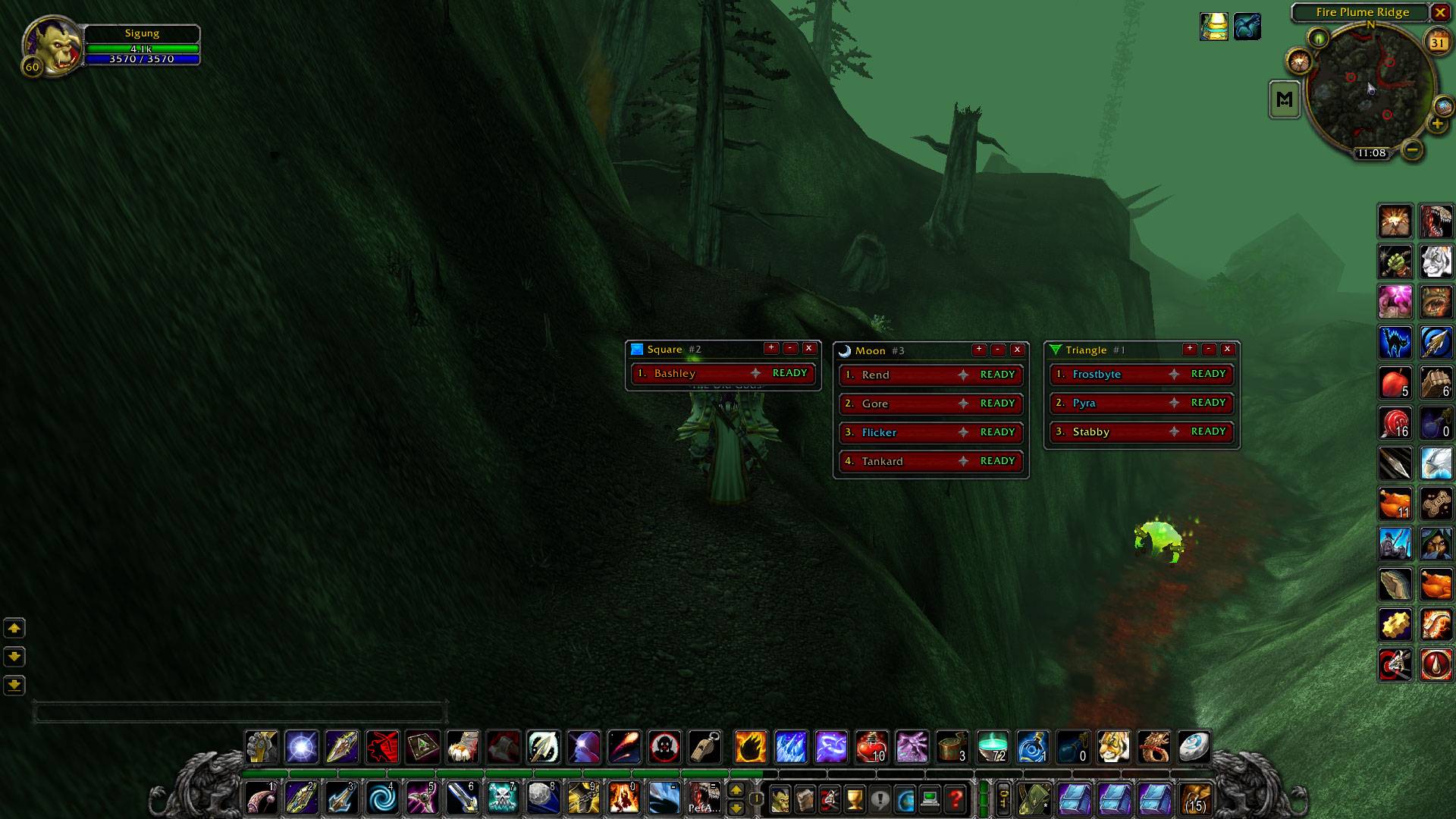
WoWScrnShot_103126_230833.jpg
Description
# KickRotate
**Interrupt rotations for Classic Era, without the shouting in voice chat.**
KickRotate gives your raid up to three interrupt windows, one per marked target (Skull, Cross, Square by default). Each window shows who kicks next, who's on cooldown, and how long until they're back. The order sorts itself as people kick, so the next ready player is always on top.
---
## Features
### Rotation windows
- **Three windows, one per raid marker.** Assign any marker to any window.
- **Live cooldown bars.** Each player's row is a raised button that sinks while their interrupt is on cooldown. A gold timer drains across it with a percent counter, then it pops back up showing **READY**.
- **Automatic sorting.** A successful kick sends that player to the bottom. A missed or resisted kick drops them below the ready players.
- **Click to interrupt.** Click any row to cast *your* interrupt on your target.
- **Minimize to a button.** Shrink a window to a small marker icon, then click it to restore the window in the same spot. Hover the icon to see the rotation order.
### Alerts
- **Back-up alert.** If the assigned kicker hasn't interrupted by the time a cast reaches 75% (adjustable), the next ready player hears an alarm and their window flashes.
- **Wrong-target warning.** If you target the wrong marked mob while yours is still alive, you get a raid-warning sound and a red flash.
- **Missed-kick tracking.** Casts that go off un-kicked count against the assigned player. So does a backup having to save it.
### Accuracy stars
Every player earns a star based on their interrupt success rate: **Grey → Copper → Silver → Gold**. Hover a name to see the exact percentage.
### Class themes
When every player in a window is the same class, the window gets a themed border with a chime:
- **Mage:** fire fading into ice
- **Druid:** twisting vines
- **Shaman:** iron chain
- **Warrior:** dripping blood
### Easy setup for leaders
- **Right-click a name** to move, reorder, reset accuracy or remove a player.
- **Drag names** to reorder a window, or drop them into another window.
- Use **+** to add group members, or **Auto-fill** to split everyone automatically.
- The raid leader and assistants manage the windows. Changes sync to everyone running the addon.
---
## Supported interrupts
| Class | Spell |
|---|---|
| Rogue | Kick |
| Warrior | Pummel, Shield Bash |
| Mage | Counterspell |
| Shaman | Earth Shock |
| Priest | Silence |
| Warlock | Spell Lock (Felhunter, credited to the Warlock) |
| Druid | Bash |
| Paladin | Hammer of Justice |
---
## Commands
| Command | What it does |
|---|---|
| `/kr` | List all commands |
| `/kr options` | Open the settings panel |
| `/kr auto` | Split interrupt-capable group members across the windows |
| `/kr add <1-3> <name>` / `/kr remove <1-3> <name>` | Edit a window |
| `/kr symbol <1-3> <skull/cross/...>` | Change a window's marker |
| `/kr show` / `/kr hide [1-3]` | Show or hide windows |
| `/kr lock` / `/kr unlock` | Lock window positions |
| `/kr mute` | Toggle sounds |
| `/kr demo` | Load demo rosters to try the UI solo |
Everything is also available in **Options → AddOns → KickRotate**: sounds, alert threshold, border style, class border art, window scale and opacity.
---
## Good to know
- **Everyone needs the addon** to receive roster changes from the leader. Cooldowns and results come from the combat log, so they're tracked for every player you can see.
- **Clicking a row always casts your own interrupt.** WoW doesn't let addons cast spells for other players.
- **Editing is locked in combat.** Layout changes made mid-fight apply when combat ends.
- **Channeled spells aren't tracked** for the back-up alert, only regular casts.
- **Accuracy stats are saved per account on your own client.** They aren't shared.
---
Found a bug or have an idea? Leave a comment — feedback is very welcome!
KickRotate Team