
KeyUpDown
- By
Bind two separate actions to a single key. One fires when you press it down, another when you release it.
Setup:
- Open the settings window with
/keyupdownor click the minimap button - Click a slot's keybind button and press the key you want to bind
- Enter a macro name in the Down and Up fields
- Choose which spec the binding should be active for, or leave it on Both
- Hit Save
Notes:
- Actions are entered as macro names only
- Bindings can be set to activate only in your Primary or Secondary spec
- Right-click a keybind button to clear it
Use Cases:
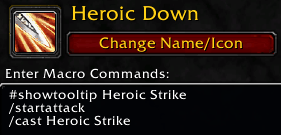
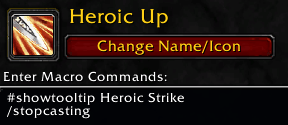
- Heroic Strike queuing: Press to queue Heroic Strike, release to cancel it. This is the whole reason I made this addon.
Example: Heroic Strike Setup

KeyUpDown Team
