


Keystone Codex
- By
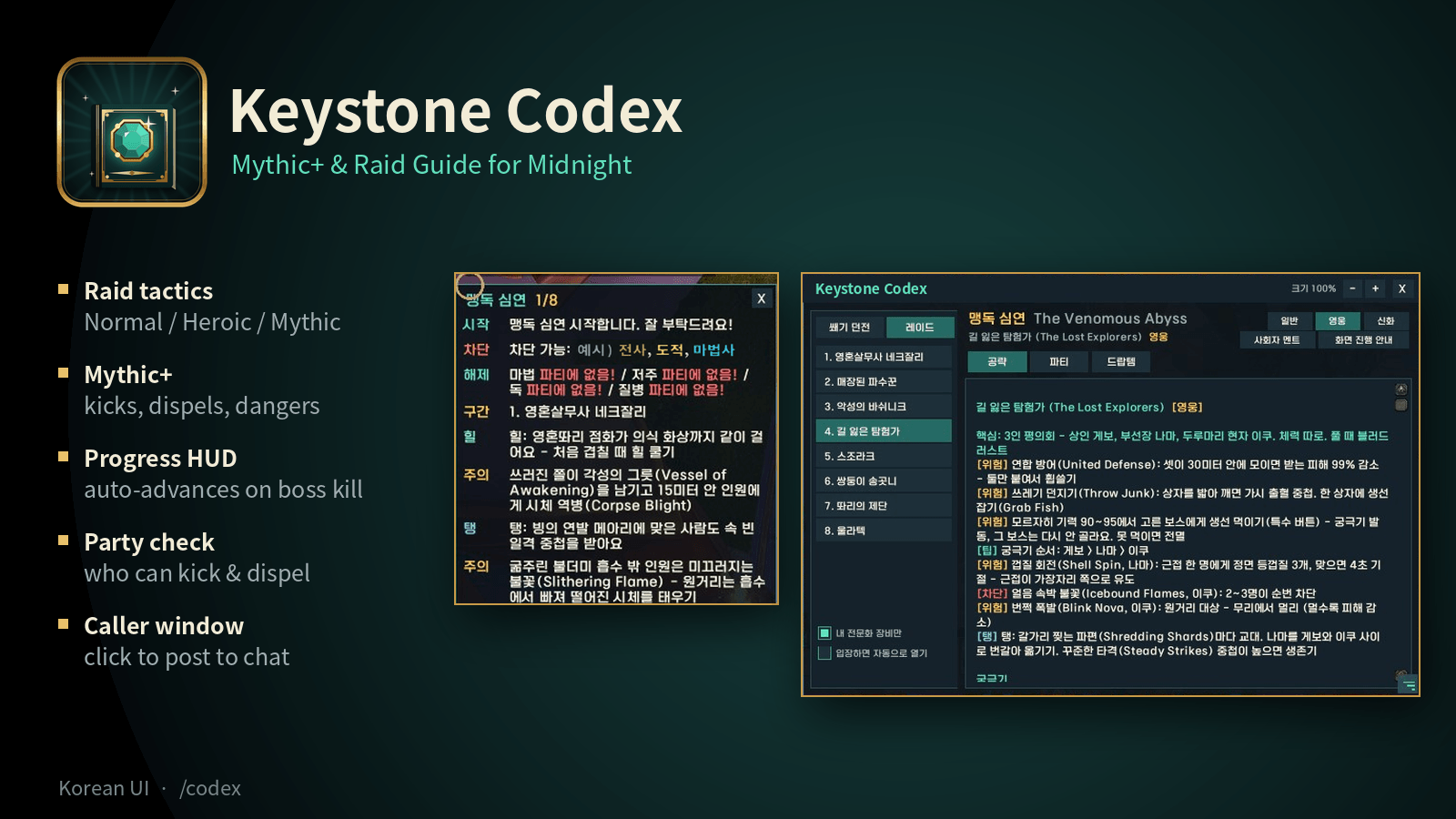
Raid tactics by difficulty, Mythic+ guides, progress HUD and caller window.
Description
Keystone Codex
An in-game strategy guide for Midnight Mythic+ dungeons and raids (The Venomous Abyss, The Unbinding of Kith'ix). It was made for guilds: everyone in your group reads the same interrupts, dangers and boss tactics without leaving the game.
Interface language: Korean (koKR). Ability names are shown in Korean with the English name in parentheses.
Features
Mythic+ Dungeons (Season 2)
Altar of Fangs, Murder Row, Den of Nalorakk, The Blinding Vale, Voidscar Arena, Ruby Life Pools, Kings' Rest, Temple of Sethraliss
- Summary: must-interrupt casts, dangerous mobs and route notes
- Script: the dungeon split into sections (trash, then boss), with what each section needs
- Bosses / Trash / Tips tabs
- Loot: pulled from the Adventure Guide, with an option to show only your spec's items
Raid: The Venomous Abyss (all 8 bosses)
- Tactics split by Normal / Heroic / Mythic
- Heroic shows the extra Heroic mechanics. Mythic shows both the Heroic and the Mythic additions.
- Inside the raid, the guide automatically selects your current difficulty.
- The selected boss's model from the Adventure Guide is shown faintly behind the tactics.
Raid: The Unbinding of Kith'ix (12.1.5, 1 boss)
- Full Kith'ix tactics split by Normal / Heroic / Mythic: adds, Extinguish, intermissions, Phase 2 Null Gates and the Eightfold Eclipse enrage
- In raid mode, pick Venomous Abyss (맹독 심연) or Kith'ix (키식스 해방) with the buttons at the top left. Inside a raid, the right one is picked automatically.
On-screen Progress HUD
- A small window that shows the current section's interrupts, dispels, dangers and tank/healer notes
- It moves to the next section automatically when a boss dies
- It shows the current keystone level during a Mythic+ run
Party Check
- Reads your group's classes and shows who can interrupt, dispel (magic / curse / poison / disease), soothe, purge, plus external defensives, Bloodlust and battle resurrection
- It warns you when nobody in the group has a needed dispel
Caller Window (사회자 멘트)
- Shows ready-made callouts for the current section
- Click a line to post it to party or instance chat, or use Say All
- Long lines are split into several messages automatically, so nothing gets cut off
- A preview mode shows the messages only to you
Quality of Life
- Minimap button, a resizable window and scale controls
- It can open automatically when you enter a supported dungeon or raid
- Outside an instance, picking a dungeon or boss in the guide also updates the HUD and the Caller window
How to Use
1. Install
Unzip the file into World of Warcraft\_retail_\Interface\AddOns\, so you have a KeystoneCodex folder there. Then restart the game. The chat window shows "Keystone Codex v1.24 로드됨" (loaded) when it works.
2. Open the guide
Type /codex or click the book icon on the minimap.
- On the left, choose Mythic+ Dungeon (쐐기 던전) or Raid (레이드), then pick a dungeon or a boss.
- Use the tabs at the top: Summary (요약), Script (대본), Bosses (보스), Trash (일반 몹), Party (파티), Tips (팁), Loot (드랍템).
3. In a Mythic+ dungeon
- Click Progress HUD (화면 진행 안내) in the guide. A small window shows what the current section needs (interrupts, dispels, dangers).
- When a boss dies, the HUD moves on to the next section by itself. Use
<and>to move manually. - Open the Party (파티) tab to see who can interrupt or dispel and what your group is missing.
4. In the raid
- Pick the raid with the buttons at the top left (맹독 심연 / 키식스 해방), then pick a boss. Choose Normal / Heroic / Mythic (일반 / 영웅 / 신화) at the top right. Inside the raid, your current difficulty is picked automatically.
- A faint image of the boss appears behind the tactics. Use
/codex art 40to make it stronger, or/codex artto turn it off.
5. Calling out to your group (Caller window)
- Click Caller (사회자 멘트) in the guide. It shows ready-made callouts for the current section.
- Click a line to post it to party chat, or click Say All (전체 말하기). Click Party Chat (파티 채팅) to switch to Only Me (나만 보기) for a preview.
- Drag the bottom-right corner to resize it. When the window is small, scroll with the mouse wheel.
6. If the guide does not open automatically
Inside the dungeon, open /codex, select that dungeon, and click Link to current location (지금 있는 곳과 연결) at the bottom left. The guide opens automatically next time.
Commands
| Command | What it does |
|---|---|
/codex or /kg |
Open or close the guide |
/codex hud |
Show or hide the progress HUD |
/codex mc |
Show or hide the Caller window |
/codex say |
Turn the automatic callout on dungeon entry on or off |
/codex art |
Turn the faint boss model behind raid tactics on or off |
/codex art 30 |
Set how visible the boss model is (5-90%, default 25%) |
/codex minimap |
Show or hide the minimap button |
/codex info |
Show the current instance info (for linking) |
/codex reset |
Clear saved dungeon links |
Tips
- Ctrl + mouse wheel on the guide window changes its size.
- Drag the bottom-right corner to resize the guide window and the Caller window. Right-click the Caller window's corner to fit its height to the content.
- "Link to current location" connects the instance you are in to the selected guide.
Works with Midnight addon restrictions
Keystone Codex does not read combat data. It only shows prepared guide text and your group's class list, so it is not affected by Midnight's combat API restrictions (secret values).
Sources and accuracy
- Raid tactics are summarized and translated from the Icy Veins boss guides (Kith'ix also checked against Method). Dungeon content was checked against both Icy Veins and Method.
- Ability names may differ slightly from the in-game Korean names, so the English names are kept in parentheses.
- Mythic notes are still incomplete for some bosses (Entombed Sentinels, Ula'tek). They will be updated as strategies are published.
Feedback
Found a mistake in a tactic or a translation? Please leave a comment. Corrections are very welcome.
---
한국어 안내
한밤 쐐기 던전과 레이드(맹독 심연, 키식스 해방)를 위한 게임 안 공략 가이드예요. 길드를 위해 만들었어요. 파티원 모두가 게임 밖으로 나가지 않고 같은 차단, 위험 요소, 보스 공략을 볼 수 있어요.
화면은 한국어예요. 기술 이름은 한국어로 쓰고, 괄호 안에 영어 이름을 함께 적었어요.
기능
쐐기 던전 (시즌 2)
송곳니의 제단, 죽음의 골목, 날로라크의 소굴, 눈부신 골짜기, 공허흉터 투기장, 루비 생명의 웅덩이, 왕들의 안식처, 세스랄리스 사원
- 요약: 꼭 차단할 기술, 위험한 몹, 길 안내
- 대본: 던전을 구간(일반 몹 → 보스)으로 나누고, 구간마다 필요한 것 정리
- 보스 / 일반 몹 / 팁 탭
- 드랍템: 모험 안내서에서 불러오고, 내 전문화 장비만 볼 수도 있어요
레이드: 맹독 심연 (보스 8명 모두)
- 일반 / 영웅 / 신화로 나눈 공략
- 영웅은 영웅에서 추가되는 기제를, 신화는 영웅과 신화에서 추가되는 기제를 함께 보여줘요
- 레이드 안에서는 지금 난이도를 자동으로 골라요
- 고른 보스의 모험 안내서 모습이 공략 글 뒤에 흐리게 보여요
레이드: 키식스 해방 (12.1.5, 보스 1)
- 키식스 공략을 일반 / 영웅 / 신화로 나눠 정리: 쫄 처리, 소등, 중간 페이즈, 2페이즈 영점 차원문과 여덟 겹의 황혼
- 레이드 모드에서 왼쪽 위 맹독 심연 / 키식스 해방 버튼으로 고르고, 레이드 안에서는 알맞은 쪽이 자동으로 골라져요
화면 진행 안내
- 지금 구간의 차단, 해제, 위험 요소, 탱커·힐러 참고를 작은 창으로 보여줘요
- 보스를 잡으면 다음 구간으로 자동으로 넘어가요
- 쐐기 진행 중에는 지금 단수를 표시해요
파티 확인
- 파티원 직업을 보고 차단, 해제(마법·저주·독·질병), 달래기, 정화, 외부 생존기, 영웅심, 전투 부활이 가능한 사람을 보여줘요
- 필요한 해제를 할 수 있는 사람이 없으면 알려줘요
사회자 멘트
- 지금 구간에서 파티에 알려줄 멘트를 보여줘요
- 줄을 누르면 파티(또는 인스턴스) 채팅으로 보내요. 전체 말하기도 있어요
- 긴 글은 자동으로 나눠 보내서 잘리지 않아요
- 미리보기 모드에서는 나에게만 보여요
편의 기능
- 미니맵 버튼, 크기 조절 가능한 창
- 지원하는 던전이나 레이드에 들어가면 자동으로 열 수 있어요
- 던전 밖에서 가이드의 던전이나 보스를 고르면, 진행 안내와 사회자 멘트 창도 같이 바뀌어요
사용 방법
1. 설치
압축을 World of Warcraft\_retail_\Interface\AddOns\ 에 풀어서 KeystoneCodex 폴더가 생기게 하고, 게임을 다시 켜세요. 채팅창에 "Keystone Codex v1.24 로드됨"이 나오면 성공이에요.
2. 가이드 열기
/codex 를 입력하거나 미니맵의 책 아이콘을 누르세요.
- 왼쪽 위에서 쐐기 던전 또는 레이드를 고르고, 아래 목록에서 던전이나 보스를 골라요.
- 위쪽 탭으로 요약·대본·보스·일반 몹·파티·팁·드랍템을 바꿔 봐요.
3. 쐐기 던전에서
- 가이드 창의 화면 진행 안내 버튼을 누르면, 지금 구간에서 필요한 것(차단·해제·위험 요소)이 작은 창에 나와요.
- 보스를 잡으면 다음 구간으로 자동으로 넘어가요.
<>버튼으로 직접 옮길 수도 있어요. - 파티 탭에서 누가 차단·해제를 할 수 있는지, 파티에 없는 능력이 무엇인지 확인하세요.
4. 레이드에서
- 왼쪽 위 맹독 심연 / 키식스 해방 버튼으로 레이드를 고르고 보스를 고른 뒤, 오른쪽 위에서 일반 / 영웅 / 신화를 고르세요. 레이드 안에서는 지금 난이도가 자동으로 골라져요.
- 공략 글 뒤에 보스 모습이 흐리게 보여요.
/codex art 40처럼 진하기를 바꾸고,/codex art로 끌 수 있어요.
5. 파티에 알려주기 (사회자 멘트)
- 가이드 창의 사회자 멘트 버튼을 누르면 지금 구간에서 파티에 알려줄 말이 나와요.
- 줄을 누르면 파티 채팅으로 보내고, 전체 말하기로 한 번에 보낼 수 있어요. 파티 채팅 버튼을 누르면 나만 보기로 바뀌어 미리 볼 수 있어요.
- 오른쪽 아래 모서리를 끌어 크기를 조절하고, 창이 작으면 마우스 휠로 내려서 봐요.
6. 던전에 들어가도 가이드가 자동으로 안 열리면
던전 안에서 /codex 를 열고 그 던전을 고른 뒤, 왼쪽 아래 지금 있는 곳과 연결을 누르세요. 다음부터 자동으로 열려요.
명령어
| 명령어 | 기능 |
|---|---|
/codex 또는 /kg |
가이드 열기/닫기 |
/codex hud |
화면 진행 안내 켜기/끄기 |
/codex mc |
사회자 멘트 창 켜기/끄기 |
/codex say |
던전 입장 자동 멘트 켜기/끄기 |
/codex art |
레이드 공략 뒤 보스 모습 켜기/끄기 |
/codex art 30 |
보스 모습 진하기 정하기 (5~90%, 기본 25%) |
/codex minimap |
미니맵 버튼 보이기/숨기기 |
/codex info |
지금 있는 곳 정보 보기 (연결용) |
/codex reset |
저장된 던전 연결 지우기 |
팁
- 가이드 창 위에서 Ctrl + 마우스 휠을 굴리면 크기가 바뀌어요
- 가이드 창과 사회자 멘트 창은 오른쪽 아래 모서리를 끌어서 크기를 조절해요. 사회자 멘트 창의 모서리를 오른쪽 클릭하면 높이가 내용에 맞게 돌아가요
- "지금 있는 곳과 연결" 버튼을 누르면 지금 들어와 있는 던전을 고른 가이드와 연결해요
한밤 애드온 제한과 상관없이 동작
Keystone Codex는 전투 정보를 읽지 않아요. 미리 준비한 공략과 파티원 직업 목록만 보여주기 때문에, 한밤의 전투 정보 제한(비밀 값)에 영향을 받지 않아요.
출처와 정확도
- 레이드 공략은 Icy Veins 보스 공략을 요약하고 번역했어요 (키식스는 Method 공략과도 대조). 쐐기 던전 내용은 Icy Veins와 Method 공략으로 점검했어요
- 기술 이름이 게임 속 한국어 이름과 조금 다를 수 있어서 영어 이름을 괄호에 남겼어요
- 일부 보스(매장된 파수꾼, 울라텍)는 신화 공략이 아직 부족해요. 공략이 나오는 대로 업데이트할게요
의견
공략이나 번역에서 틀린 곳을 찾으면 댓글로 알려주세요. 고쳐 주시는 의견은 언제나 환영해요.
Keystone Codex Team
