


Keystelia
- By
feature-6-tenue-en.png
feature-7-teleportations-en.png
feature-5-transmog-en.png
feature-4-accueil-en.png
Description
Keystelia
Your Mythic+ and raid coach. Prepare, play together, understand what happened, and know what to work on next — in one clean add-on.
Keystelia covers the whole evening: before the key (what to fix, what to kick, which key to run), during it (aggro alerts, tank assistant, pull guide), after it (what went well, what to work on) and over the week (vault, score, gear, raid progress). Made for every player, beginners included.
English and French · No required dependencies · Nothing automatic in combat · No made-up data: every number comes from the game or a dated, cited source
Open the menu with
/keystelia. Your settings and history are kept; the previous command aliases still work.
🏠 Home
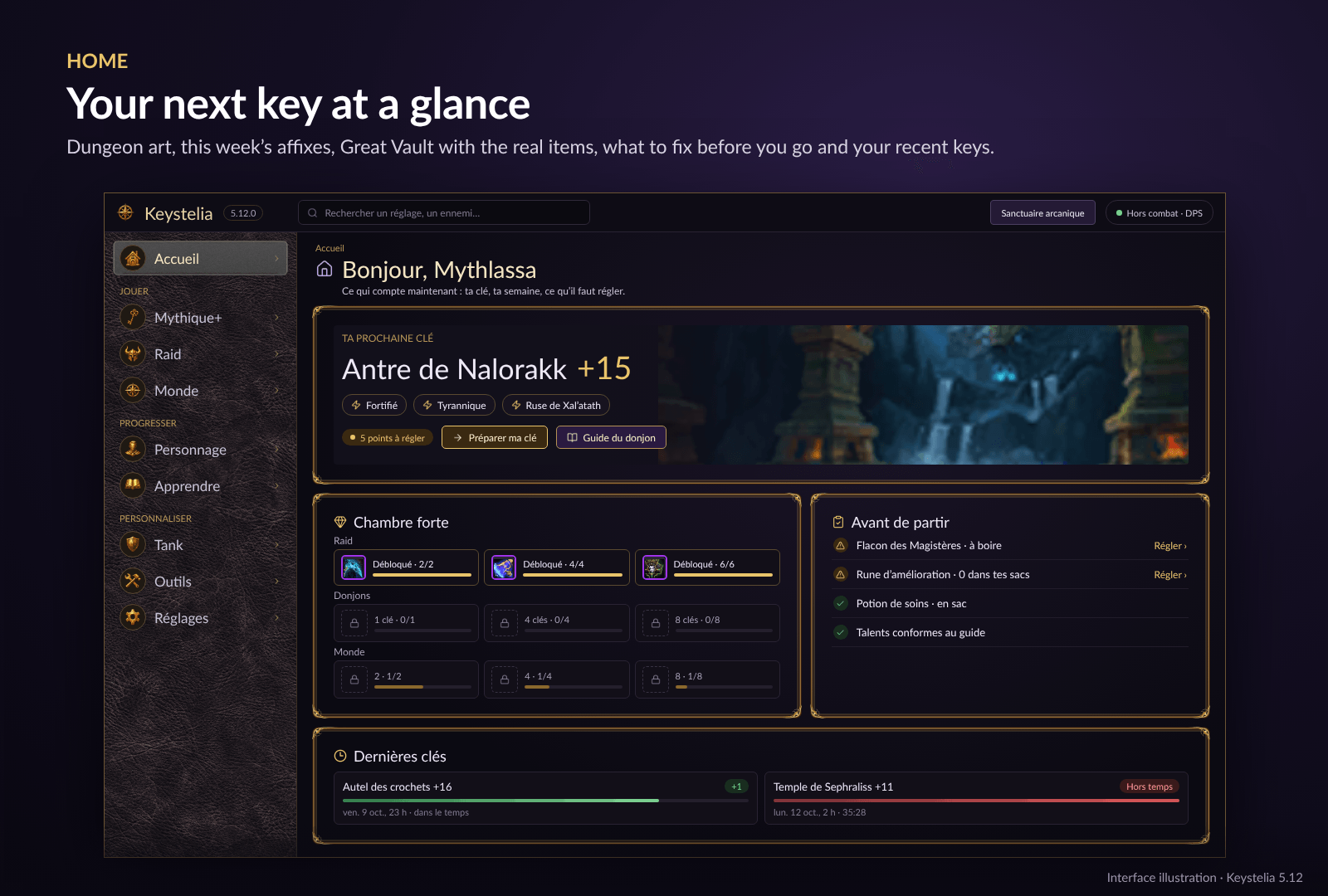
Your next key at a glance: the dungeon's art, this week's affixes, the timer, your best time and rating there; the Great Vault as progress bars with the real item icons once it is ready; Before you go (what to fix first) and your recent keys with their result.
🗝️ Mythic+
- Prepare my key — enchants, sockets, durability, consumables and build compared with your spec's guide; in this dungeon, what to interrupt and what to kill first.
- Keys — the keys of your group and guild (compatible with BigWigs, Details! and every LibKeystone add-on) and what each key brings to each player.
- My group — an interrupt plan to share in one click, and group coverage: Bloodlust, battle res, every dispel type, checked against the chosen dungeon.
- Ready check — a small panel lists the consumables you are missing, with a button to use them.
- Full group — when your group reaches 5, one click teleports you to the dungeon.
🗺️ Dungeon guide
- Pull guide — focus targets, kicks, dispels, purges and dangers in all eight Season 2 dungeons: 39 written cards cross-checked with Wowhead's guides, plus 57 cards from Wowhead's important-spell tables. Enemy and spell names in your language.
- Dungeon maps — every enemy in place on each floor (data from Mythic Dungeon Tools, GPL-2); hover for forces, pack number, crowd control and the guide's tip.
- Routes — YoDaTV's route or your own: click a pack to add it to a pull, forces per pull and total, MDT import and export.
- Pro videos — Kiratank's and YoDaTV's guides and a high key for each dungeon, one click away.
⚔️ In combat
- DPS and healers — on-screen alert and sound the moment an enemy targets you; the Call Tank button (or a key bind) warns your group.
- Tanks — your threat on every enemy nameplate (held, unstable, lost, DANGER when your healer is targeted), lost-mob counter and markers on mouseover.
- Smooth and light: one threat scan per tick, no flicker.
📈 After the key
- Debrief — 3 things to remember, compared with your own median (never an invented norm).
- Group — interrupts, dispels, avoidable damage and deaths of every player, read from the game's own meter.
- My keys — four metrics per role, key-by-key curve, per-dungeon table and history, kept per character.
🛡️ Raid
- Prepare my raid — what is left to fix, active consumables, talents compared with the guide's raid build, and a ready-check panel.
- Bosses by role — what matters for your role on each boss, what is deadly, interruptible or dispellable, from the Adventure Guide.
- My raid group — buffs, debuffs, Bloodlust, battle res, dispels and interrupts: what is missing is said plainly.
- Progress and loot — bosses killed this week, lockouts, raid vault row and the pieces of your goal still to get.
💎 Your character
- Gear — your end-of-season goal slot by slot, a character sheet, try any item, where to find each piece, spec guide, upgrades with your crests and a Raidbots export.
- Loot — Mythic+ and raid loot by spec and slot, favourites with an on-screen alert when one drops, teleport buttons.
- My week — your advised next key, Great Vault and score per dungeon.
- Helpers — bonus roll confirmation, crest conversion in two clicks, and a crafting shopping list that searches every reagent at the auction house for you.
🌍 World
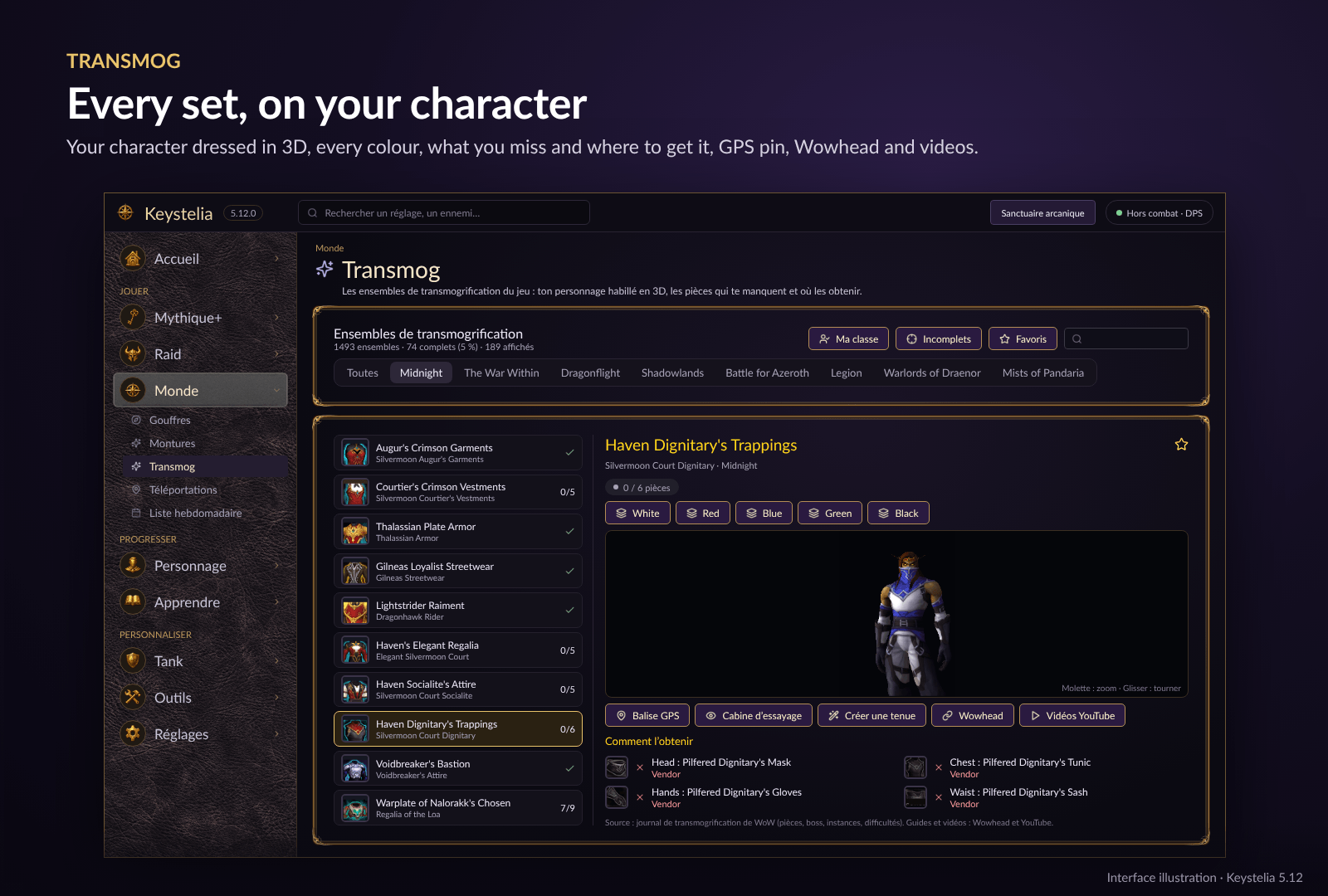
- Transmog — every transmog set of the game with your character dressed in 3D (head to toe), one button per difficulty, each piece collected or not and where it drops (boss, instance, difficulties read from the game), GPS pin to the instance entrance, favourites, Wowhead and YouTube.
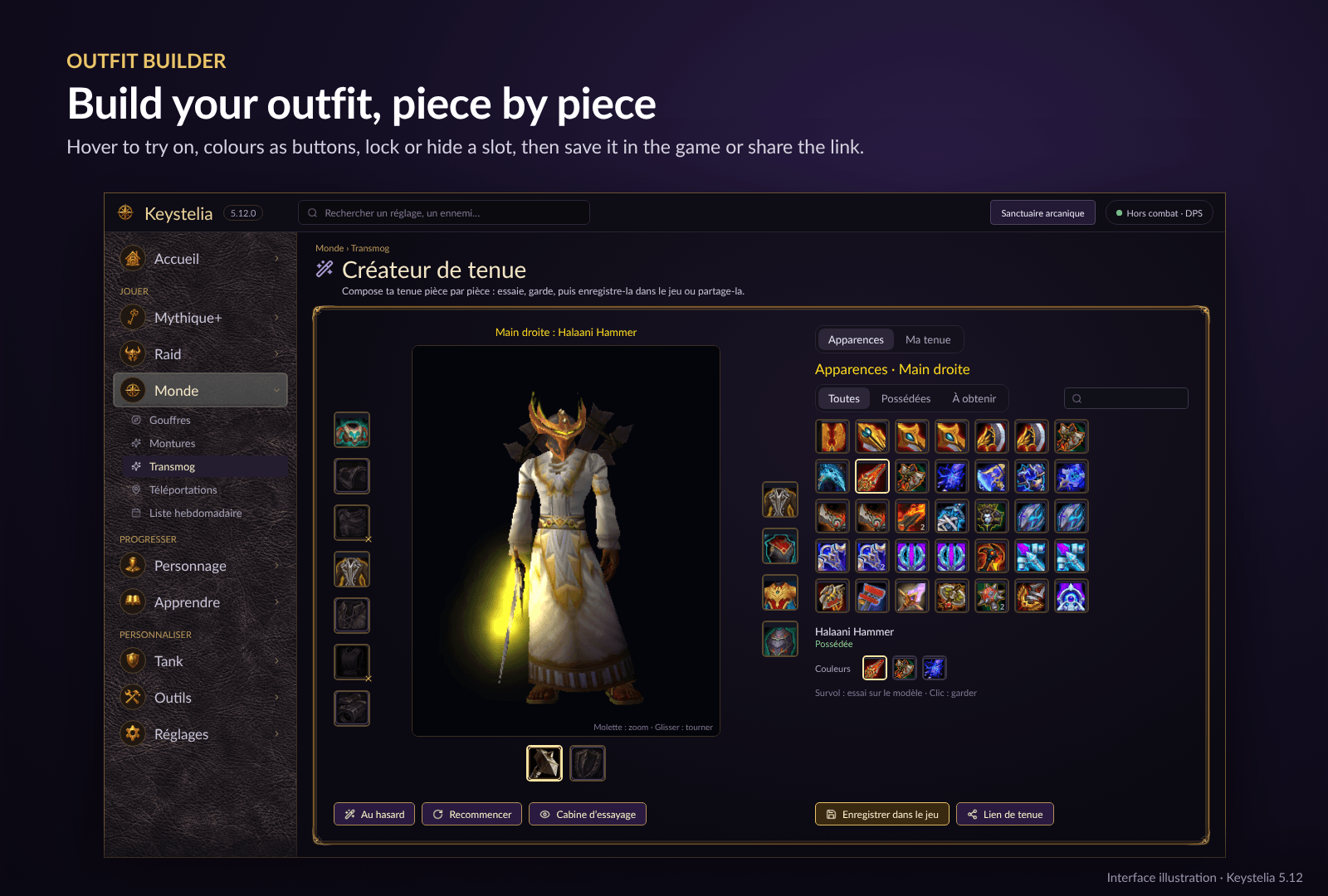
- Outfit builder — your character between the 13 slots like the character sheet: pick any appearance you own (or not), hover to try it on, colours as buttons, lock or hide slots, random outfit from what you own, then save it in the game's outfits or share an outfit link in chat. It also lists what you still need to wear it, and where to get it.
- Mounts — every mount with its source, difficulty, tutorial, GPS pin and 3D model.
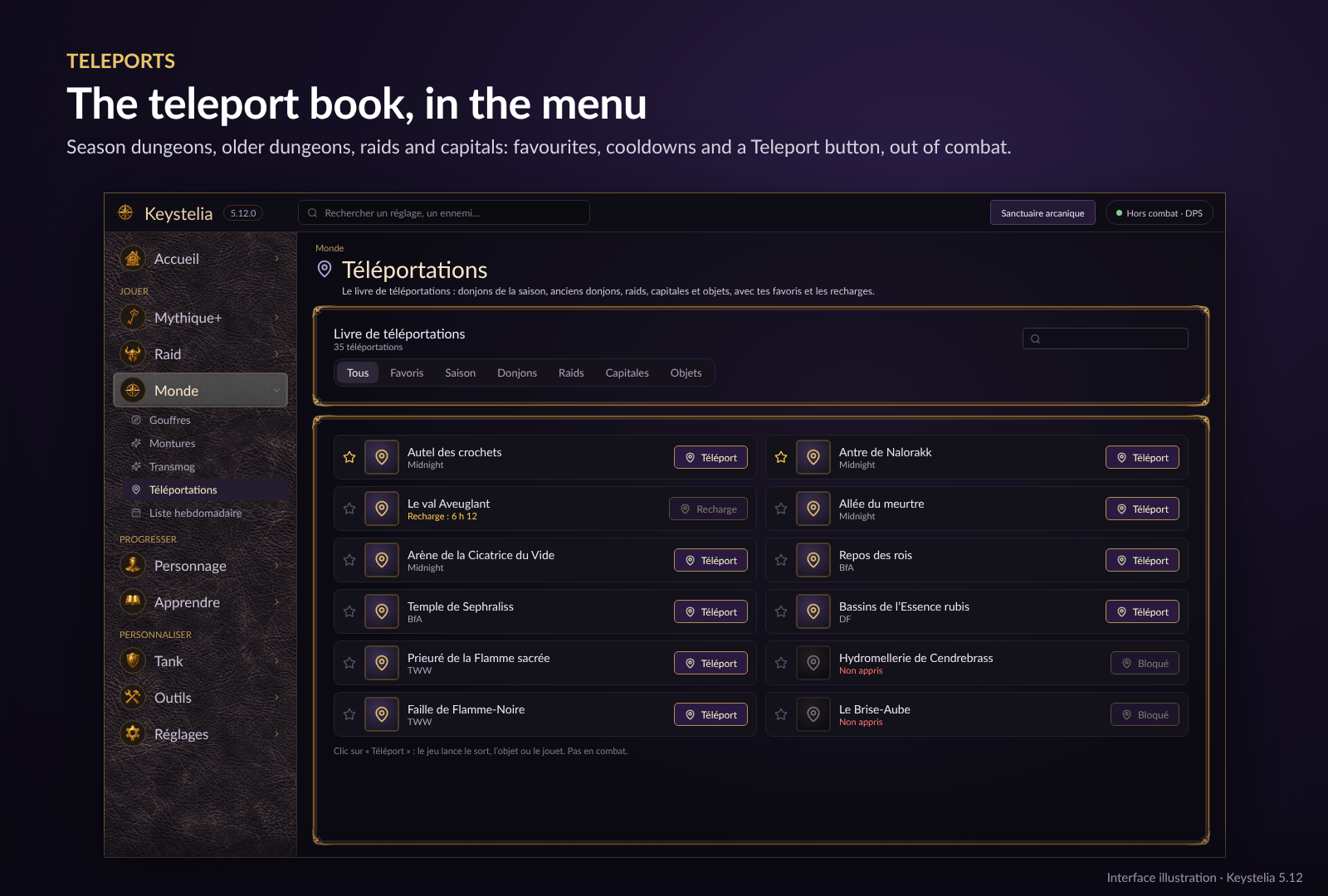
- Teleports — the teleport book right in the menu: season dungeons, older dungeons, raids, capitals and items, with favourites, cooldowns and a Teleport button.
- Delves and Weekly checklist.
📚 Learn
Short, sourced lessons for first steps, tank, healer and DPS, plus this week's affixes.
🎨 Make it yours
Themes (or build your own), layout editor, profiles per role or spec, colour-blind and high-contrast modes, "Reduce motion", LibSharedMedia sounds. Works with the default nameplates and alongside Plater, ElvUI, Platynator, Threat Plates, KuiNameplates and NeatPlates.
🧩 Optional modules
Untick any of them in the add-on list without touching the rest: Maps (dungeon maps and routes, loaded only when opened), Timers (key and raid timers, records per boss), Debrief (after-key debrief and death review), Teleports (teleport book in the menu, with favourites and cooldowns), Mounts (every mount with its source and 3D model), Transmog (sets, 3D model and outfit builder, loaded only when opened), Delves, Weekly (week checklist) and Quality of Life (small out-of-combat helpers).
🚀 Quick start
- Install and reload. Enable enemy nameplates with
V. - Type
/keysteliaor click the minimap button. - The Home page shows your next key, your vault and what to fix before you go.
- Optional: bind Call the Tank in the WoW key bindings.
⌨️ Commands
/keystelia— open or close the menu/keystelia test— test the aggro alert ·/keystelia testtank— preview the tank assistant/keystelia guide— pull guide ·/keystelia bar— combat marker bar ·/keystelia editor— layout editor/keystelia tp— full-group teleport frame (on/off) ·/keystelia tp book— teleport book/ktransmog— transmog sets and outfit builder/keystelia diagnostic— copyable diagnostic report ·/keystelia help— main commands
⚠️ Honest about WoW's limits
WoW blocks automatic add-on actions and chat in combat, so anything that acts for you is always a click, out of combat. The game also hides some values (threat, marks, names in instances). When information is missing, Keystelia says so — it never turns missing data into a fake answer.
🇫🇷 En français
Keystelia
Ton coach Mythique+ et raid. Prépare, joue ensemble, comprends ce qui s'est passé et sache quoi travailler ensuite — dans un seul addon.
Pour tous les joueurs, débutants compris · Français et anglais · Aucune dépendance obligatoire · Rien d'automatique en combat · Rien d'inventé : chaque donnée vient du jeu ou d'une source datée et citée
Ouvre le menu avec
/keystelia. Ton historique et tes réglages sont conservés ; les anciennes commandes restent utilisables.
- 🏠 Accueil — ta prochaine clé en un coup d’œil (image du donjon, affixes, chrono, ton meilleur temps et ton score), la chambre forte en barres avec l’icône des vrais objets, Avant de partir (ce qu’il faut régler d’abord) et tes dernières clés.
- 🗝️ Mythique+ — Préparer ma clé (enchantements, châsses, durabilité, consommables, build, et dans ce donjon quoi interrompre et quoi tuer d'abord), Clés du groupe et de la guilde (compatible BigWigs, Details! et LibKeystone), Mon groupe (plan d'interruptions et couverture : héroïsme, résurrection en combat, dissipations selon le donjon), panneau à l'appel des consommables, téléportation quand le groupe est complet.
- 🗺️ Guide des donjons — guide des pulls des 8 donjons (39 fiches recoupées avec Wowhead et 57 fiches tirées de ses tableaux, noms en français), plans avec chaque ennemi à sa place (données Mythic Dungeon Tools, GPL-2), routes de YoDaTV ou les tiennes avec import et export MDT, vidéos de Kiratank et YoDaTV pour chaque donjon.
- ⚔️ En combat — alerte d'aggro à l'écran et bouton Appel tank pour DPS et soigneurs ; pour les tanks, l'état de la menace sur chaque barre ennemie (tenue, instable, perdue, DANGER si ton soigneur est visé). Léger et sans clignotement.
- 📈 Après la clé — Bilan (3 points comparés à ta propre médiane), Groupe (interruptions, dissipations, dégâts évitables et morts de chaque joueur, lus dans le compteur du jeu), Mes clés (indicateurs, courbe, historique par personnage).
- 🛡️ Raid — Préparer mon raid, Boss par rôle (Journal d'aventure), Mon groupe de raid (ce qui manque, dit clairement), Progression et butin (boss tués, verrous, chambre forte, pièces restantes).
- 💎 Ton personnage — Équipement (objectif de fin de saison, fiche, essai d'objets, où chercher, guide de spé, améliorations, export Raidbots), Butin (favoris avec alerte quand l'un tombe), Ma semaine, et des aides : confirmation du jet bonus, conversion des écus en deux clics, liste d'achats d'artisanat qui recherche chaque composant à l'hôtel des ventes.
- 🌍 Monde — Transmog : tous les ensembles du jeu sur ton personnage en 3D, chaque pièce possédée ou non et où elle tombe (boss, instance, difficultés lus dans le jeu), balise GPS, favoris, Wowhead et YouTube. Créateur de tenue : ton personnage entre les 13 emplacements, essaie n’importe quelle apparence au survol, couleurs en boutons, verrouille ou masque un emplacement, tenue au hasard, puis enregistre-la dans les tenues du jeu ou partage un lien de tenue ; il te dit ce qu’il manque pour la porter et où l’obtenir. Montures (source, difficulté, tutoriel, GPS, modèle 3D), Téléportations directement dans le menu (favoris, recharges, bouton Téléport), Gouffres et Liste hebdomadaire.
- 📚 Apprendre — leçons courtes et sourcées (premiers pas, tank, soigneur, DPS) et affixes de la semaine.
- 🎨 À ton goût — thèmes, éditeur de disposition, profils par rôle ou spé, modes daltonisme et contraste élevé, « Réduire les animations ».
- 🧩 Modules optionnels — Plans, Chronos, Bilan, Téléportations, Montures, Transmog, Gouffres, Hebdomadaire et Qualité de vie : chacun se décoche dans la liste des addons sans toucher au reste.
Tape /keystelia pour ouvrir le menu. L'interface suit la langue du jeu, et tu peux la changer dans Apparence → Langue.
Keystelia Team
