Keyspire
- By
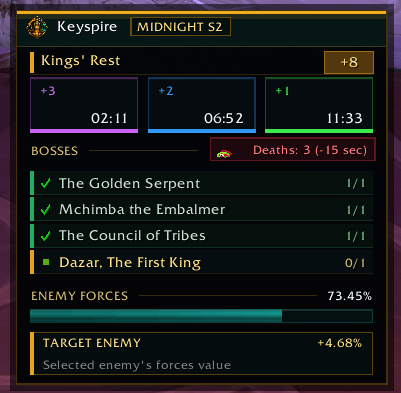
A clean Mythic+ progress tracker with +1/+2/+3 timer thresholds, boss status, death penalties, enemy forces, and selected-enemy forces value
Keyspre.png
Description
Keyspire
Keyspire is a clean and focused Mythic+ progress tracker designed to keep the most important information about your key visible in one compact interface.
Instead of spreading timers, boss progress, deaths, and enemy forces across multiple UI elements, Keyspire brings them together into a single readable Mythic+ panel.
Key Features
+1 / +2 / +3 Timer Thresholds
See exactly where your run stands against the different Mythic+ completion thresholds.
Keyspire displays the remaining timing targets for:
-
+3
-
+2
-
+1
This makes it easy to understand your current pace at a glance.
Boss Progress
Track every required boss directly inside the Keyspire panel.
Boss states are displayed clearly so you can immediately see:
-
Completed bosses
-
Remaining bosses
-
Current dungeon progress
Death Tracking
Keyspire tracks party deaths during the run and displays the associated Mythic+ timer penalty.
This gives you a clear view of how deaths are affecting the key.
Enemy Forces
Monitor your current Enemy Forces completion with:
-
A clean progress bar
-
Exact percentage
-
Easy-to-read run progress
Selected Enemy Forces Value
Select an enemy and Keyspire can display that enemy's contribution toward the dungeon's Enemy Forces requirement where supported.
This is especially useful for:
-
Route planning
-
Adjusting pulls
-
Recovering missing count
-
Understanding individual mob value
Compact Mythic+ Interface
Keyspire is designed to stay readable without taking over your screen.
The interface focuses only on information that matters during a key:
-
Dungeon timer
-
+1 / +2 / +3 thresholds
-
Boss completion
-
Death penalties
-
Enemy Forces
-
Selected enemy forces value
Built for Mythic+
Keyspire is intentionally focused on Mythic+ dungeon progression.
It is not a damage meter, rotation helper, or full UI replacement.
Its purpose is simple:
Know your pace.
Know your bosses.
Know your forces.
Finish the key.
Lightweight by Design
Keyspire is built to provide useful dungeon information without unnecessary UI clutter or excessive configuration.
The goal is to install it, position it where you want, and start running keys.
Keyspire — See the key. Control the pace.
Keyspire Team