KeyRoulette
- By
An automated tool to sync, collect, and randomly draw Mythic+ keystones for your party. /kr
Description
Whose key are we running?
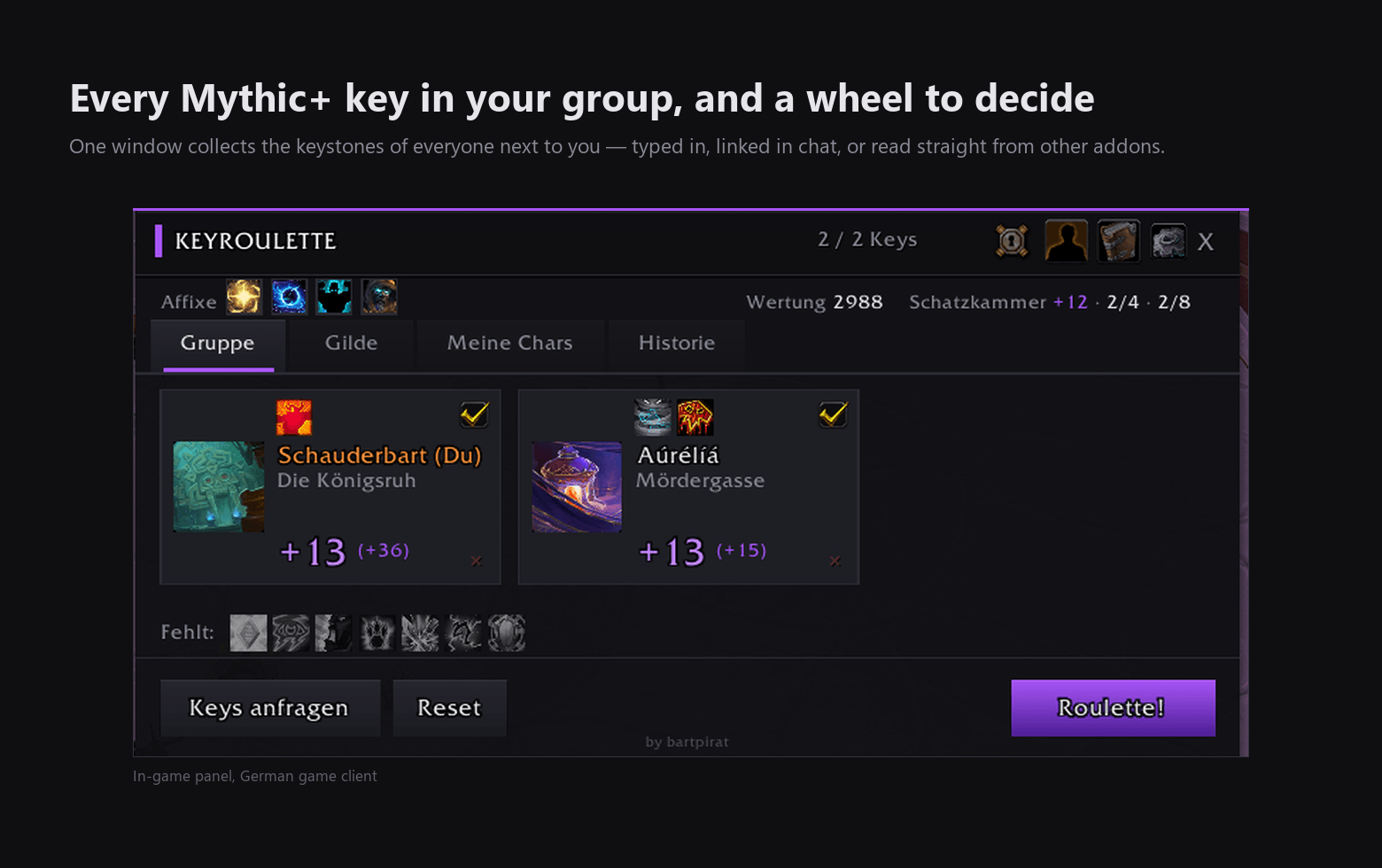
KeyRoulette collects the Mythic+ keystones around you — your group, your guild, your own alts — shows what each one would add to your score, and spins a wheel to decide.
The wheel
Click Roulette! and you get a winner. Keys arrive on their own from other KeyRoulette users, from LibOpenRaid and LibKeystone, and from links posted in chat; whatever is missing you can type in. Three roll modes: fair, favour low keys, or favour the biggest rating gain for the group.
The guild board
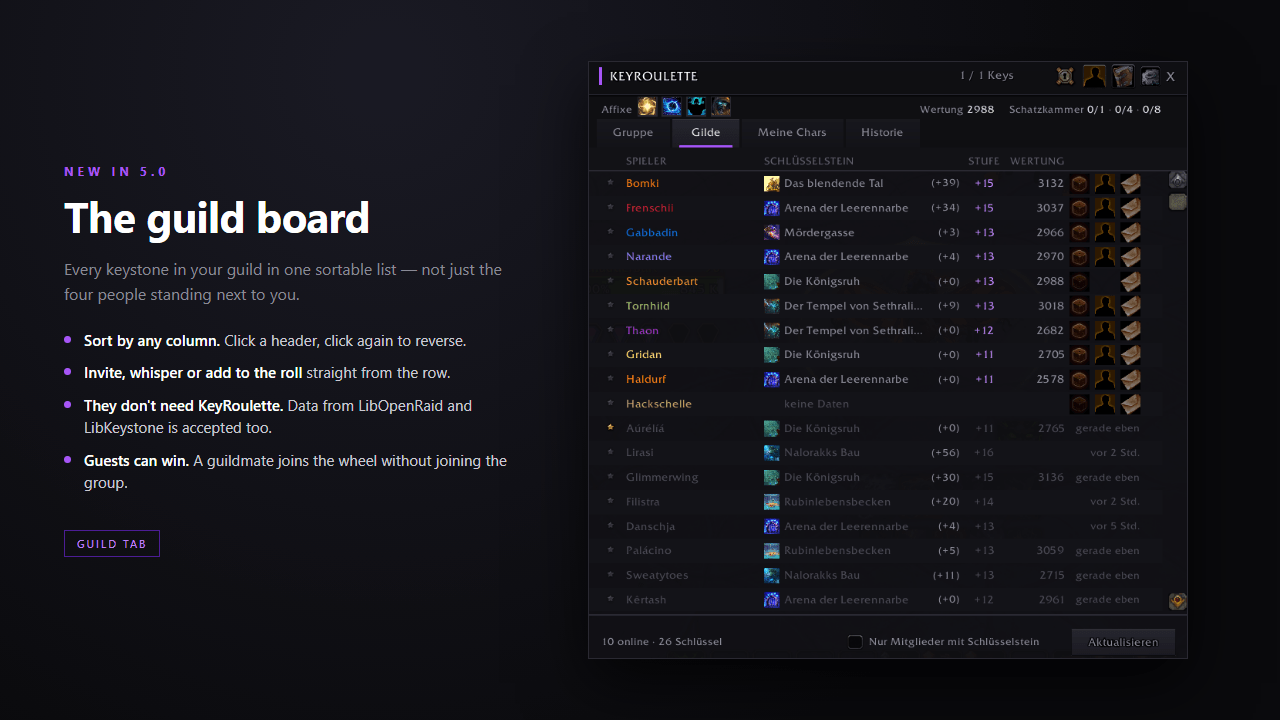
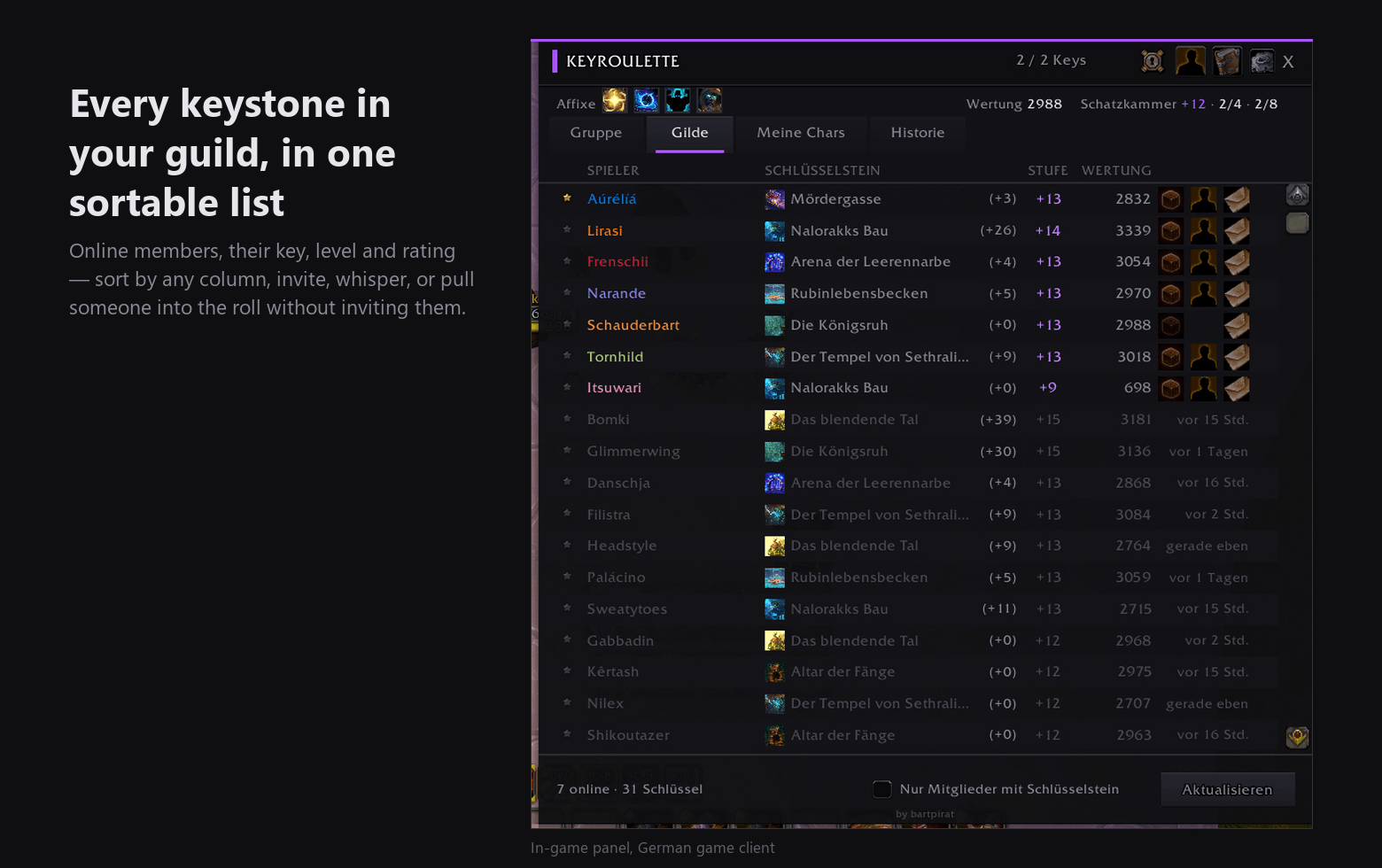
A second tab lists the keystone of everyone online in your guild — key, level, rating, and how long ago it was seen. Sort by any column, invite, whisper, or pull someone into the roll without inviting them at all.
What each key is worth
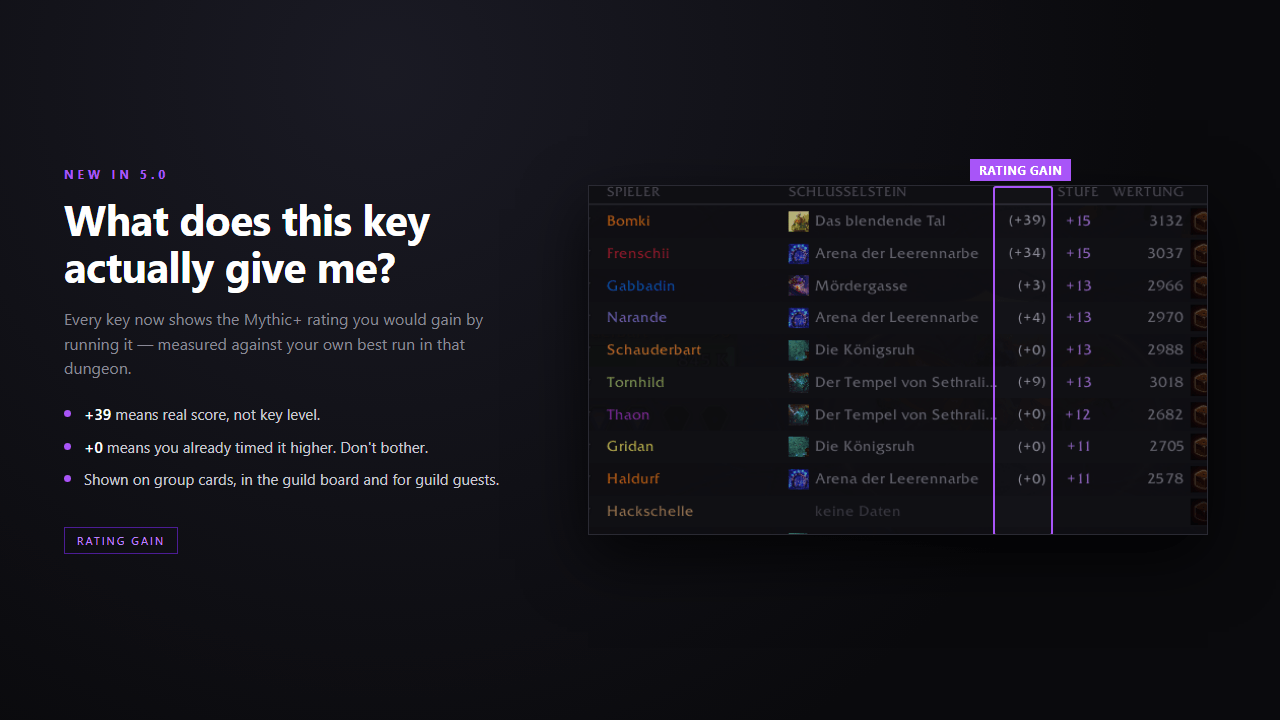
Every key shows the rating you would gain by running it, measured against your own best run in that dungeon. Already timed it higher? +0. Never touched it? The full value.
Raid buffs at a glance
Each group card shows the raid buffs its class brings, with the real spell tooltip on hover. Below the grid stands what nobody covers yet — from Stamina and Intellect to Bloodlust and a combat resurrection.
Alts and history
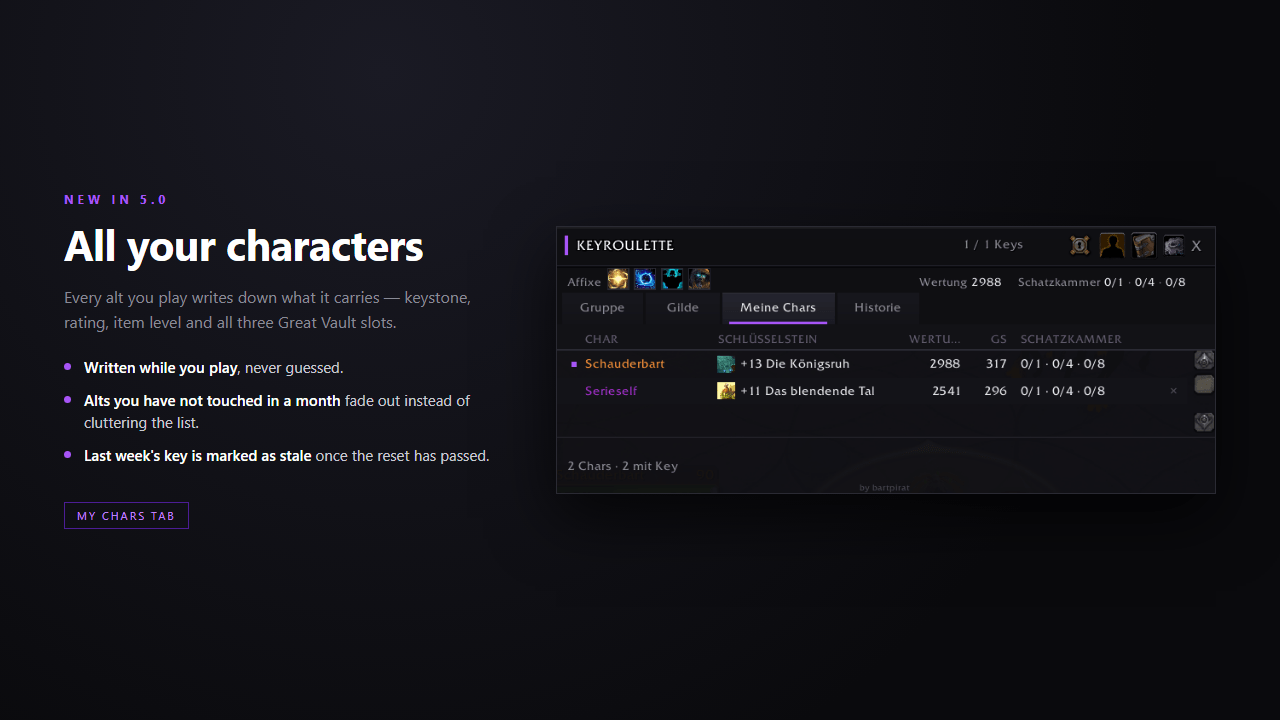
"My Chars" remembers every character you play: keystone, rating, item level and all three Great Vault slots. "History" keeps the last 50 rolls.
Commands
| Command | What it does |
|---|---|
/kr |
Open or close the window |
/kr guild |
Open the guild board |
/kr share |
Post your own keystone to chat |
/kr sync |
Ask the group for keys again |
/kr help |
List every command |
Good to know
- Works in raids and Group Finder parties, using your own subgroup.
- Inside a raid other addons share no keystones, so those have to be linked in chat or entered by hand. The window says so instead of showing empty cards.
- Five languages: English, Deutsch, Français, Español, Русский.
- No dependencies to install. Libraries ship with the addon.
New in 5.1
Raid buffs on every card, window size in the settings panel, larger and more legible cards, a result window whose dungeon icon is a teleport button, and a guild whisper that writes the question for you. The full list is in the changelog.
Questions, bugs, ideas
There is a Discord for KeyRoulette: discord.gg/GRv47HW2gh. Ask there if something behaves oddly, or say what you would like the addon to do next. The comments on this page work too. Either way, the output of /kr status helps a lot with a bug report.
Wessen Schlüssel laufen wir?
KeyRoulette sammelt die Mythisch+-Schlüssel um dich herum — deine Gruppe, deine Gilde, deine eigenen Twinks —, zeigt, was jeder davon deiner Wertung bringen würde, und lost mit einem Rad aus.
Das Rad
Ein Klick auf Roulette! und du hast einen Gewinner. Die Schlüssel kommen von selbst: von anderen KeyRoulette-Nutzern, über LibOpenRaid und LibKeystone und aus Links im Chat; was fehlt, tippst du ein. Drei Modi: fair, niedrige Schlüssel bevorzugt, oder der größte Wertungs-Zugewinn für die Gruppe.
Das Gildenbrett
Ein zweiter Tab listet den Schlüssel jedes Gildenmitglieds, das online ist — Schlüssel, Stufe, Wertung und wie lange der Eintrag her ist. Nach jeder Spalte sortierbar, mit Einladen, Flüstern und der Möglichkeit, jemanden mitlosen zu lassen, ohne ihn einzuladen.
Was ein Schlüssel wert ist
An jedem Schlüssel steht die Wertung, die dir ein Lauf bringen würde, gerechnet gegen deinen eigenen Bestwert in diesem Dungeon. Schon höher gelaufen? +0. Nie angefasst? Der volle Wert.
Raidbuffs auf einen Blick
Jede Gruppenkarte zeigt die Raidbuffs ihrer Klasse, mit dem echten Zaubertooltip, wenn du mit der Maus darauf zeigst. Unter den Karten steht, was der Gruppe noch fehlt — von Ausdauer und Intelligenz bis Kampfrausch und Kampfwiederbelebung.
Twinks und Historie
„Meine Chars" merkt sich jeden Charakter, den du spielst: Schlüssel, Wertung, Gegenstandsstufe und alle drei Fächer der Großen Schatzkammer. „Historie" behält die letzten 50 Auslosungen.
Befehle
| Befehl | Was er tut |
|---|---|
/kr |
Fenster öffnen oder schließen |
/kr guild |
Gildenbrett öffnen |
/kr share |
Eigenen Schlüssel in den Chat schreiben |
/kr sync |
Die Gruppe erneut nach Schlüsseln fragen |
/kr help |
Alle Befehle auflisten |
Gut zu wissen
- Läuft im Raid und in Gruppensucher-Gruppen, mit deiner eigenen Untergruppe.
- Im Raid teilen andere Addons keine Schlüssel; die müssen im Chat verlinkt oder von Hand eingetragen werden. Das Fenster sagt das, statt leere Karten zu zeigen.
- Fünf Sprachen: English, Deutsch, Français, Español, Русский.
- Nichts zusätzlich zu installieren. Die Bibliotheken liegen bei.
Neu in 5.1
Raidbuffs auf jeder Karte, die Fenstergröße im Einstellungsmenü, größere und besser lesbare Karten, ein Ergebnisfenster, dessen Dungeon-Symbol ein Teleport-Knopf ist, und ein Flüster-Knopf im Gildenbrett, der die Frage schon vortippt. Die vollständige Liste steht im Changelog.
Fragen, Fehler, Ideen
Für KeyRoulette gibt es einen Discord: discord.gg/GRv47HW2gh. Frag dort, wenn sich etwas seltsam verhält, oder sag, was das Addon als Nächstes können soll. Die Kommentare auf dieser Seite gehen genauso. In beiden Fällen hilft die Ausgabe von /kr status bei einem Fehlerbericht sehr.
KeyRoulette Team