keyradar-auto-refreshing-m-group-finder-in-a-transparent-v0-zltwjng06wbh1.webp
Description
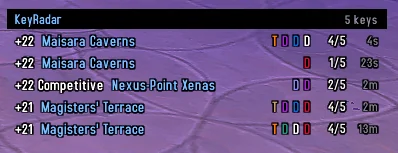
Tired of spamming the refresh button while looking for keys? KeyRadar re-runs your M+ search automatically (piggybacking on your normal clicks/keypresses, since Blizzard hardware-locks the search API) and shows the results in a minimal, fully transparent list you can park anywhere on screen while you do other in-game activities.
Slash commands
| Command | Effect |
|---|---|
/kr | Toggle the key list on or off. |
/kr config | Open the settings panel (same as right-clicking the KeyRadar title bar). Configure background/header color and opacity, font face and size, refresh interval, maximum rows, minimum Mythic+ rating, and position lock. |
/kr on / /kr off | Enable or disable auto-refresh without closing the list. |
/kr interval N | Set the minimum refresh interval in seconds. Minimum: 3. Default: 8. |
/kr rating N | Set the minimum Mythic+ rating filter applied to all searches. |
/kr rows N | Set the maximum number of displayed rows (4–25). |
/kr lock | Toggle position lock. When unlocked, drag the KeyRadar title bar to move the list. |
/kr reset | Reset all settings and the list position to their defaults. |
KeyRadar Team