KeylzResourcesDK
- By
KeylzResourcesDK is a minimalist, Death Knight–only resource addon that replaces the default rune orbs with clean bar segments and a matching runic power bar for Midnight, without using the personal resource manager.
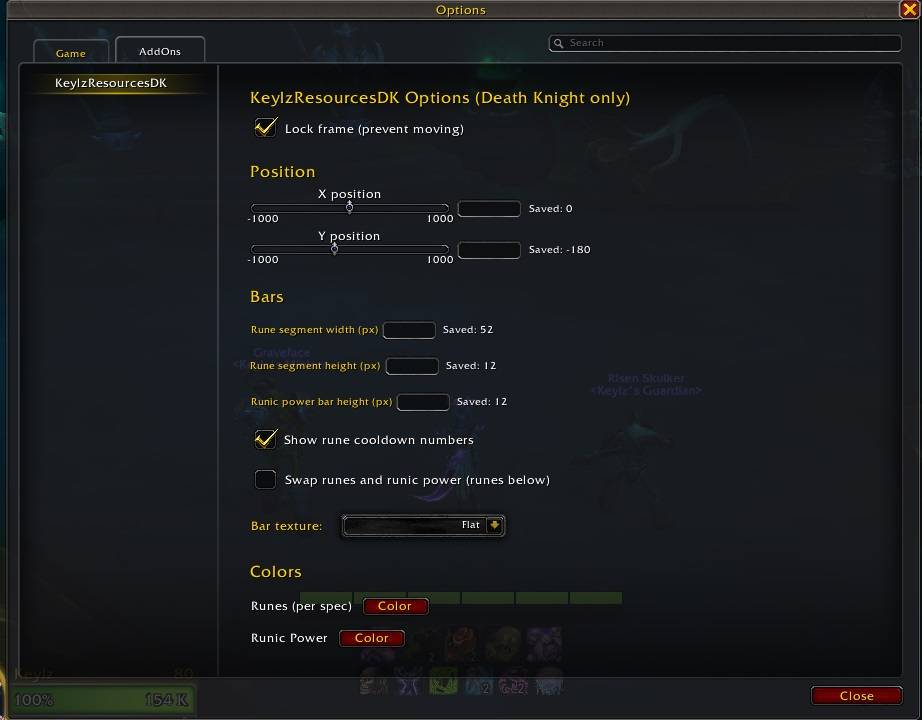
addonoptions.jpg
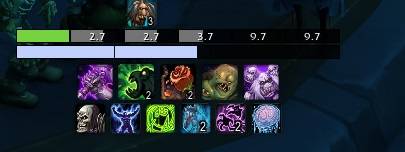
runestimeleft.jpg
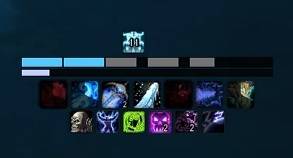
runes.jpg
Description
KeylzResourcesDK
KeylzResourcesDK is a lightweight, Death Knight–only resource bar addon that replaces Blizzard’s default rune UI with a clean, customizable bar setup. Brainstormed and tested by Keylz-Blackrock [EU] and Aryh-Sargeras [US]
Yes, i know that RP isn't shown currently. It's a secret value. This is not a reskin for personal resource manager, so we do NOT have any chance to display it. For Frost and Unholy I added ticks at the "common rp costs". (as written in the description)
For any improvement/wishes, you can message me on Discord (aerosha) or Battle.net (Keylz#21751)
Features
🩸 DK-only
- Loads only on Death Knights, no bloat for other classes.
- Automatically hides Blizzard’s default rune frame and keeps it hidden.
🔢 Runes Bar
- Horizontal rune bar with smooth “fill” animation while runes recharge.
- Runes are sorted so the most filled runes are always leftmost.
- Adjustable: Rune width (px) and Rune height (px)
💧 Runic Power Bar
- Separate runic power bar aligned with runes width.
- Option to swap positions: Runes on top / RP below (default) and vice versa
🎯 Spec-based tick marks
- Tick markers on the runic power bar based on your spec:
- Frost: 35% and 70%
- Unholy: 30%, 60%, and 90%
🎨 Per-spec Rune Colors
- Each spec can have its own rune color, with sensible defaults:
- Blood:
#d92140 - Frost:
#50c9ff - Unholy:
#75d33e - Change colors per spec via the in-game color picker –> saved separately for each spec.
📏 Pixel-perfect positioning
- Move the entire frame using: X / Y sliders (range: -1000 to 1000) or numeric input boxes for exact values.
- Frames are draggable with the mouse (unless locked).
- Current stored coordinates are always shown as: Saved: <X> / Saved: <Y>
🧱 Bar appearance
- Choose from multiple bar textures (Default / Raid / Flat).
- Simple black background and thin border for a clean minimalist look.
- Sections in the options panel:
- Position – X/Y sliders, numeric inputs, saved coordinate display.
- Bars – rune segment width/height, runic power bar height, swap bars, textures.
- Colors – per-spec rune color and runic power bar color.
🔒 Lock mode
- Lock/unlock the frame from the options so you don’t accidentally drag it mid-fight.
- Configuration
- Open the options via:
- Slash command:
/keylzdkor/krdk - Or through the standard Game Menu → Options → AddOns → KeylzResourcesDK.
Note: This addon and parts of its code were created with the help of an AI assistant (ChatGPT).
KeylzResourcesDK Team