Keyborg Companion
- By
A personal note
I created Keyborg Companion because I was missing a WoW addon that matched the layout of my Azeron Cyborg. I originally built it for my own use, to make my setup feel clearer and easier to use. I’m sharing it in the hope that it helps other Azeron players who have been looking for something similar.
Compatibility
Keyborg Companion supports World of Warcraft Retail and WoW Forever. Both versions are included in the same addon package, with game-specific features handled where needed.
Customizable themes: Choose from Alliance, Horde and Fantasy-inspired interface styles to match your character and personal preferences.
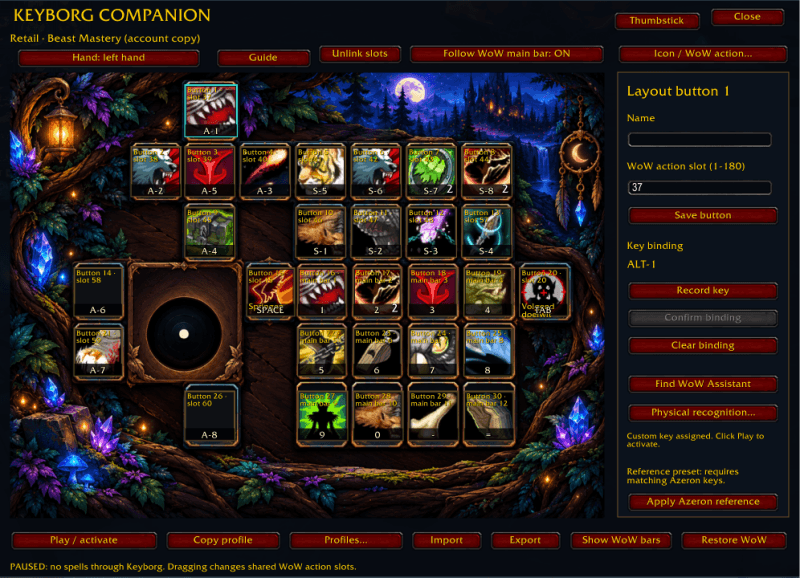
Keyborg Companion brings your Azeron Cyborg II layout into World of Warcraft. Arrange actions on a visual keypad, connect them to your physical keys, and switch to a transparent play view that keeps the game visible.
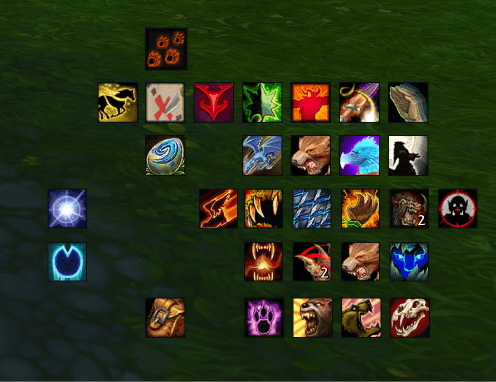
(in game example)
Main features
- Left- and right-hand layouts with individually selectable action buttons.
- Visual key mapping with key recording and a guided physical-button learning process.
- Spells and collections: drag spells, items, macros, mounts, toys and companion pets onto action buttons.
- Spell flyouts: open and select actions from menus such as Call Pet and Pet Utility.
- Local profiles: create, copy, name, select, clear and delete profiles.
- Account profile library: save a layout with its actions and copy available abilities to another character of the same class. Review replacements and missing abilities before confirming.
- Form and Skyriding support: designated main-bar buttons follow WoW’s active action bar while higher modifier buttons remain fixed.
- Clean play view: transparent background, square icons, pressed feedback, cooldown indicators and available charge counts.
- Custom icons and utilities: configure actions such as Jump, Next Target, Autorun, World Map and All Bags.
- Thumbstick setup: enable native WoW gamepad movement and inspect live controller readings.
- Built-in English guide covering setup, profiles, account copying, backups and troubleshooting.
Getting started
Type /keyborg to open setup or /keyborg help for the guide. Keep your intended Azeron profile active, configure the matching key bindings, then click Play / activate. The addon starts paused after login or reload.
Important details
Your Azeron must already send suitable keyboard inputs. Keyborg Companion does not program its firmware, and the separate Windows application is not required.
Actions use real WoW action slots. Changes can affect ordinary action bars; account copying provides a review and action backup before replacements. Unavailable abilities are reported.
Export/Import shares profile settings. Account library copies available action contents between your own characters. For druids, save the source profile in each desired form to include its form bar.
Keyborg Companion does not automate combat rotations. WoW’s Single-Button Assistant remains responsible for its spell selection.
Interface artwork created with AI assistance.
Keyborg Companion Team