Keybind Canvas
- By
On-screen keyboard for your action bars: drag an action onto a key and its hotkey appears on the real bar.
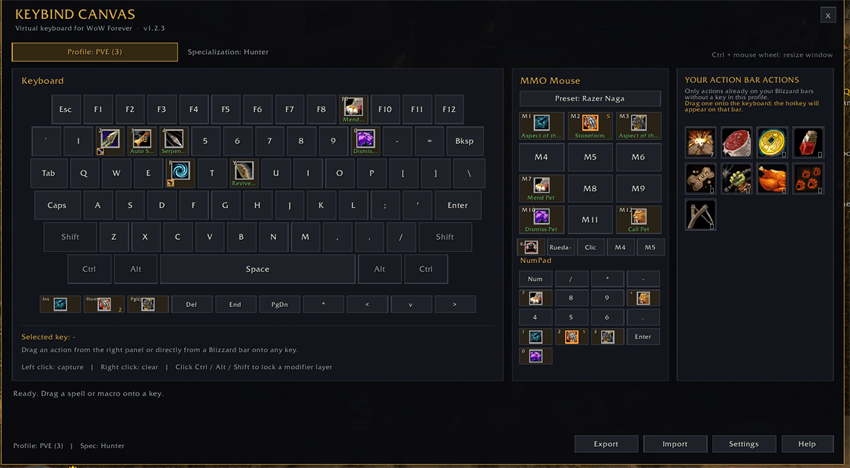
Drag an action from the right panel onto a key and the hotkey appears on the Blizzard action bar.
Description
Keybind Canvas
On-screen keyboard for World of Warcraft: Forever (1.60.1, Interface 16001).
Keybind Canvas shows your keybinds as a keyboard on screen. Drag an action from your Blizzard action bars onto a key and the hotkey is written to the real button, so it appears on the bar exactly where you expect it. No other addons or libraries required.
Why another binding addon?
Blizzard's binding UI tells you which key is bound, not what the key does in your layout, and it has no overview of modifier combinations. Keybind Canvas shows the whole keyboard, keeps one icon per combination (Q, CTRL-Q, SHIFT-Q), and uses colour-coded frames so you can read your layout at a glance.
Features
- Full on-screen keyboard: QWERTY, F1-F12, navigation keys, modifiers and NumPad.
- One icon per binding:
Q,CTRL-Q,ALT-Q,SHIFT-Qand combinations are separate cells. - Sticky modifier layers: click Ctrl, Alt or Shift to work on that layer only, with the whole keyboard tinted in the modifier colour.
- Colour language: Ctrl blue, Alt green, Shift orange, Ctrl+Shift cyan, Alt+Ctrl purple, Alt+Shift yellow, all three pink.
- Native hotkeys: bindings target
ACTIONBUTTONn/MULTIACTIONBARnBUTTONm, so Blizzard draws the key on the bar and it follows the active page. - Action bar panel: lists only real actions on your bars that do not have a key yet, without empty slots or duplicates. Drag one onto the keyboard.
- Mouse support: wheel up/down, middle click and
BUTTON4/BUTTON5, plus 12 cells for MMO mice. - Mouse presets: Razer Naga, Corsair Scimitar, Logitech G600, number row and F1-F12 layouts.
- Profiles: PVE, PVP and leveling profiles, optional per-character and per-specialization selection. Auto-apply is off by default.
- Import / export: validated Base64 strings. Import never executes code.
- Combat aware: the window opens in combat, but changes are blocked until combat ends.
- Safe cleanup: clearing a key restores the binding it replaced.
- Minimap button: opens the window, drag to move it around the minimap.
- English and Spanish UI: follows the client locale.
How it works
- Type
/kbcto open the keyboard. - Drag an action from Your action bar actions onto a key.
- The hotkey appears on the matching Blizzard bar button.
- Right-click a key to clear its binding.
Only actions that are already on a Blizzard action bar can be bound. Dragging directly from the spellbook or the macro window is rejected on purpose: those bindings cannot be rendered by the bar button.
Commands
/kbc                     Open or close the window
/kbc profile <name>      Activate a profile
/kbc export              Export the active profile
/kbc import              Import a profile
/kbc apply               Reapply the active profile
/kbc minimap             Show or hide the minimap button
/kbc restore             Restore Blizzard defaults (asks for confirmation)
/kbc release             Release a stuck keyboard capture
Requirements
- World of Warcraft: Forever 1.60.1 (
## Interface: 16001). - No dependencies.
Notes and limits
- Left and right click stay reserved for the interface and cannot be bound.
- Legacy spell and macro bindings created by older versions keep working, but new ones cannot be created from the spellbook or macro window.
/kbc restoreresets all game bindings to Blizzard defaults and empties the active profile. Export the profile first if you want a copy.
Español
Teclado virtual para World of Warcraft: Forever. Arrastra una acción de tus barras de Blizzard a una tecla y el atajo se escribe en el botón real, así que aparece en la barra. Interfaz en inglés y español según el idioma del cliente.
Comandos: /kbc, /kbc profile, /kbc export, /kbc import, /kbc restore, /kbc release.
Keybind Canvas Team