
KaioHelper
- By
An ultra-light combat assistant that uses Blizzard's native API to glow your next recommended spell right on your action bar
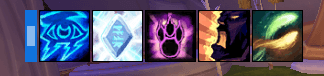
Buff reminder bar.png
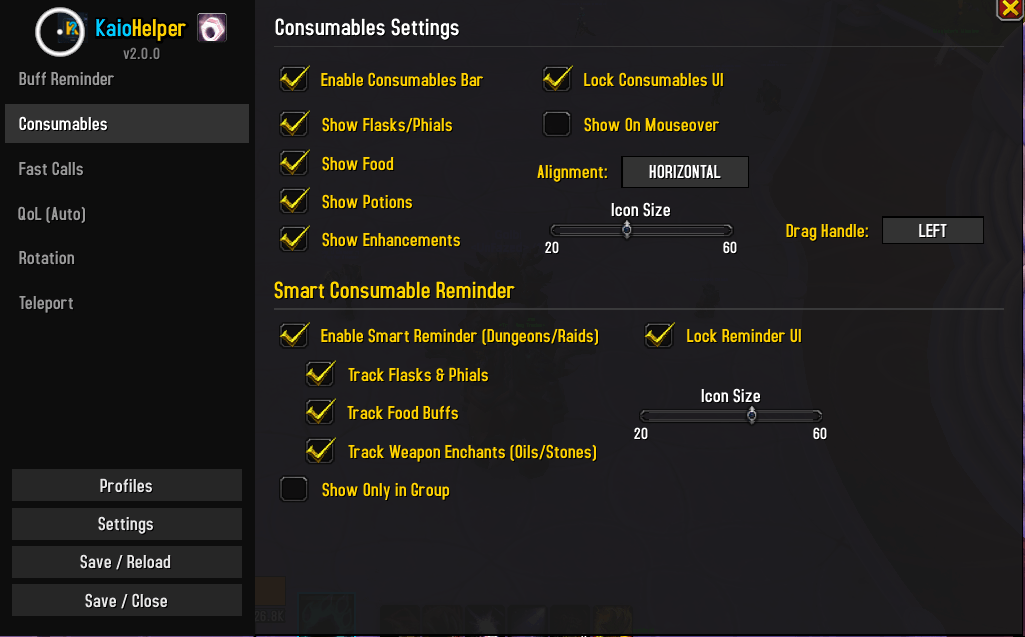
Consummable.png
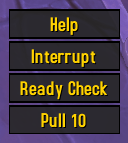
Fast calls On Screen.png

Consummable bar.png
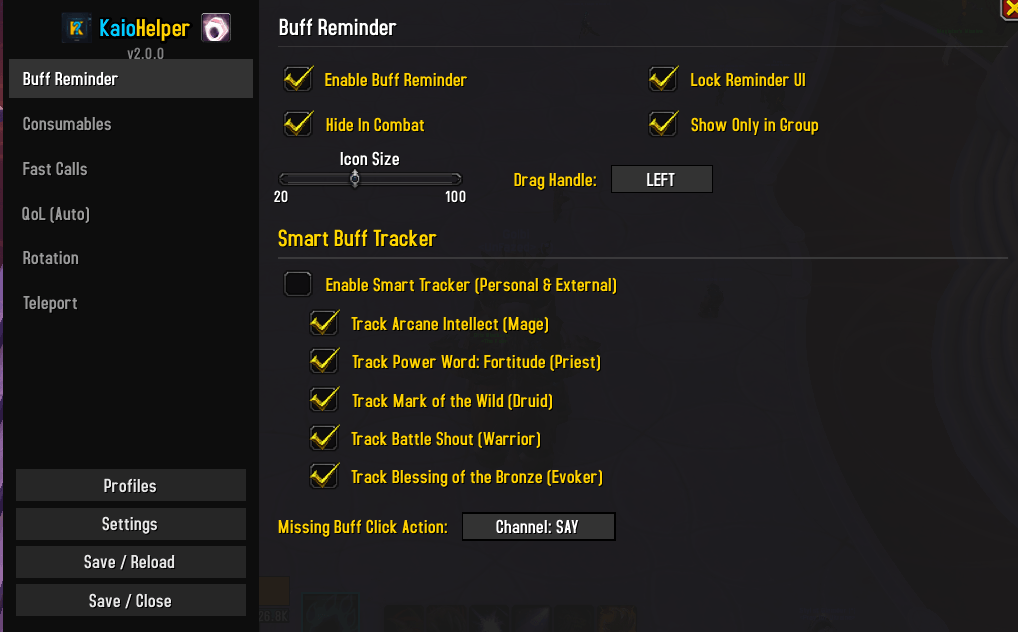
BuffReminer.png
Description
# KaioHelper - Your Ultimate WoW Assistant!
Welcome to **KaioHelper**, an addon designed by a player, for players. If you are looking for an all-in-one tool that is lightweight, aesthetically pleasing, and incredibly practical to simplify your life in dungeons, raids, or even during your solo adventures, you are in the right place!
No more cluttered interfaces and dozens of heavy addons that slow down your game. KaioHelper brings together the most useful features in a single modular addon, featuring a modern and minimalist design.
---
## 🌟 Why choose KaioHelper? (The Advantages)
* **Ultra Lightweight & Modular**: The core of the addon has been built from scratch (v2.0) to be extremely performant. Need only one feature? Disable the rest! Only active modules consume system resources.
* **Modern "Flat" Design**: No more outdated pixelated Blizzard borders. The configuration interface (`/kaio`) and all on-screen elements use a sleek, flat, and dark design.
* **Plug & Play**: The addon comes pre-configured with excellent default options. Install it, and it works immediately without spending hours navigating through menus.
* **Highly Customizable**: Almost all visual elements can be resized, moved anywhere on the screen, shown or hidden in combat, and fully customized to your liking.
---
## 🚀 Features and Modules (What it does for you)
### 1. ⚔️ Rotation Module (Glow / Suggestion)
Never lose track of your DPS rotation again! This module intelligently highlights the buttons on your action bars to suggest the next spell you should cast.
* Native support for external engines (such as MaxDps).
* Automatically scans your action bars (including ElvUI, Bartender4, etc.) to make the right spells glow at the exact right moment.
### 2. 🧪 Consumables Tracker (Smart Tracker)
Do you often forget to eat food or drink your flask before a boss? Not anymore.
* Displays an elegant icon bar for your Flasks, Food, Runes, and Potions.
* **Smart Mode**: Only reminds you of your missing consumables at crucial moments (when in a group, or during a Ready Check).
### 3. 🛡️ Buff Reminder
Check at a glance if you (or your group members) have all essential buffs active.
* Tracks personal buffs and group buffs (Intellect, Stamina, Attack Power, etc.).
* Clickable and movable icons. It automatically disappears when you have everything you need!
### 4. 📢 Fast Calls
Communicate instantly with your group without typing a single word in the chat!
* Buttons (or keybinds and mouse buttons) to quickly announce: **"I need a Defensive CD!"** or **"Interrupt NOW!"**.
* Displays a beautiful "Chat Bubble" in the center of the screen with a smooth animation to catch your attention, and sends the message into the party/raid chat.
* Built-in buttons to trigger a *Ready Check* and a *Pull Timer* (`/pull 10`) with a single click.
### 5. 🌍 Teleportation & Quality of Life Module (Auto QoL)
* Simplified management of your teleportation items, toys, and cloaks for fast travel across Azeroth.
* Small comfort automations to streamline your gaming experience.
---
## 🛠️ How to use it? (Getting Started)
1. **Open the Menu**: Simply type `/kaio` in your chat to open the modern options panel.
2. **Move the Elements**:
- In the `/kaio` menu, navigate to any tab (for example, *Buff Reminder* or *Fast Calls*).
- Uncheck the **"Lock UI"** box.
- A drag handle ("Drag me") or a dummy icon will appear. Click and drag it wherever you want on the screen!
- Re-check **"Lock UI"** to lock the position.
3. **Keybinds**: In the *Fast Calls* tab, click the "Bind Key" button, then press any key on your keyboard or mouse button (such as Scroll Wheel, Mouse Button 4, etc.) to bind your quick announcements!
---
## 🔄 Recent Updates (v2.0)
The addon has been **completely rewritten** for this 2.0 version!
* **New Look**: The entire interface has been redesigned with a modern and unified "Flat" style. The old Blizzard interface elements have been removed.
* **Major Fixes**: Optimization of the keybinding system (which now supports mouse buttons and the scroll wheel) and overall stability improvements.
* **Ergonomics**: Added a highly requested close (X) button to easily exit the configuration panel, improved window dragging, and added ghost ("dummy") interfaces so you can configure your UI even when playing solo.
---
*A huge thank you to everyone using KaioHelper! If you encounter a bug or have an awesome suggestion, please don't hesitate to leave a comment.*
KaioHelper Team
