Enhanced Version of the Original by "wealdly" - an addon which bridges WoW's Assisted Combat API with your action bars, displaying recommended spells alongside their actual keybinds/hotkeys in a customizable queue.
I did some enhancements with the help of AI (ChatGPT, Gemini and DeepSeek) because I am a complete noob and just wanted some changes for myself. I would love to hear your feedback on what doesn't work, what works well, or which changes you would like to see.
What's New:
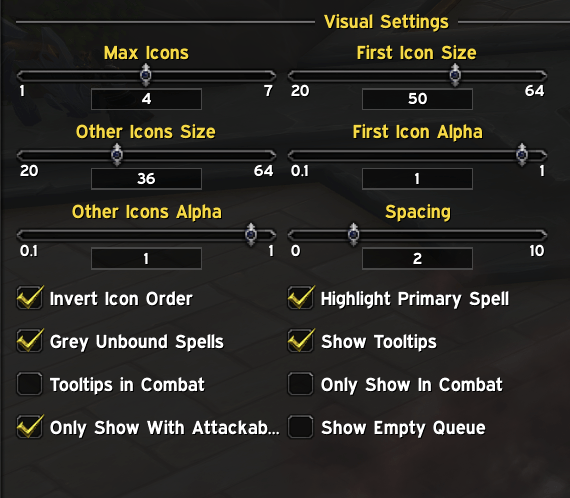
- Inverted Mode (Icons are mirrored)
- Some Alpha Settings (Icon transparency)
- More Highlight Options on the Main Icon
- Slider for Moving the Main Icon a bit away from the other ones
- Hide the Keybinds completely
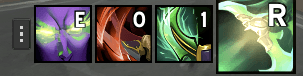
JustAC-Enhanced is a World of Warcraft addon that displays a queue of assisted combat abilities with their hotkeys.
What It Does
- Shows a visual queue of spells recommended by WoW's built-in Assisted Combat system
- Displays keybinds for each spell directly on the icons
- Automatically scans your action bars to find where spells are bound
- Provides customizable highlighting for your primary spell
Key Features
- Smart Hotkey Detection: Automatically finds which keys your spells are bound to
- Customizable Display: Adjust icon sizes, spacing, transparency, and highlight effects
- Blacklist System: Hide specific spells from appearing in the queue
- Manual Hotkey Overrides: Set custom hotkey text when automatic detection fails
- Combat Awareness: Options to only show during combat or when you have a target
- Drag & Drop Interface: Easily reposition the spell queue
Quick Commands
/jacor/justac- Open configuration/jac toggle- Pause/resume the display/jac debug- Toggle debug mode
Setup
- Make sure Assisted Combat is enabled in WoW's settings:
/console assistedMode 1/console assistedCombatHighlight 1/reload
The addon works by scanning your action bars and displaying the spells that WoW's Assisted Combat system recommends, complete with the actual keybinds you've assigned to them.
The Just Assisted Combat Enhanced Team