Description
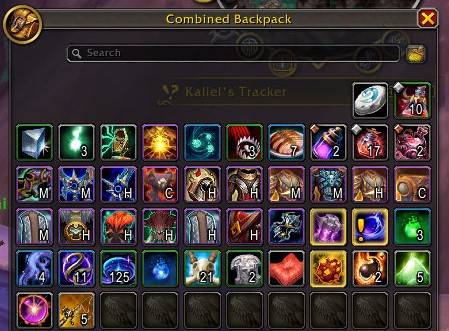
ItemTier adds a compact, color-coded upgrade-track badge directly onto your bag item buttons — so you can instantly tell which gear is worth keeping, upgrading, or vendoring without ever opening a tooltip.

What does it do?
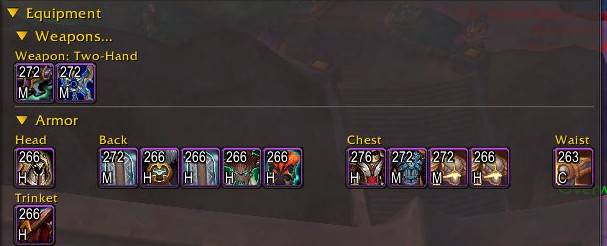
Every upgradeable item in your bags will show a small label in a corner of its icon — for example "M" for Myth or "H" for Hero. The label is color-coded by track, so at a glance you can see:
- Gray → Explorer
- Green → Adventurer
- Blue → Veteran
- Purple → Champion
- Orange → Hero
- Gold → Myth
- Red shades → PvP tracks (Aspirant, Combatant, Challenger, Rival, Duelist, Gladiator)
No more hovering over every piece in your bags after a dungeon run or raid — just open your bags and the track of each item is right there on the icon.
Features
- Baganator corner widget — integrates via the official Baganator API. Enable it under Baganator → Icon Settings → Icon Corners and place the badge wherever you like.
- Full PvE and PvP track coverage — Explorer through Myth, plus all PvP rating tracks.
- Three display modes:
- Short — single letter (M, H, C …)
- Abbrev — short word (Myth, Hero, Chmp …)
- Full — full track name (Myth, Hero, Champion …)
- Color-coded labels — each track has a distinct color; can be toggled off for a cleaner look.
- Reliable track detection — uses three methods in priority order: the official C_ItemUpgrade API, tooltip text scanning, and a bonus-ID lookup table as a last resort.
- Lightweight — results are cached per item link and cleared automatically on bag updates.
- In-game options panel — under Options → AddOns → ItemTier, no external config needed.
Slash Commands
/itemtier Open options panel
/itemtier enable | disable Toggle the addon on/off
/itemtier mode short|abbrev|full Change display mode
/itemtier colors on|off Toggle color-coded labels
/itemtier status Print current settings
/itemtier cache clear Wipe the item cache
Example scenario
You finish a Mythic+ dungeon and loot three items. Open Baganator — each new item already shows its track badge on the icon. You see two "H" (Hero) in orange and one "C" (Champion) in purple. You
immediately know which pieces are upgrades over your current gear track without reading a single tooltip.
For more information see https://github.com/fl-99/wow-addon-itemtier/blob/master/README.md
The ItemTier Team