ItemPeek
- By
Light wieght 3d Model viewer that shows a preview of the model your mouse is above.
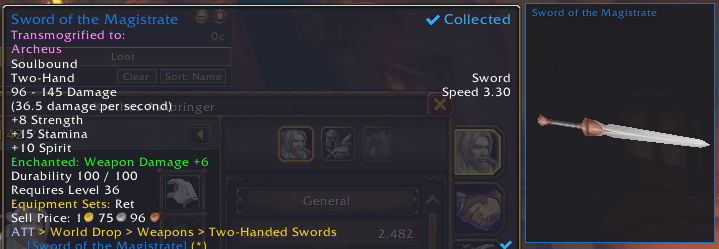
itempeek.PNG
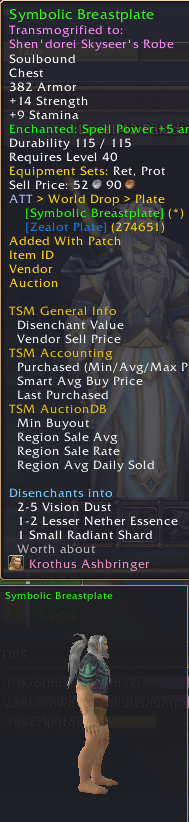
itempeek1.PNG
Description
# ItemPeek
**A minimal, lightweight 3D item preview. Hover a weapon or piece of armor and a small rotating model appears beside the tooltip. That's it.**
No extra windows, no compare panes, no setup. One file, no libraries, nothing running when you're not hovering an item.
## Why ItemPeek
- **One window.** A single small preview, shared by normal tooltips and chat links.
- **Never covers your bags.** It sits beside the tooltip on whichever side keeps your bag, character sheet and comparison tooltips clear. Near the screen edge it slides along the tooltip instead of jumping around.
- **Never gets in the way.** It can't be clicked, so it never blocks your mouse. It doesn't move, resize or restyle the game's tooltip, so it plays nicely with TSM, Auctionator, AllTheThings and UI suites.
- **Shows the right item.** It waits until the game has loaded the item before drawing it, so you don't see the wrong model or your own transmog by mistake.
- **Clear previews.** Weapons, shields and off-hands are shown on their own. Armor is shown on your bare character so only the new piece stands out (switchable).
- **Tiny.** One Lua file. Nothing to configure unless you want to.
## Commands
- `/peek` turns the preview on or off
- `/peek size s|m|l` sets small, medium or large
- `/peek undress` shows armor on your bare character, or over your current gear
- `/peek rotate` turns auto-rotation on or off (hold **Ctrl** to pause it)
- `/peek combat` hides the preview during combat
## Good to know
- Works on item tooltips anywhere: bags, bank, character sheet, vendors, loot, auction house and chat links.
- If you used another 3D preview addon before, turn it off so you don't get two previews.
Found a bug or have an idea? Leave a comment, feedback is always welcome.
ItemPeek Team