


IsThisGearGood
- By
Tool tip that tells you if gear is an upgrade, what it sells for, and what it disenchants into.
Description
IsThisGearGood
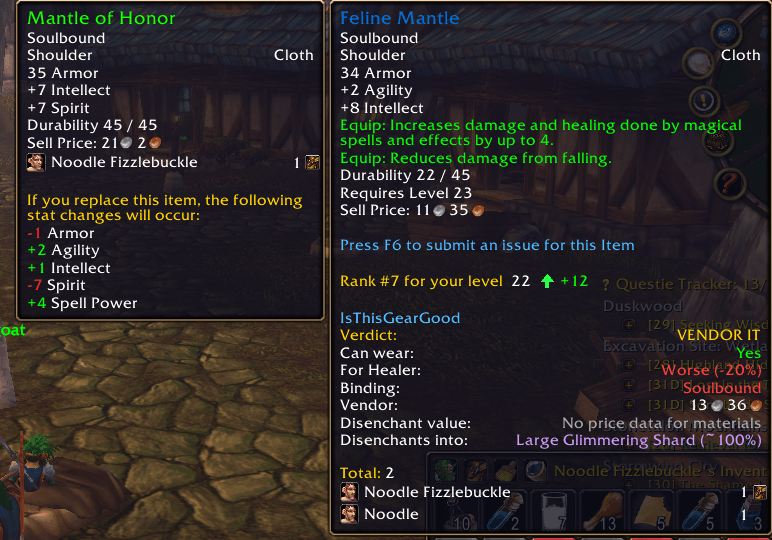
Hover over any piece of gear and get one clear answer: equip it, auction it, vendor it, or disenchant it.
Built for World of Warcraft: Forever.
The verdict
Every gear tooltip starts with a single recommendation:
- EQUIP IT when it's an upgrade for your class and spec
- SELL ON AUCTION HOUSE, VENDOR IT, or DISENCHANT IT when it isn't, whichever is worth the most after the auction house cut
- SEND TO [your alt] when one of your other characters could use it
Disenchanting is only suggested if your character is an enchanter.
What else the tooltip shows
- Can wear: Yes or No, with the reason (wrong armor type, level too low, wrong class).
- Upgrade check: Upgrade, Same, or Worse compared to what you have equipped, with a percentage. Stats are weighted for your class and spec, and "Equip:" bonuses like spell damage and healing are counted.
- Alt check: shows when the item is an upgrade for another of your characters on the same realm.
- Binding: Soulbound or not, and whether it binds when equipped.
- Auction price: the average from the last 12 hours of your own auction house browsing. Falls back to Auctionator's latest price if you have it installed.
- Vendor price: what a vendor will pay.
- Disenchant value: roughly what the materials are worth, plus the materials you are likely to get and their odds.
Works where you need it
- Bags, vendors, and the auction house: hover any gear.
- Loot rolls: the Need/Greed window shows whether the item is an upgrade and what to roll.
- Quest rewards: the best reward for your spec is marked, or the one that sells for the most if none is an upgrade.
- Chat links: click an item link in chat for the same breakdown, or type
/itggand shift-click an item to print it to your chat window.
Settings
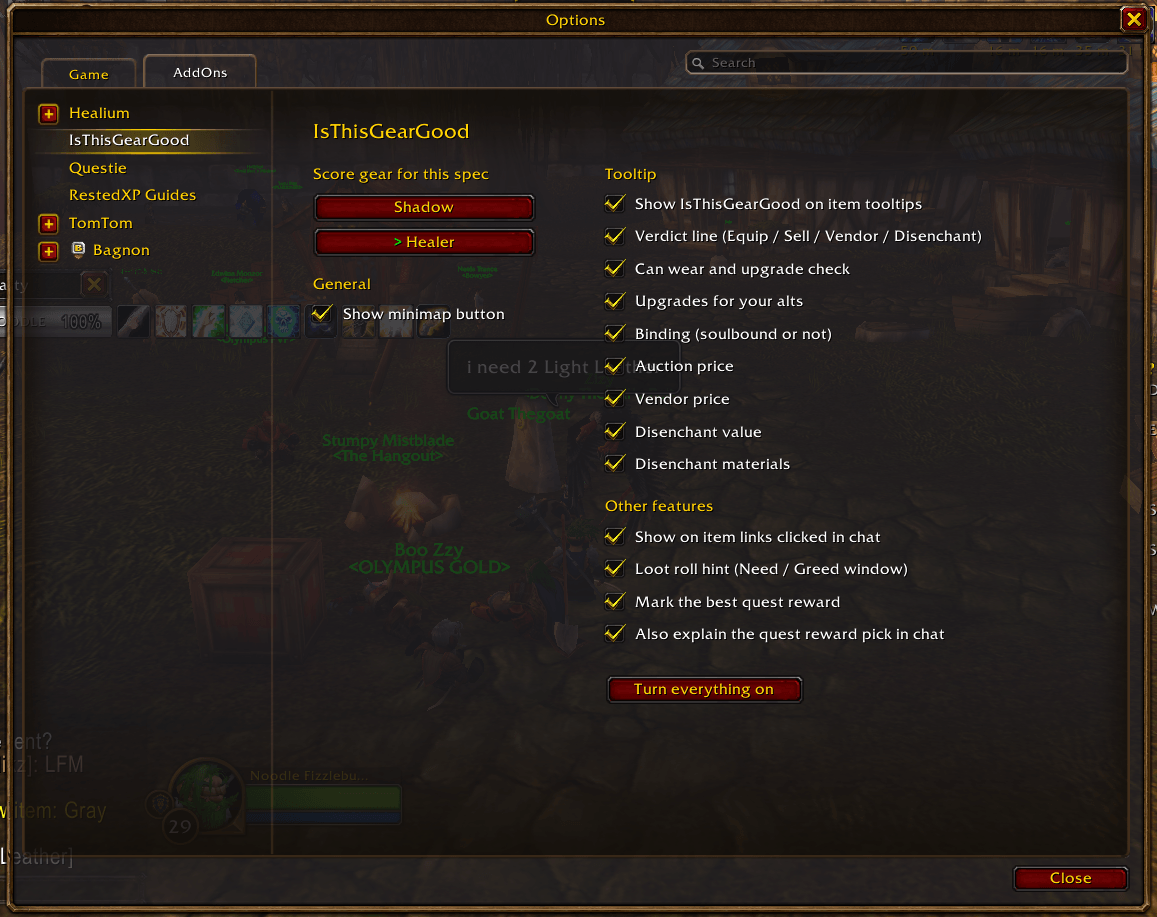
Click the minimap button, or go to Options > AddOns > IsThisGearGood, to:
- Pick the spec your gear is scored for
- Turn any tooltip line or feature on or off
- Hide the minimap button
The first time you log in on a character, a small window asks what spec you play.
Commands
/itggor/itgg optionsopens the settings page/itgg [item link]checks a linked item/itgg spec <name>changes spec from chat (example:/itgg spec healer)/itgg debugprints errors to chat, useful for bug reports
Good to know
- The upgrade check is a guide. It doesn't account for procs, set bonuses, or weapon speed.
- Auction prices and disenchant values only exist for items and materials you have seen on the auction house recently. Browse it now and then to keep them fresh.
- Disenchant results are estimates based on item level and quality.
- For the alt check, log in to each alt once so its gear is saved. It covers armor and jewelry.
- No setup needed. Auctionator is optional.
Feedback
Found a bug or think the stat weights for your class are off? Leave a comment with your class, spec, and the item.
IsThisGearGood Team
