Description
# isiLive
**A Mythic+ group helper for World of Warcraft.** One window that shows who has which key, how the group is doing, and what matters during a run.
- **For:** M+ players in pre-made groups and LFG runs
- **WoW version:** `12.0+` (Midnight) only
- **Current version:** `0.9.295`
- **Active season:** `midnight_s1` — 8 dungeons (Wing, MT, NPX, MC, AA, POS, SOT, SR)
---
## Feature highlights
- **Group Finder buff-rating hearts** — green heart markers in Blizzard LFG search results and applicant rows show which listings add useful, non-stacking class buffs for your current character.
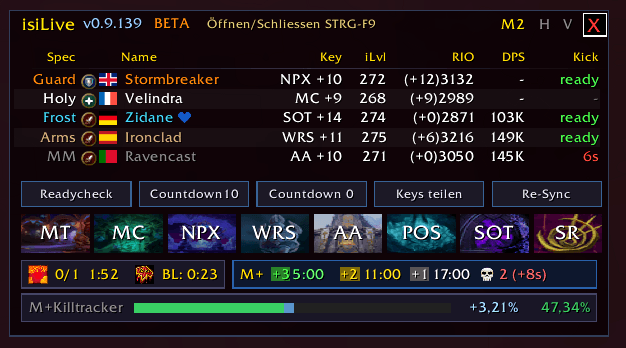
- **One-window M+ roster** — spec, role, language, key, iLvl, Raider.IO, last-run DPS, interrupt status, leader marker, isiLive peer marker, and ghost rows after leavers.
- **Live enemy forces tools** — tooltip percentages, nameplate percentages, bottom killtracker bar, pull prediction, and combat-end refresh from the bundled MDT-synced forces database.
- **Season portal grid** — all current dungeon portals with cooldowns, availability highlights, and verified LFG target highlighting.
- **Share Keys sync** — posts your key first, then asks isiLive peers to post their own key line through the fastest AddOn-message priority path.
- **Run utility alerts** — Battle Res charges, Bloodlust cooldown, BR/Lust group announces, and separate ready sounds when Battle Res or Bloodlust becomes available during a key.
- **Configurable support tools** — Escape-menu shortcut strips, Hearthstone travel shortcut, optional player stats box, nameplate controls, runtime logs, and safe UI position locking.
---
## License and Source Attribution
isiLive uses an MIT-based license with an additional source-attribution requirement.
You may use, modify, redistribute, and include substantial parts of this project in other projects.
If you do so, visible credit to the original GitHub source is required:
### Recommended CurseForge / Wago attribution text
```text
Source attribution required when redistributing or reusing substantial code:
```
---
## What it does
When you join a group, isiLive opens a single window with everything you want to see before and during a key:
- Who is in the group, their spec, item level, Raider.IO rating, and keystone
- Optional default-on LFG buff-rating hearts that help you pick groups and applicants by relevant class-bonus coverage before anyone joins your party
- One-click access to all 8 season dungeon portals, with live cooldowns
- Escape-menu shortcut panels for tools, travel, verified mount shortcuts, and installed/enabled supported addons
- Configurable Hearthstone travel shortcut with random owned, default item, or a specific owned Hearthstone toy
- Who can interrupt, and whose kick is still on cooldown
- Battle Res charges, Bloodlust cooldown, and separate Battle Res-ready / Bloodlust-ready alerts during a run
- The M+ timer with `+3 / +2 / +1` cutoffs live
- Forces percentage with a live pull-prediction bar and combat-end refresh so completed pulls are reflected immediately
- Default-on **forces overlay on every enemy nameplate** during a key — shows what each individual mob contributes plus the verified remaining count needed to finish enemy forces
- Forces info on the **mouseover tooltip** for any mob in a key
- Optional independent **player stats box** with live primary/secondary stats, short English labels, and separate opacity/font/lock controls
- Optional **Group Finder buff-rating hearts** for applicant and search-result rows, shown only when the listed class/spec offers a relevant non-stacking group bonus for your current character
- Cyrillic-safe rendering for isiLive-owned dynamic text such as roster names, invite notices, tooltips, and dungeon labels
Everything syncs automatically between group members who run isiLive — no manual import, no `/say` spam.
---
## Install
1. Download from **CurseForge** or **Wago**, or drop the folder `isiLive/` into `World of Warcraft/_retail_/Interface/AddOns/`.
2. Start the game. The window opens automatically the next time you join a 5-player group.
No setup required. Open the settings via **Escape → AddOns → isiLive** if you want to change language, sounds, or auto-open behavior.
The optional Escape-menu Addons panel shows shortcuts only for supported addons that are installed and enabled. External shortcuts use the target addon's registered slash handler directly after any verified load-on-demand load; they do not write slash text into chat.
---
## Main window
The window opens automatically when you join a group and closes when you leave. You can also open or close it yourself:
- **`Ctrl + F9`** — toggle the window
- **Red X** in the top-right corner — close it
- **Lock icon** in the top-right — prevents dragging so the window doesn't move by accident
- Drag the title bar to move the window. The position is remembered, and the window stops at the WoW screen edge instead of being draggable outside the game view.
### Layouts
The window comes in four layouts. Click the button in the title bar to switch:
| Button | Layout | What you get |
|---|---|---|
| **M+** | Compact main | Full roster + all M+ tools stacked (default) |
| **M** | Main | Roster + tools in a classic stacked view |
| **H** | Horizontal | Slim tool strip — just the essentials |
| **V** | Vertical | Small palette with markers and group tools |
The selected layout is remembered across sessions.
---
## The roster
Columns in order: **Spec · Name · Lang · Key · iLvl · RIO · DPS · Kick**
- **Spec** — role-sorted: tanks first, then healers, then DPS
- **Lang** — spoken-language flag for the player
- **Key** — keystone and level, short code (e.g. `MT +14`, `DAWN+12`). Red if this player owns the key you joined for.
- **iLvl** — equipped item level
- **RIO** — current Raider.IO score. After a run, a green `(+X)` shows the gain: `(+12)3521`
- **DPS** — overall DPS from the last dungeon, read from Blizzard's in-game damage meter
- **Kick** — green `ready`, red seconds on cooldown, or `-` if the spec has no interrupt. Heal specs without interrupt (Holy Paladin, Mistweaver Monk, Restoration Druid, Discipline / Holy Priest) correctly show `-` instead of a stale cooldown. **Hover** over the cell to see extra interrupts the player has via talents (e.g. Protection Paladin's Avenger's Shield) — synced live across the group through isiLive.
### Markers next to names
- **Blue heart** — this player also runs isiLive
- **Crown** — this player is the group leader
- **Ghost row** (greyed out) — a player who left the group. Kept visible until the group dissolves or you reload, so you can still see who was there after a wipe or dungeon reset.
- **Right-click a row** to whisper that player
### Ready check
During a ready check, the row background changes color: **green** for ready, **red** for declined or no answer, **yellow** (with sandglass) for still waiting. After the ready check ends, ready/declined colors stay visible for 20 seconds so you can glance at who responded how.
---
## Tools in the main window
### M+ Utility Row
- **BR** — Battle Res charges and cooldown with icon, plus optional ready TTS when a charge returns
- **Lust** — Bloodlust/Heroism cooldown with icon and remaining time
- **M+ Timer** — `+3 / +2 / +1` cutoffs counting down live, plus death penalty; resets immediately when the key completes or is aborted
### Killtracker (Enemy Forces)
A bottom bar that shows your kill-count percentage:
- **Green** < 80%, **Yellow** < 95%, **Red** ≥ 95%
- After a verified LFG invite target announce, the bar shows the target dungeon and key level right-aligned until the key starts
- During an active key, the verified dungeon name stays visible on the progress bar as a left-aligned outlined label with the started key level read from the active Mythic+ timer snapshot
- During a pull, a light-blue segment on the right shows **how much the current pull will add** (`+X.XX%`) — so you can see mid-pull whether it's enough
- When combat ends, the tracker refreshes Blizzard's live scenario progress immediately, so the last pull is counted before the next pull or boss engagement
### Teleport Grid
All 8 season dungeon portals in one place:
- **Icon + short code** when ready (e.g. `MT`, `DAWN`)
- **Cooldown timer** when on cooldown, normalized to the current portal cooldown cycle
- **Highlight** when a portal becomes available
- **Highlight + gold border** on the right portal when you accept an LFG invite or create your own LFG listing for a dungeon
### Markers (for everyone)
Eight world-marker buttons: **Square, Triangle, Diamond, Cross, Star, Circle, Moon, Skull**. Anyone in the group can use them — not just the leader.
### Role icons = one-click marks
Click the **tank icon** in a roster row to put a **blue square** on that player. Click the **healer icon** for a **green triangle**. Works for everyone, not only the leader.
### Group leader buttons
Only enabled when you are the leader:
- **Ready Check**
- **Countdown 10s / Countdown 0s** (pull timers)
### Share Keys
Posts everyone's keystone in group chat — yours first, then other isiLive users reply with their own. The button has a 30-second cooldown after a real local share or successful peer request; receiving clients also lock their button for 30 seconds whenever a valid peer request arrives, even if they have no key to post.
### Re-Sync
Forces a fresh sync round. Use it if someone's iLvl or key looks stuck. Asks compatible LibKeystone addons for their keys too. 10-second cooldown.
---
## Mythic+ features
### Forces on mob tooltips
When you hover a mob during a key, the tooltip gains a line:
```
+3 progress (1.25% of 240)
```
That tells you how much that mob is worth and what fraction of the dungeon-total it represents — handy to decide whether a pull gets you over a threshold. Localized in all 8 supported languages (DE: `+3 Fortschritt (1,25% von 240)`).
The percent is computed from the bundled MDT-synced forces DB, **not** from Blizzard's `GetUnitCriteriaProgressValues` API directly. That API in 12.0+ protected contexts can return cumulative dungeon progress instead of the per-mob contribution; reading from the DB is deterministic and immune to that drift.
### Forces overlay on enemy nameplates
Default-on text over every hostile unit's nameplate during a key; Settings -> Nameplates can disable it or hide the remaining-needed suffix.
```
1.16%
```
Configurable: percent toggle, font size 8-24, position around the nameplate (LEFT/RIGHT/TOP/BOTTOM). Same DB-based source as the tooltip — deterministic mob contribution, never the cumulative progress.
### Player stats box
An optional standalone stats box can be enabled in Settings. It is independent from the M+, H, and V layouts and can be moved separately.
- Shows the class-appropriate primary stat (`Str`, `Agi`, or `Int`) plus `Crit`, `Haste`, `Mast`, `Vers`, `Leech`, and `Speed` when Blizzard's live APIs provide those values
- Uses short English labels only
- Values and percentages are right-aligned for compact scanning; the value column keeps a stable compact width for three- and four-digit values, and the percent column fits values up to `(999.99%)`
- Can be locked, hidden, moved, and configured with separate background opacity and relative font size
- Starts disabled by default
Plater / Platynator users: a soft warning is shown in Settings if either is loaded — both addons can already display M+ forces on nameplates via their own scripts, so you can disable isiLive's overlay there if you prefer to avoid duplication.
### Battle Res / Bloodlust chat announce
During an active key, every time someone in the group casts a Battle Res or starts Bloodlust, isiLive posts a short line:
```
Alice used BR
Bob started Bloodlust
```
You can turn either announce off in the settings. Non-isiLive group members won't see the message — it's shared only between isiLive users.
### Pre-key group view
When you accept an LFG invite, the matching portal highlights and the center notice includes a clickable portal button from the verified listing activity. The accepted-invite notice shows dungeon, title, leader, and source rows. The dungeon row includes the key level when the level is available from the accepted context or as an exact `+N` in the verified LFG group title. The chat tells you which dungeon and level you joined, and the bottom M+ killtracker mirrors that verified target as a right-aligned dungeon + key-level label until the key starts.
### Group Finder class-bonus hints
Optional Group Finder hints help you scan applicant and search-result rows for useful class buffs before you join a group or accept someone into your own listing. The goal is to answer one question quickly: **what does this group add for my current character that is actually useful and not already duplicated?**
- **Search result rows** show compact green heart texture markers directly inside the Blizzard row, independent of third-party class-badge addons.
- **Applicant rows** show language flags beside the applicant name and the same heart markers to the right of the class badge when that applicant offers a relevant non-utility group bonus.
- **Tooltips** add localized bonus text per listed class/spec, so you can see which buffs created the marker score.
- **Relevance is player-aware:** physical, magic, intellect, attack-power, stamina, mastery, versatility, enemy-damage and universal damage bonuses are counted only when they matter for your current character profile.
- **Non-stacking bonuses are deduplicated:** two players with the same class buff count once per search result, so the marker score reflects coverage instead of duplicate noise.
- **Utility stays separate:** Battle Res, Bloodlust, PI, Devotion Aura, Atrophic Poison, Healthstone and similar utility notes may appear in tooltips, but they do not inflate the compact green heart score.
- **Heart scale:** 1 heart means one useful non-stacking buff, 2 hearts means two, 3 hearts means three, and 4 hearts means four or more.
- **Default-on setting:** **Display -> Group Finder: Buff rating hearts**. The settings description shows the same fixed-size green heart texture examples using `media/heart_bonus_green.tga`.
### Ghost rows after wipes / reloads
If the group breaks up or someone disconnects, their data stays visible as a greyed-out row. You can still see what spec/key they had. Joining a new group clears the old ghosts.
---
## Hotkeys
| Key | Action |
|---|---|
| `Ctrl + F9` | Toggle the main window |
| `Ctrl + Alt + F9` | Toggle demo mode with full preview surfaces (for testing without a group) |
## Slash commands
```
/isilive help — show normal user commands
/isilive admin — show administrative / support commands
/isilive settings — open the settings panel
/isilive lock — lock window position
/isilive unlock — unlock window position
/isilive resetui — recenter window and reset scale + opacity (asks for confirmation)
```
Administrative commands shown by `/isilive admin` include the full preview mode,
runtime / queue / Lua error logs, teleport and nameplate diagnostics, and
binding checks. They are intentionally kept out of the normal help list.
## Settings
Open via **Escape → AddOns → isiLive**. Everything takes effect immediately.
- **General** — language, startup auto-show, minimap button, Hearthstone travel shortcut selection
- **Display** — UI scale, background opacity, default layout (M+, M, H, V), lock main frame position, player stats box controls, Group Finder language flags and class-bonus hints, reset UI
- **Behavior** — addon sync, auto-show/hide triggers (show on login, auto-open on M+ queue, auto-open on key end, auto-close on key start, auto-close on leaving the group), lock main frame position, fade in combat, raid behavior status
- **Sounds** — lead transfer, full group, incoming summon, Battle Res, Battle Res Ready, Bloodlust, Bloodlust Ready, plus VIP guest mount sound mute toggles for Astral Aurochs, Grand Expedition Yak, and Trader's Gilded Brutosaur
- **Nameplates** — enable forces overlay, font size, position, percent toggle
- **Chat Announcements** — announce Battle Res / announce Bloodlust
- **Administrative** — queue debug log, runtime log (both reset on reload, for support), plus dedicated **Clear Queue Debug Log** / **Clear Runtime Log** buttons in the panel for one-click log purge without using the slash command
### Languages and translations
- User-facing text is localized through the locale tables.
- New built-in text is maintained in English and German first.
- Other prepared locales may temporarily use English fallback text until a translator updates them.
- Only the sound setting labels and descriptions are already post-edited for the prepared French, Spanish, Portuguese, Italian, Russian, and Turkish locale tables; other areas may still use English fallback text.
- Community translation pull requests are welcome; accepted translators are credited in the changelog.
### Auto-open defaults
- Open on joining a group — **on**
- Open when a key ends — **on**
- Close automatically when the key starts — **off** (separate toggle)
- Close automatically when leaving the group — **off** (separate toggle)
- Show on login/reload — **on** (except in raid groups)
- Raid groups hide the window completely and pause all background processing
---
## FAQ
**Why don't I see DPS after a run?**
DPS is read from Blizzard's own damage meter. If Blizzard hasn't finalized the session yet, isiLive briefly retries. If the damage meter has no data for a player (e.g. late joiner), the DPS column stays empty rather than showing a guess.
**Why is the Key column empty for another player?**
They either don't have a keystone, or they don't have isiLive or a LibKeystone-compatible addon to share it.
**Why did my portal highlight disappear?**
You're already inside the dungeon, or the LFG queue was cancelled, or the group dissolved — any of those clears the highlight.
**Why is the main window gone in a raid?**
Raid groups (6+ members) are a hard-off state: UI hidden, background sync off. It comes back when the group drops to party size.
**Why did the chat announce not fire?**
BR/Lust announce only fires during an active M+ key. Also check the Chat Announcements toggles in the settings.
---
## Links
- **Source code:** [github.com/byi77/isilive](https://github.com/byi77/isilive)
- **Bug reports / feature requests:** GitHub issues
- **Technical documentation:** [`docs/`](docs/)
Also published on CurseForge and Wago — search for *isiLive*.