
example.jpg
Description
Inviter3k
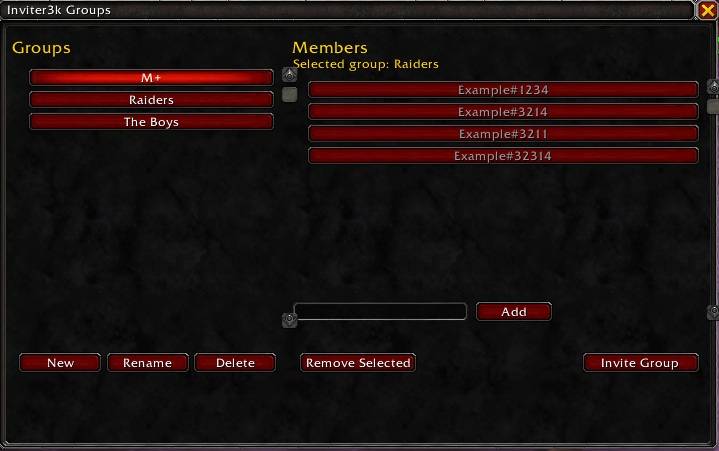
Lightweight World of Warcraft addon to create, manage, and quickly invite saved groups of BattleTags. Clean GUI, simple slash commands, and an optional minimap launcher for fast in‑game access.
Features
- Named groups: create, rename, and delete saved groups.
- BattleTag members: add and remove members per group.
- Quick invites: invite a whole saved group from the GUI or with a slash command.
- Scrollable panes: Groups and Members lists support scrolling for long lists.
- Minimap launcher: optional LibDataBroker + LibDBIcon minimap button.
- Slash commands: robust and easy chat-based controls for power users.
Installation
- Download the zip and extract it.
- Put the
Inviter3kfolder into your World of Warcraft AddOns directory, for example:.../World of Warcraft/_retail_/Interface/AddOns/Inviter3k. - Make sure these libraries are installed and enabled: LibDataBroker-1.1, LibDBIcon-1.0.
- Enable the addon in the in‑game AddOns menu or restart the game.
- Saved variables are created automatically on first load.
Usage
GUI
- Toggle the main window with
/inviter3kor/i3k. - Left pane: Groups — New, Rename, Delete.
- Right pane: Members — add via edit box, Remove Selected, Invite Group.
- Select a group on the left to view and manage its members on the right.
Slash commands
/inviter3khelpor/i3khelp— show help and usage./inviter3kor/i3k— toggle the main GUI./invite3kor/i3kinvite— invite the currently selected group (when GUI is open)./invite3k <group>— invite a specific saved group by name or unique prefix (case-insensitive)./i3ktoggleor/inviter3ktoggle— toggle the minimap icon; acceptsshoworhide.
Notes: /invite3k with no argument invites the GUI-selected group; if no group is selected it lists available groups. Group matching is case-insensitive and supports unique prefixes.
Examples
- Invite the group named Raiders:
/invite3k Raiders - Invite the currently selected group:
/invite3k - Hide the minimap icon:
/i3ktoggle hide
Troubleshooting
- Minimap icon missing: confirm LibDataBroker-1.1 and LibDBIcon-1.0 are installed and enabled.
- Layout issues with long names: shorten the group name or resize the window.
Inviter3k Team
