


Invited WHERE?
- By
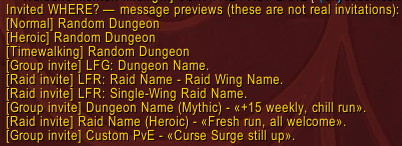
Screenshot_23.png
Description
Invited WHERE? shows where you’re being invited before you accept, with clear notifications in your chat tabs.
Whether you’re waiting for a dungeon, joining an LFR wing, or applying to several premade groups, the addon helps you identify the invitation at a glance.
- Dungeon Finder: shows the selected dungeon or the difficulty of a random dungeon queue.
- Timewalking: displays a simple
[Timewalking] Random Dungeonnotification. - Raid Finder: shows the raid and wing names. Matching names appear only once.
- Premade groups: shows the selected activity and the leader’s group title, including details such as “+15 weekly”.
- Custom groups: shows the group title and Custom PvE/PvP activity when available.
- Private notifications: messages appear only in your own chat tabs.
Example messages:
[Normal] Random Dungeon
[Heroic] Random Dungeon
[Timewalking] Random Dungeon
[Group invite] LFG: Dungeon Name.
[Raid invite] LFR: Raid Name - Wing Name.
[Group invite] Dungeon Name (Mythic) - «+15 weekly, chill run».
[Raid invite] Raid Name (Heroic) - «Fresh run, all welcome».
[Group invite] Custom PvE - «Curse Surge still up».
Only player-written group titles appear in quotation marks. Invitations are never accepted automatically.
Chat timestamps and tabs
Messages appear in all regular chat tabs, including unselected tabs and undocked windows. Dedicated whisper conversations and Combat Log are excluded. Notifications remain visible only to you.
Timestamps follow your in-game Chat Timestamps format and use your computer's local time. Choosing None disables them.
Check your queues with /qwhere
Type /qwhere to check Dungeon/Raid Finder queues and Premade Groups applications:
- When solo: lists your queued activities and active applications. Custom listings show the player-written group title; dungeon and raid listings show both the activity and the group title.
- In a party or raid: shows
Looking for more,Paused, orNot queued. Role checks and invitations awaiting entry have their own statuses. If several queues exist, an active search takes priority over paused queues. - Current LFR recruitment: when the reported status belongs to your current LFG group, the message includes its destination. LFR shows the current raid and wing, so paused queues for other wings do not hide where replacement players are being sought. Matching raid and wing names appear only once.
Examples:
[Queue] [Heroic] Random Dungeon
[Queue] Dungeon Name (Mythic) - «+15 weekly».
[Queue] «Group n Chill».
[Queue] LFR: Raid Name - Current Wing Name - Looking for more
[Queue] Paused
[Queue] Not queued
Queue checks run only when you enter the command, with no background polling. Separate battleground/arena, world PvP, and pet-battle queues are not included.
No configuration is required. Type /invitedwhere test to preview the messages, /qwhere to check your queues, or /invitedwhere to check the installed version.
Designed for WoW Retail. Addon messages are currently in English; activity names follow your game client’s language.
Invited WHERE? Team
