Description
English Description | Deutsche Beschreibung weiter unten.
InTime – Real-time Mythic+ Pace Tracker
Are you on time – and is a bonus upgrade within reach? InTime answers both questions at a glance, live during your key.
What you see
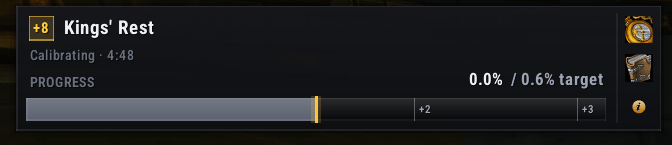
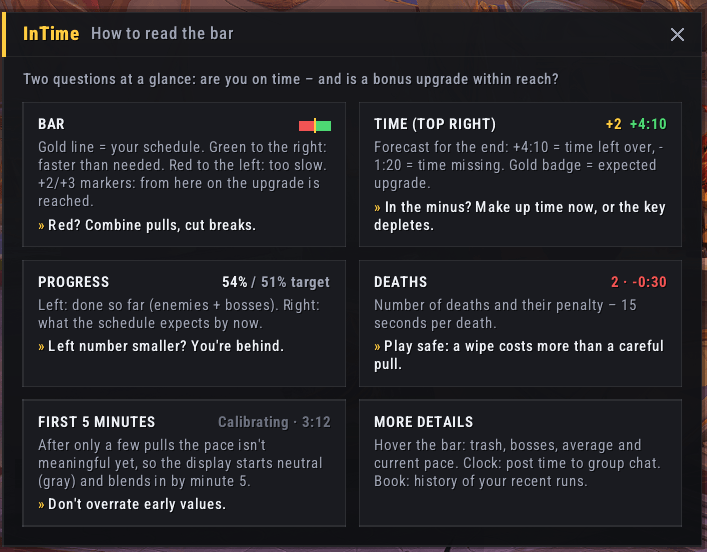
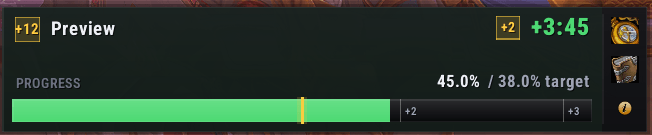
- Pace bar – The gold line in the middle is your schedule. Green to the right: you're faster than needed. Red to the left: you're too slow. Markers show exactly where +2 and +3 begin.
- Time forecast –
+4:10means you'll finish with about 4:10 to spare,-1:20means you're 1:20 short. A gold badge shows the expected upgrade (+1/+2/+3). - Progress vs. schedule – How much of the dungeon is done (enemy forces + bosses, weighted by boss HP) compared to where you should be right now.
- Deaths – Death count and the time penalty they cost.
- Details on hover – Trash %, bosses killed, average pace and current pace.
Built to stay calm
- Calibration phase: During the first 5 minutes the display starts neutral and blends into the real values. A handful of pulls just isn't a reliable pace yet.
- Smoothed forecast: Mobs die in bursts at the end of a pull. InTime smooths this out so the forecast shows the trend instead of jumping back and forth.
- Combat-aware: The current pace is frozen during combat and updates once the pull is done.
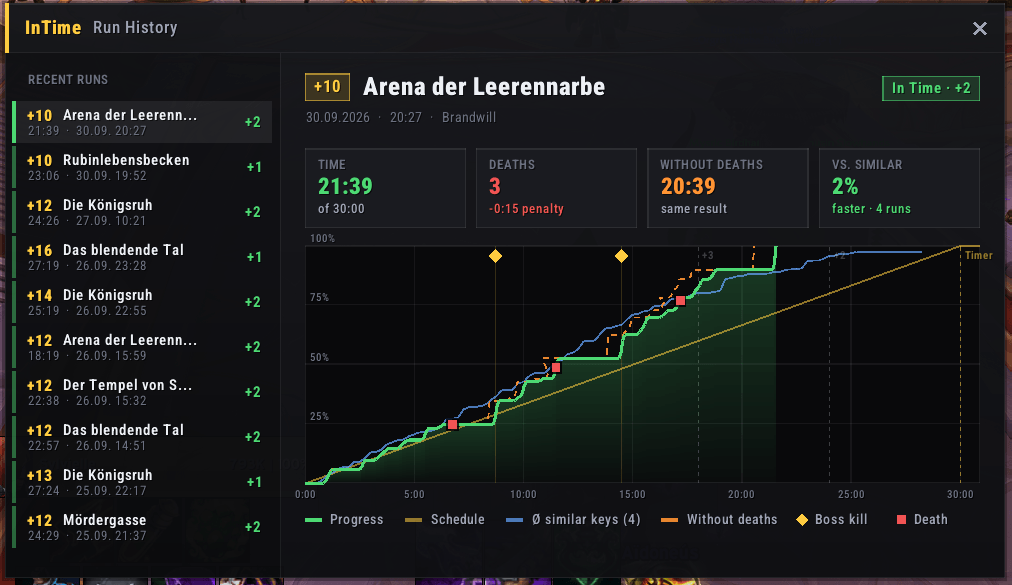
Run History
Click the book icon to open the history of your last 10 runs:
- Progress graph against your schedule with +2 / +3 / timer lines
- Boss kills and deaths marked on the timeline
- Hover the graph to see progress, schedule and comparison at any point
- Comparison with similar keys (same dungeon, ±1 key level)
- "Without deaths" estimate – would that run have upgraded without them?
Older runs are automatically compressed into averages, so the comparison gets better over time without bloating your SavedVariables.
More
- Built-in legend – click the i button for a short guide to every element and what to do about it
- Post your time to group chat with one click
- Profiles shared across characters (like WeakAuras/ElvUI): bar position, size, scale and options
- Movable via Edit Mode or
/it unlock, adjustable scale and width, buttons left or right - Minimap button
- Fully localized: English, German, French, Spanish
Commands
| Command | Description |
|---|---|
/it test |
Show a preview bar |
/it options |
Open settings |
/it lock / /it unlock |
Lock / move the bar |
/it hide / /it show |
Hide / show the bar |
/it scale 1.0 |
UI scale (0.5 – 3.0) |
/it width 480 |
Bar width (200 – 800) |
/it resetlocation |
Reset position |
/it minimap |
Toggle minimap button |
/it resync |
Restart tracking after a reload |
/it resethistory |
Reset run history (e.g. for a new season) |
Feedback and bug reports are always welcome in the comments!
Deutsche Beschreibung
InTime – Mythic+ Tempo-Tracker in Echtzeit
Liegt ihr in der Zeit – und reicht es für +2? InTime beantwortet beide Fragen auf einen Blick, in Echtzeit während eures Keys.
Was du siehst
- Tempo-Balken – Die goldene Linie in der Mitte ist euer Zeitplan. Grün nach rechts: schneller als nötig. Rot nach links: zu langsam. Marker zeigen genau, wo +2 und +3 beginnen.
- Zeit-Prognose –
+4:10heißt, ihr seid voraussichtlich mit 4:10 Puffer fertig,-1:20heißt, es fehlen 1:20. Ein goldenes Abzeichen zeigt die erwartete Abschluss-Stufe (+1/+2/+3). - Fortschritt vs. Zeitplan – Wie viel des Dungeons geschafft ist (Gegner + Bosse, gewichtet nach Boss-HP), verglichen mit dem, was laut Zeitplan jetzt sein sollte.
- Tode – Anzahl der Tode und die Strafzeit, die sie gekostet haben.
- Details per Mouseover – Trash-Anteil, getötete Bosse, Ø Tempo und aktuelles Tempo.
Ruhige Anzeige statt Gezappel
- Kalibrierungsphase: In den ersten 5 Minuten startet die Anzeige neutral und blendet sich auf die echten Werte ein. Ein paar Pulls ergeben einfach noch kein verlässliches Tempo.
- Geglättete Prognose: Mobs sterben am Ende eines Pulls gebündelt. InTime glättet das, damit die Prognose den Trend zeigt, statt hin und her zu springen.
- Kampf-bewusst: Das aktuelle Tempo wird im Kampf eingefroren und nach dem Pull aktualisiert.
Run-Verlauf
Ein Klick auf das Buch öffnet den Verlauf deiner letzten 10 Runs:
- Fortschrittsgraph gegen den Zeitplan mit +2-/+3-/Timer-Linien
- Boss-Kills und Tode auf der Zeitachse markiert
- Maus über den Graph: Fortschritt, Zeitplan und Vergleich an jeder Stelle
- Vergleich mit ähnlichen Keys (gleicher Dungeon, ±1 Stufe)
- „Ohne Tode“-Schätzung – hätte es ohne die Tode für eine höhere Stufe gereicht?
Ältere Runs werden automatisch zu Durchschnittswerten zusammengefasst. So wird der Vergleich mit der Zeit immer besser, ohne dass deine SavedVariables wachsen.
Außerdem
- Eingebaute Legende – Klick auf den i-Button für eine kurze Erklärung jedes Elements und was du daraufhin tun kannst
- Zeitstand in den Gruppenchat posten mit einem Klick
- Profile, die zwischen Charakteren geteilt werden (wie bei WeakAuras/ElvUI): Position, Größe, Skalierung und Optionen
- Verschiebbar über den Bearbeitungsmodus oder
/it unlock, Skalierung und Breite einstellbar, Buttons links oder rechts - Minimap-Button
- Vollständig übersetzt: Deutsch, Englisch, Französisch, Spanisch
Befehle
| Befehl | Beschreibung |
|---|---|
/it test |
Vorschau-Leiste anzeigen |
/it options |
Einstellungen öffnen |
/it lock / /it unlock |
Leiste sperren / verschieben |
/it hide / /it show |
Leiste aus-/einblenden |
/it scale 1.0 |
Skalierung (0.5 – 3.0) |
/it width 480 |
Breite (200 – 800) |
/it resetlocation |
Position zurücksetzen |
/it minimap |
Minimap-Button an/aus |
/it resync |
Tracking nach einem Reload neu starten |
/it resethistory |
Run-Verlauf zurücksetzen (z. B. für eine neue Season) |
Feedback und Bug-Reports sind in den Kommentaren jederzeit willkommen!
InTime Team