interruptPriority
Addons for interrupting your focus target's casts and coordinating interrupts with your party or raid; includes alerts and a configurable UI.
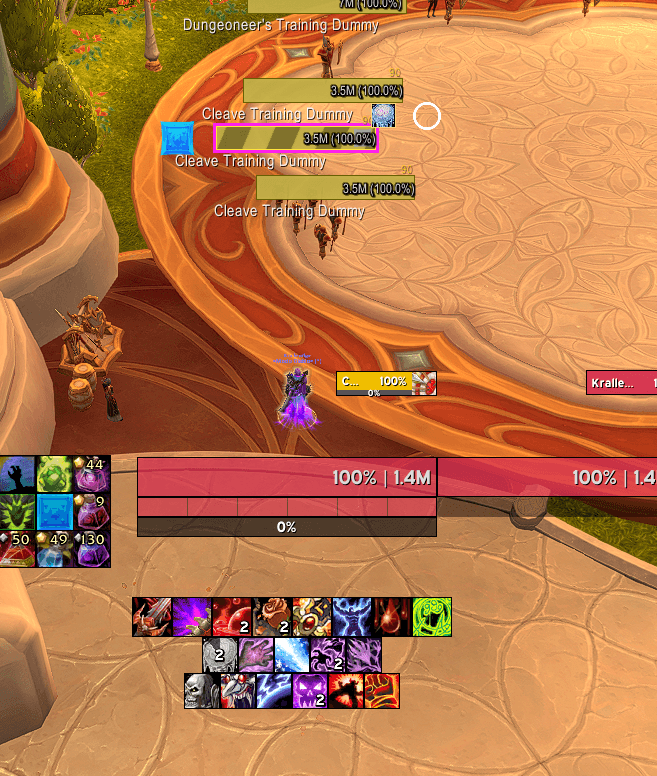
Captura de pantalla 2026-10-05 141222.png
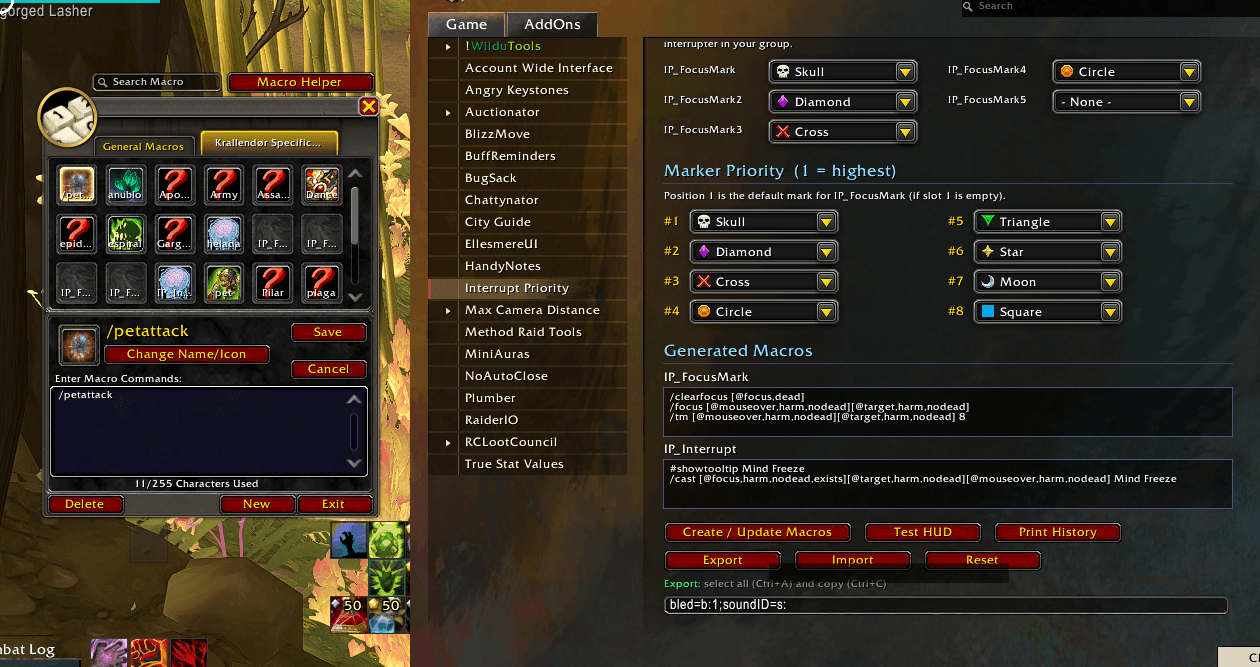
Captura de pantalla 2026-10-04 231046.png
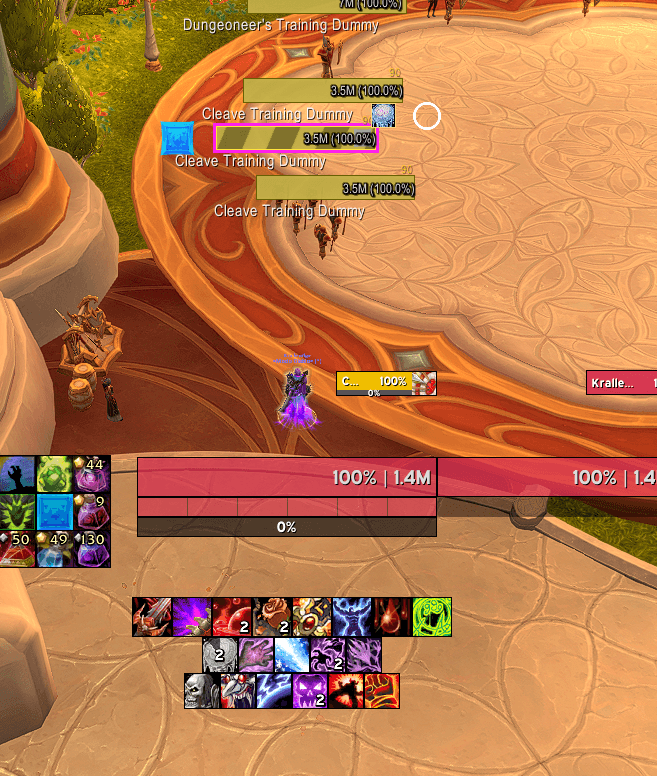
Captura de pantalla 2026-10-05 141222.png
Description
Try an addon for priority interrupts# Interrupt Priority (IP)
The interrupt assistant for Mythic+ in Midnight. IP tells you what to kick, when you can kick it and whose turn it is, with a compact HUD, macros that write themselves and kick turns that keep working inside the key without any communication.
Everything is built around Midnight's (12.x) restrictions: IP never reads or compares the data the game hides in combat ("secret values"). It passes that data straight to bars, cooldowns and text, which is exactly what Blizzard allows. No Lua errors from secret data, and no features that stop working the moment the key starts.
What changes compared to the base game?
In the base game, to interrupt well in M+ you have to do all of this at once:
- watch your focus' cast bar (if you even have it on screen),
- remember whether your interrupt is on cooldown,
- tell whether the cast can be interrupted,
- and sort out on voice chat who kicks which mob.
IP puts all of it into a single bar next to your character and alerts you only when you can and should interrupt:
| Base game | With IP |
|---|---|
| Set focus and raid mark separately | One key (IP_FocusMark) sets focus and your raid mark |
| Write an interrupt macro per character and per language | IP_Interrupt is created for you with your spell's localized name |
| No idea whether your kick will be back before the cast ends | A line on the bar shows the exact moment your interrupt comes back |
| The alert sound plays even with your kick on cooldown | Silent while on cooldown; plays right when it's back if the cast is still going |
| "Who kicks the Square's second cast?" over Discord | Turns per mark: the nameplate shows YOUR TURN or who's next |
| No idea whether your kick did anything | "Your interrupt didn't interrupt anything" warning when it hit nothing |
Getting started (30 seconds)
- Type
/ip. The options window opens and the addon creates yourIP_FocusMarkandIP_Interruptmacros. - Drag both macros to your action bar.
- On the pull, press
IP_FocusMarkon the caster you're responsible for. Focus and mark in one press. - When the bar turns orange and your icon glows, press
IP_Interrupt.
Click Test HUD in the options window for a demo without leaving the city.
Features
1. Compact cast HUD
One flat bar (280×24 by default, fully adjustable):
[your mark] [enemy spell icon] [ spell name ...... target 1.4 ] [your interrupt]
The bar color tells you your state without reading anything:
- orange: your interrupt is ready;
- purple: your interrupt is on cooldown;
- grey with a shield: the cast can't be interrupted.
All three colors are customizable.
"Your kick is back here" line: if you used your interrupt 10 s ago and the enemy starts a 3 s cast, the yellow line shows whether you'll make it in time.
Timer, spark and cast target ("→ Healer"), so you know who the cast is aimed at.
Action-bar style proc glow on your interrupt icon and a pulsing border when it's your kick.
Fade in and out. When idle the HUD disappears; it only shows up when there's something to kick.
Result notice under the bar for a few seconds:
- "CUT (you) 284ms", with your reaction time;
- "CUT by Juan", in M+ too;
- "MISS".
In practice: you stop scanning nameplate cast bars. You look at one spot near your character and the color tells you whether to act.
2. No alerts when you can't interrupt
- Interrupt on cooldown: no sound, the bar dims and the nameplate arrow is hidden. If your interrupt comes back while the cast is still going, the sound plays at that moment and the bar lights up.
- Uninterruptible cast: the bar, the arrow and the effects are hidden, in M+ too (the game itself does it even though the addon can't read the data).
- Sound only for your focus (optional): other casts are shown silently.
In practice: the sound means "press now", never "there's a cast you can't touch".
3. Automatic macros
IP_FocusMark: focuses your mouseover or target and puts your raid mark on it. Up to 5 variants (IP_FocusMark2…5), each with a different mark, to hand out marks to other players.IP_Interrupt: casts your interrupt on your focus, then your target, then your mouseover. The order is configurable.- Detects your class, specialization and pet:
- Balance Druid → Solar Beam; Feral and Guardian → Skull Bash.
- Survival Hunter → Muzzle.
- Warlock with a Felhunter → Spell Lock; with a Felguard → Axe Toss. The macro is rewritten when you swap demons.
- Macros update themselves when you change spec or talents, and never in combat (they wait and apply when you leave combat).
- Works in any client language.
4. Nameplate indicators
- Arrow above the casting mob (your focus or your marked mob). It can be an arrow, your interrupt's icon or the mob's raid mark, with adjustable color, bounce, size and position.
- Your interrupt's icon above your focus, with its cooldown: swipe, countdown and greyed out until it's ready. You always know which mob is yours.
- Preview in the options: a fake nameplate shows your changes live as you move the sliders, no target needed.
- Works with any nameplate addon; the offset is adjustable because each one draws its bars in a different place.
5. Kick turns (what makes IP special)
In M+ the game doesn't let addons know who interrupted, but it does reveal that someone did. IP uses that to move the turns forward:
- Turns per mark, for mobs that cast several times. Example: give the Square "1 Juan, 2 Ana". The first kick on the Square mob is Juan's; as soon as someone interrupts it, the turn passes to Ana, then back to Juan.
- Global rotation for mobs without a list of their own, up to 5 players.
- If you kick out of turn, the list lines up after you.
- Above the marked mob's nameplate you see YOUR TURN in pulsing gold, or "1/2 Juan" in their class color.
- "Alert only on my turn": sound, border and arrow fire only when it's your turn, even if that mob isn't your focus.
- Resets when combat ends and skips players who aren't in the group.
- CC rotation: a list of up to 5 players. It advances with the
IP_NextCCmacro (or/ip next cc) and automatically when you use your own CC.
In practice: the classic "who kicks now?" goes away. Everyone with IP sees the same turn on their screen, without sending anything during the key.
6. Group coordination
- Mark assignment: "Auto-assign group" gives your mark to you and the next ones to your teammates. "Announce to group" posts it in chat with mark icons, e.g.
[IP] Kicks: {skull} Adan {cross} Juan. - Sync between IP users before the key: when they receive the assignments, each player's
IP_FocusMarkswitches to their own mark automatically and the turns are shared. Only messages from your group members are accepted. - Tab above the bar with the name of whoever owns the marked mob that is casting.
- Announce your own interrupts to the group (optional).
7. Crowd control
- Your focus' CC: red-bordered icons to the left of the HUD showing the stuns or controls on your focus. If it's stunned, you don't need to kick.
- Backup interrupts: your known stuns and controls (e.g. Kidney Shot, Hammer of Justice or Storm Bolt) to the right of the HUD, with their real cooldown. When your interrupt is on cooldown, you see at a glance what else can stop the cast.
8. Useful warnings
- Failed kick: if you use your interrupt and nothing gets interrupted (immune target, uninterruptible cast or nothing casting), you're told right away.
- No focus: a reminder when you enter combat, or when your focus dies.
- Sound or voice: several game sounds, or text-to-speech with your own text (e.g. "Kick!").
9. Statistics and history
- Session history: interrupted, missed, how many were yours, and your average and best reaction time.
- Mythic+ history per key: dungeon, level, interrupt rate, your kicks, failed kicks and average reaction. Saved across sessions, survives
/reload, and a summary is posted in chat when the key ends. - Real cooldown with talents: IP learns your interrupt's cooldown outside restricted content, per character, specialization and talent loadout, and uses it inside the key.
10. Where to load
Turn IP on or off by content type and difficulty:
- Open world: cities and inns, or everywhere else.
- Dungeons: Normal, Heroic, Mythic, Mythic+ or others.
- Raids: Raid Finder, Normal, Heroic, Mythic or others.
- Delves and scenarios.
- PvP: battlegrounds and arenas.
There's an "Only Mythic+ and raids" shortcut, and chat tells you when you enter a zone where IP turns on or off.
11. Comfortable configuration
- Own window with a sidebar and eleven pages: General, Where to load, Alerts, Crowd control, Appearance, Nameplates, Group, Turns, Macros, History and Profiles. Animated toggles, sliders with an editable value and a color picker.
- Live HUD preview on the Appearance page: it cycles through "ready", "on cooldown" and "uninterruptible" while you tweak.
- Appearance: width, height, scale, opacity, bar texture, font and outline. If another addon loads LibSharedMedia, its textures and fonts show up too.
- Profiles, with automatic switching per specialization (e.g. one for tank and one for DPS) and text export/import. Importing never runs code.
- Minimap button (can be hidden) and an addon compartment entry, with a tooltip showing your status.
- Healer mode: if your specialization has no interrupt, the HUD becomes an info-only cast warning.
- Interface in English and Spanish.
Transparency: what Midnight allows and what it doesn't
IP is designed around Blizzard's rules, not against them:
- ✅ Your own data is always exact: your interrupt, its cooldown, your CC and your failed kicks.
- ✅ Knowing that someone interrupted a mob: enough for turns and statistics.
- ✅ Showing who interrupted on screen, in M+ too: the game draws the name. IP can't read it, so it doesn't appear in chat or in per-player stats.
- ❌ Knowing in M+ whether a teammate used or missed their interrupt. That's why a teammate's failed kick doesn't advance the turns.
- ❌ Reading the CC on a mob in M+. The game draws it, but the addon can't make decisions with it.
- ❌ Sending addon messages during a key or a boss fight. That's why everything is synced beforehand, and turns advance on their own from game events.
- ⚠️ In M+ the game hides whether a cast is interruptible. IP hides the bar and the arrow, but the sound may still play. Turn on "Sound only when your focus casts" to reduce the noise.
Experimental: "Group interrupt cooldowns" tries to show your teammates' interrupt cooldowns using a comparison the game answers in hidden form. It's off by default. Try it with /ip testkick inside a key and chat will tell you whether it works on your client.
Commands
/ip                  open options
/ip test             HUD demo
/ip unlock | lock    move / lock the HUD
/ip macros           create or update macros
/ip sync             send assignments and turns to IP users in your group
/ip next [cc]        next turn (global kicks or CC)
/ip rotreset         back to the first turn
/ip history          session history in chat
/ip testkick         test group cooldowns on the next interrupt
/ip minimap          show or hide the minimap button
/ip profile [name]   switch or show profile
/ip status | help
FAQ
Do my teammates need IP? No. IP works solo: your HUD, your alerts, your macros and your stats. If they have it too, you get synced assignments and the same turns on every screen.
Does the addon rely on other addons' media? No. Everything uses the game's own textures, fonts and sounds. LibSharedMedia is optional.
Does it work with Plater, EllesmereUI or other nameplate addons? Yes. The arrow, the focus icon and the turn badge sit on the nameplate with an adjustable offset, and the preview helps you place them where you want.
Does it affect performance? The HUD only works while it's visible. The timer text updates 10 times per second, not every frame, and animations run on the game engine itself. for pugs or premade, continue beta
interruptPriority Team