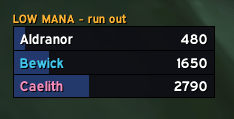
low_resource_kazrogal.png
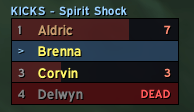
kick_rotation_reliquary.png
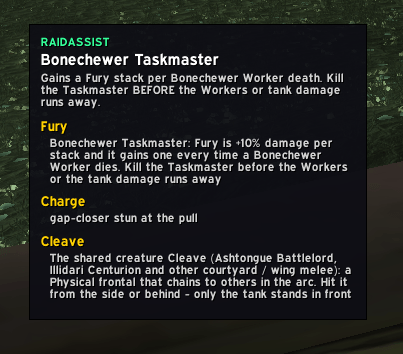
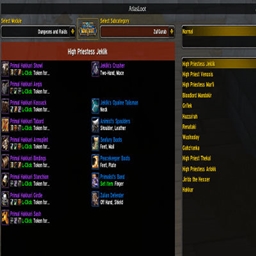
mob_info.png
Description
RaidAssist
A raid-leading and raid-awareness toolkit for Burning Crusade Classic (2.5.6).
RaidAssist bundles the trackers, warnings and marking helpers a Burning Crusade raid team needs into one addon with a single configuration window. It watches the combat log, the group roster and your nameplates and turns them into glanceable on-screen cues: who has a cooldown ready, who is about to run out of mana, which boss ability is coming, what is ticking on you right now, and which mob to kick, sheep or skull.
Everything keys off numeric spell / NPC / item IDs rather than names, so it works on a client of any language. Nothing is ever posted to party or raid chat - every notice stays on your own screen.
Getting started
- Install from CurseForge (or drop the
RaidAssistfolder intoInterface/AddOns) and reload. - On first login each character shows a short welcome screen that asks you to pick a profile for the role that character plays. Pick one and you are done - the addon now shows only the frames that role needs.
- Type
/raat any time for the command list, or/ra configto open the settings window. - Type
/ra moveto unlock every RaidAssist frame and drag it where you want it, then run it again to lock.
Use /ra test to preview all the bars and alerts without a real pull, and
/ra sim <boss> to replay a scripted fight for practice.
Profiles (the profile selector)
Every character carries a profile that sets the default on-screen visibility of each feature, so a plain DPS is not looking at the raid-lead management frames and a raid leader gets everything. Choose it on the first-run welcome screen or later from the Profile tab in the config window.
| Profile | What it shows |
|---|---|
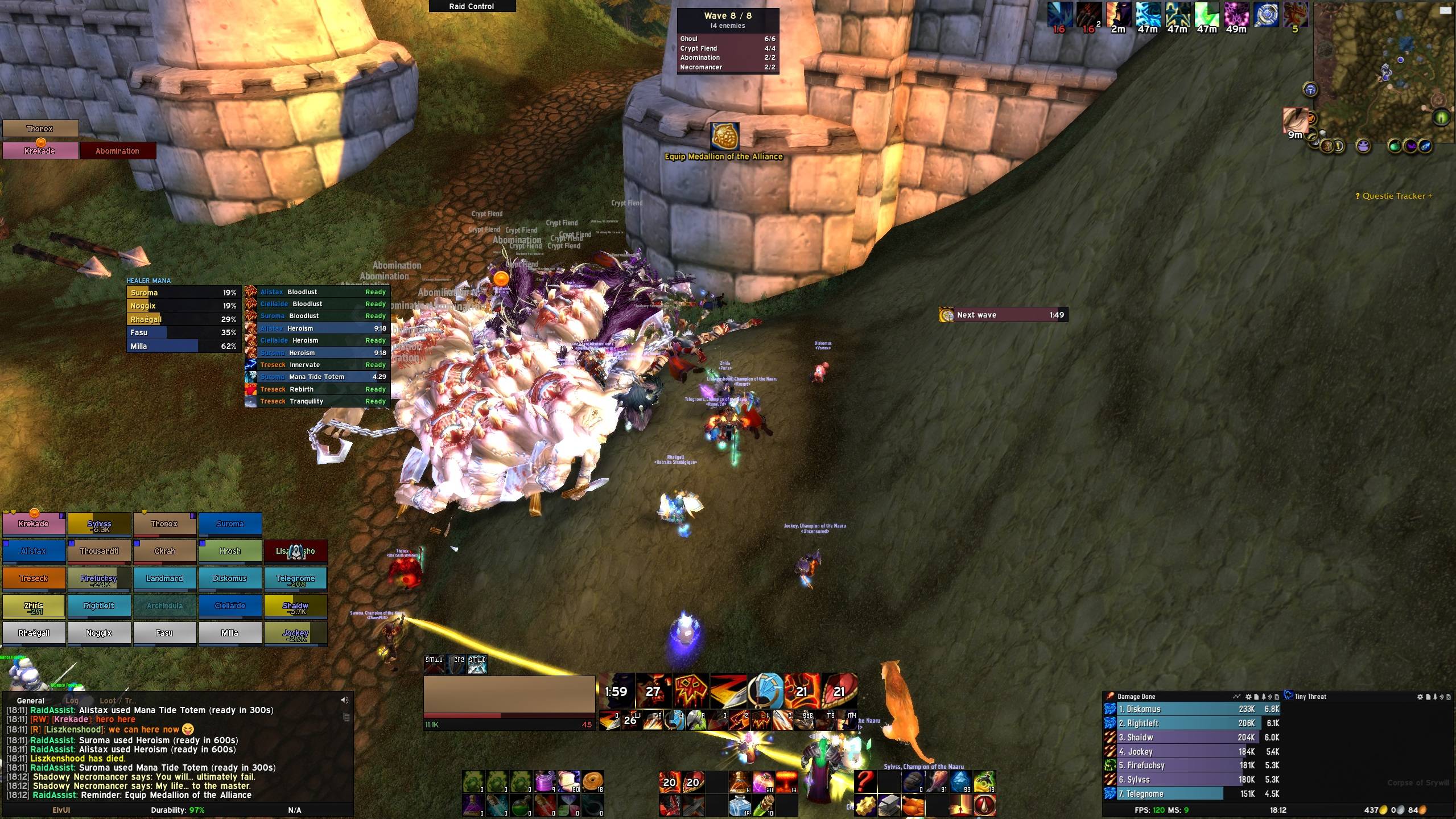
| Raid Leader | Everything, including the management frames: the raid cooldown roster grid, healer mana list, low-resource list, Auto Mark, the full raid-wide debuff list and the Mob Info window. |
| Healer | Survival and personal frames, plus healer mana, the low-resource list and the full raid-wide debuff list. No cooldown grid, Auto Mark or missing-debuff nag. |
| Tank | Survival and personal frames, plus the cooldown roster grid (incoming saves, Bloodlust). No healer mana, low-resource list or raid-wide debuff list. |
| Raider | Survival and personal frames only - hazards, action prompts, trash casts, nameplate icons, kick rotation, the cast banner, reminders. No management or raid-wide lists. |
How the layering works: an explicit tick in the Modules tab always wins, then the profile default, then "on". So a fresh character on a profile sees that role's curated set, and a single tick in the Modules tab overrides one feature on top of it - for example a dispeller on the Raider profile turning the Raid Debuffs list back on. Switching profile, or pressing Follow profile defaults, clears those per-feature overrides. Profiles are stored per character, so you can lead on one toon and DPS on another.
Features
Each feature can be switched on or off individually in the Modules tab. Turning one off only hides its on-screen output - the engine keeps running, so features that depend on it still work.
Raid-lead and raid-wide awareness
- Raid Cooldowns - a persistent roster grid of the raid's major cooldowns: one row per player per cooldown, showing "Ready" or a live countdown, with shift-click to whisper the player. Cooldowns are remembered across a reload or relog.
- Healer Mana - a live list of every player assigned the Healer role and the mana they have left, with a "drinking" marker and an optional amber low-mana flag, so you can call a drink, a Mana Tide or an Innervate before the healing drops out.
- Low Resource Warnings - during a fight that opts in (Kaz'rogal's Mark of Kaz'rogal today), a list of grouped players who have fallen below a mana or health threshold that a mechanic is about to punish, plus a personal centre-screen "LOW MANA" banner for you.
- Ready Check - a pass/fail window that pops on any ready check (and on
demand via
/ra check), showing each player's answer, the raid-wide buffs and Paladin blessings they are missing, and which RaidAssist version they are running. - Mob Info - a raid-lead window that shows RaidAssist's interrupt, cast, hazard, debuff and crowd-control notes for whatever NPC you currently have targeted. Raid Leader profile only.
- Missing Debuffs - a centre-screen warning while the boss is missing a debuff the raid is meant to keep on it - a healing cut like Mortal Strike, or a cast slow like Curse of Tongues - until one lands.
- Raid Debuffs - a stacked on-screen list of who in the raid currently has a tracked boss or trash debuff and for how long, including stack counts. Scopes to "debuffs on me / of a school my class can clear" or "everything on the raid" depending on profile.
Boss and trash mechanics
- Encounter Abilities - during a boss fight, a stack of the boss's abilities counting down to when each is next available, a duration-bar stack for effects running right now, a cast bar for boss casts, a flashing notification banner and a centre-screen radial countdown for the last seconds before an ability. A multi-phase fight (Reliquary of Souls) shows only the active head's abilities.
- Ground Hazards - a big centre-screen MOVE! warning, with sound, the moment something dangerous on the ground starts ticking on you, held until you have walked clear.
- Trash Casts - countdown radials, centre-screen icons, target marks and "run out" banners for the dangerous casts trash mobs make between bosses.
- Spell Rotation - a rolling turn order for a boss spell the raid answers in turn: interrupting a cast (Reliquary of Souls' Spirit Shock) or casting a save on whoever a boss ability lands on (Gurtogg Bloodboil's Fel Rage). A movable frame shows the order and each responder's cooldown, with a personal flash on your turn.
- Action Prompt - a personal "react now" icon that names your counter - Vanish, Feign Death, a potion, a Soulstone - when a boss ability you can shrug off is cast on you.
Nameplates and marking
- Nameplate Icons - small icons floated above enemy nameplates so you can read a pack without targeting: buffs to Purge on the right, a crowd-control hint (Sheep / Banish, framed in the assigned class colour) and a "kick this one" icon on the left.
- Auto Mark - hands out raid target icons (Skull, Cross, …) to a trash pack as you sweep the cursor across it holding CTRL, following a per-mob icon order defined for every current raid instance (and kept up to date as new raids release). When two RaidAssist users both have assist, a single-setter election keeps them from fighting over icons; a deliberate CTRL-hover always places.
- Role / target marking - encounter data can mark the raid by assigned role or class, and move the Skull onto a boss's current target, all through the same single icon-setter path.
Quality of life
- Reminders - a corner stack of prep-nag icons before a pull: equip your PvP trinket / Medallion, restock a consumable, loot a quest item. Each clears itself the moment you fix it, and most show only out of combat.
- Skip Cinematics - auto-dismisses boss intro cinematics and movies while you are inside a dungeon or raid, so a weekly re-clear does not replay them. World and quest cutscenes are never touched.
- Automatic combat logging - optionally turns the game's own combat log on
when you enter a raid instance and off when you leave, so your Warcraft Logs
uploads are never missed. A manual
/combatlogis never interfered with. - Version check - RaidAssist users quietly share their version; if someone in your group is on a newer build you get one chat line about it, at most once an hour. Same or older versions produce no noise.
On-screen alert families
RaidAssist keeps its "show the player something" systems deliberately separate so each stays glanceable:
- Icon Alert - a large icon (or short row) flashed in the centre of the screen to say "react to this NOW", then fades.
- Radial Timer - one shared centre-screen countdown ring with a big number, for the last seconds before a boss ability or a trash cast.
- Player Warning - one shared centre-screen banner (headline plus one line) for a personal instruction with no specific spell to press: INTERRUPT, MOVE, SPREAD, LOW MANA.
- Reminders - the persistent corner icon stack for pre-fight prep.
- Action Prompt - the personal icon that names a specific counter spell.
All of them are movable with /ra move and previewed by /ra test.
Slash commands
/ra and /raidassist are equivalent.
| Command | What it does |
|---|---|
/ra |
Print the command list. |
/ra config |
Open (or close) the configuration window. |
/ra move |
Unlock every RaidAssist frame so you can drag it, then run again to lock. Frames for features your profile hides are left out. |
/ra test |
Show sample bars and alerts matching your profile so you can position and preview the UI. Run again to clear. |
/ra check |
Open the Ready Check window on demand (it also auto-shows whenever someone starts a ready check). |
/ra sim |
List the scripted practice fights available. |
/ra sim <boss> |
Replay a scripted fight so every frame reacts as it would on a real pull - without pulling the boss. Run again to stop. |
Scripted fights for /ra sim: RageWinterchill, Anetheron, Kazrogal,
Azgalor, Archimonde, HyjalTrash, BTTrash, Supremus, TeronGorefiend,
GurtoggBloodboil, ReliquaryOfSouls, MotherShahraz, IllidanStormrage.
Configuration
Everything is configured in one tabbed window - /ra config. Tabs:
| Tab | Contents |
|---|---|
| Global | Addon-wide settings, such as automatic combat logging on entering a raid. |
| Profile | The four-way profile picker, the Raid Debuffs list scope, "Follow profile defaults", and a button to re-open the welcome guide. |
| Modules | An on/off checkbox for every feature, as a per-character override on top of the profile. |
| Sounds | A master mute plus a per-cue mute for each audio alert. |
| Cooldowns | Which raid cooldowns the roster grid tracks. |
| Encounters | Per-instance, per-boss and per-trash-pack toggles for encounter abilities, hazards, trash casts, missing-debuff checks and marking. |
| Ready Check | Which raid-wide buff categories the ready-check report checks for. |
| Healer Mana | The low-mana flag toggle. |
| Nameplate Icons | Purge / crowd-control / kick icon behaviour. |
Settings are saved per character in RaidAssistDB.
Feedback
Bug reports and encounter-data corrections are welcome on the CurseForge project page. Please include your client language, the boss or trash pack, and the spell or NPC involved.
InstanceAssist Team

Owner