Inspect Caps Character stats
- By
See anyone’s stat caps in the inspect window: hit, expertise, defense, crit and crush immunity for any class and spec, by raid phase. Missing key talents, stat priority, raid buffs counted. Panel next to the character window. English and Russian.
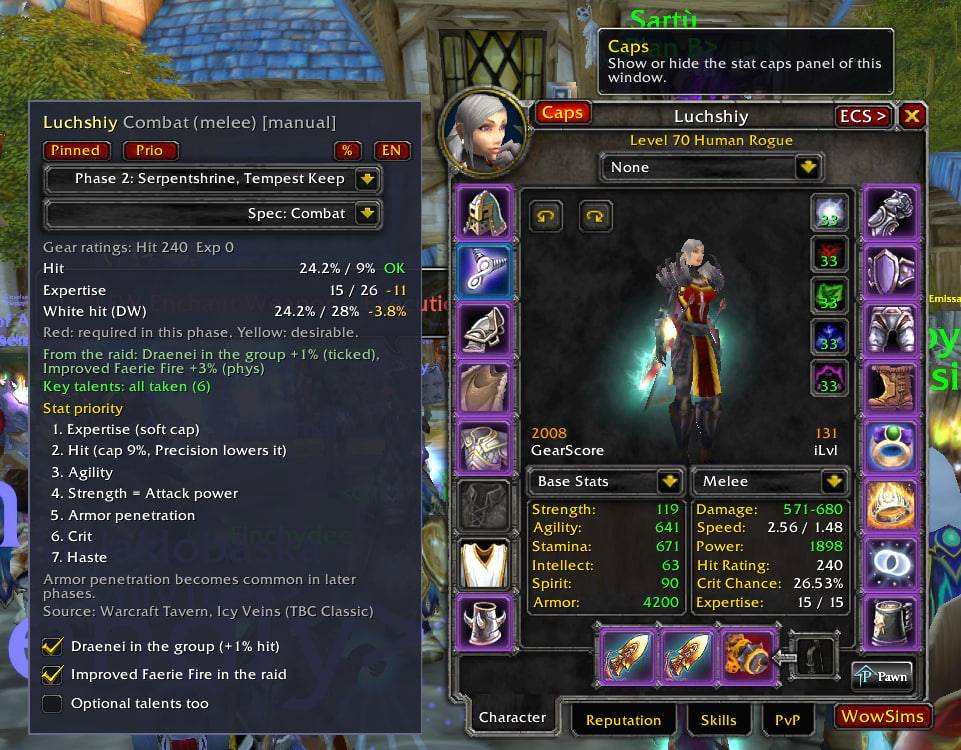
photo_2026-10-25_13-30-40.jpg
Description
Inspect Caps
See the stat caps of any player right in the character and inspect windows. Open the inspect window on anyone, and a panel next to it shows what they still lack for their class and spec: hit, expertise, defense, crit immunity, crush, plus the key talents they did not take and the stat priority of their spec.
Everything is calculated from the level 70 base values, the player’s gear (items, gems, active socket bonuses, enchants, set bonuses), talents, race and the raid buffs, so it works for other players, not only for your own character.
Features
Caps for every class and spec
- Melee and ranged: hit (9%) and expertise (26); for dual wielders also the white-hit cap.
- Casters: spell hit (16%).
- Tanks: defense, crit immunity (defense, resilience and the crit-reduction talent together) and the crush cap (102.4%) as separate lines.
- Healers have no caps; their key talents are still checked.
- Each line shows what the player has, the cap and what is missing. A button switches between percent / skill and rating.
Raid phase
- A phase drop-down (Pre-raid, Phase 1-5) decides what is required (red) and what is only desirable (yellow). For example, crush cap and expertise become required in later phases, and tanks’ hit and expertise are always soft caps.
Raid buffs are counted
- Auras read from the player (Heroic Presence, Totem of Wrath), a draenei in the group (found automatically), and switches for Improved Faerie Fire and Misery.
- Talents that lower the hit you need (Precision, Surefooted, Elemental Precision, Shadow Focus...), racial expertise and defense talents like Anticipation are included.
Key talents
- Lists the key talents a player has not taken. Only the core talents that every recommended build takes are checked; build-dependent ones (for example Rampage for Fury) are checked only if you tick Optional talents too.
- Uses the active talent set, so dual spec is handled.
Spec drop-down
- Auto or any spec of the class. Feral druids get Cat and Bear (they share the same talents). The choice is remembered per player.
Stat priority
- A Prio button shows the stat priority of the viewed spec, with caps and notes, based on the Warcraft Tavern and Icy Veins guides for TBC Classic.
Panel
- Pinned to the left of the character and inspect windows by default. A Caps button on the window turns it on and off. Free detaches the panel so you can drag it anywhere; Pinned puts it back.
- English and Russian with one click (Cyrillic font is handled on non-Russian clients).
Commands
/ic shows all of them. Useful ones: /ic phase 0-5, /ic lang en|ru, /ic side left|right, /ic optional on|off, /ic toggle, /ic reset, /ic compare (checks the calculation against your own character sheet), /ic slots (what each item contributes), /ic checkdb (checks the talent lists of your class).
Good to know
- The game shows dodge, parry and block only for your own character, so the exact crush value is shown for you; for other tanks the panel explains that it cannot be read.
- Item and buff tooltips and talent names are read in English; on other game languages the calculation falls back to the plain item stats.
- Key talents and stat priorities follow the common raid builds and the guides for TBC Classic. If your raid uses a different build, tick or untick the optional talents, or edit
Data.luaandPriority.lua.
Inspect Caps Character stats Team