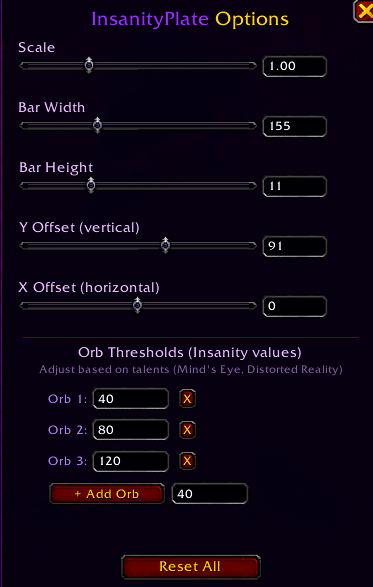
InsanityPlateOptions.png
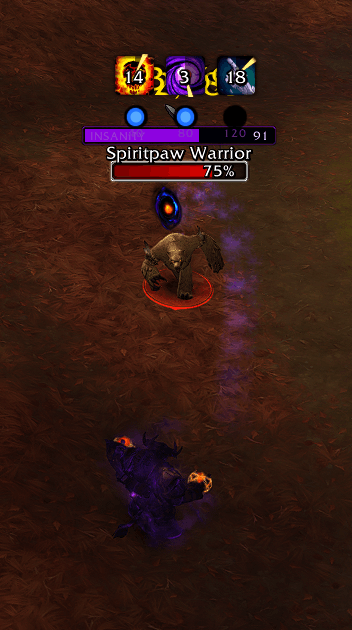
InsanityPlateSC.png
Description
# InsanityPlate
Shadow Priest Insanity bar displayed on enemy nameplates with customizable threshold orbs for Shadow Word: Madness tracking.
## Features
- **Insanity bar on enemy nameplates** — always visible when targeting an enemy
- **Threshold orbs** — glowing indicators at customizable insanity values (default: 40 / 80 / 120)
- **Fully customizable** via `/ip` options panel:
- Bar width and height
- Scale
- X/Y offset positioning
- Add, remove, or edit orb threshold values
- **Talent-aware thresholds** — adjust orbs for Mind's Eye (-5 cost) or Distorted Reality (+5 cost)
- **Lightweight** — event-driven, minimal CPU usage
- **Settings persist** between sessions
## Usage
- Type `/ip` to open the options panel
- Drag sliders or type exact values in the input boxes
- Add orbs at any insanity value for Shadow Word: Madness thresholds
- Type `/ip reset` to restore defaults
## Installation
1. Download and extract to `World of Warcraft/_retail_/Interface/AddOns/`
2. Make sure the folder is named `InsanityPlate`
3. Reload UI or restart WoW
## Requirements
- Shadow Priest specialization (addon auto-detects)
- Enemy nameplates enabled
InsanityPlate Team