InRange Ping
- By
IRP1.png
IRP2.png
Description
InRange Ping
Know the instant your target is in range.
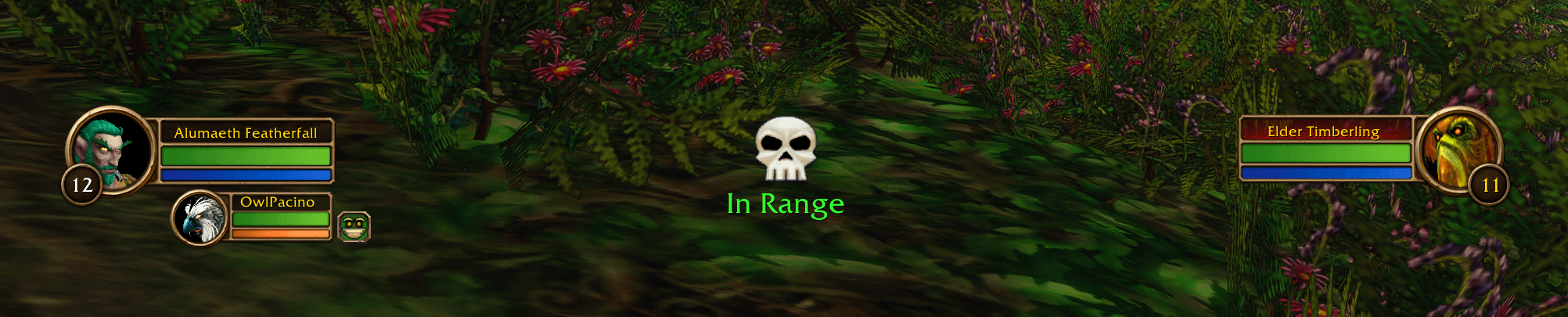
InRange Ping shows a clear on-screen alert, with an icon and a sound of your choice, the moment your current enemy target comes within range of your ranged spells. No more watching your action bar for the range indicator, and no more pulling the wrong way because you guessed the distance.
Built for ranged classes like Hunters, Mages, Warlocks, Priests, Shamans and Druids, and it works for any class with a ranged ability.
Features
Two display modes
- Ping: the alert appears when your target enters range, holds briefly, then fades out.
- Stay while in range: the alert stays on screen for as long as your target is in range, and disappears when it isn't.
Make it yours
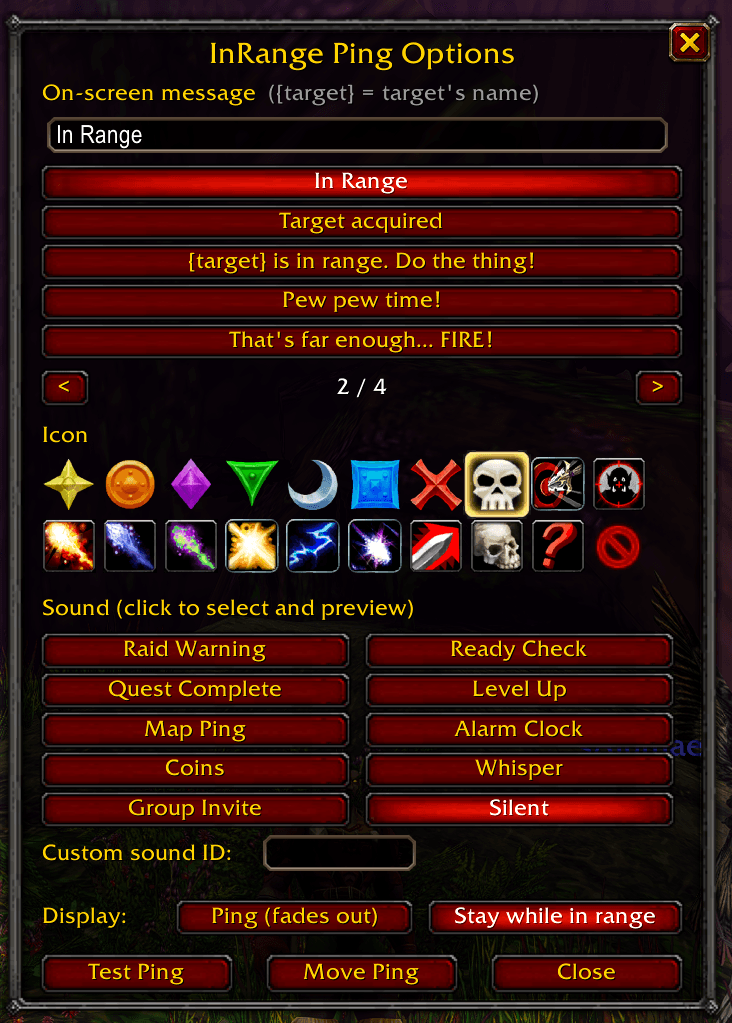
- Choose your icon. Pick from the eight raid target markers and a selection of built-in spell icons, or choose no icon for a text-only alert. The icon is displayed above the message.
- Choose your sound. Select from a list of built-in sounds, go silent, or enter any sound ID of your own. Click to preview.
- Choose your message. Pick from class-themed and humorous messages, or write your own. Use
{target}to include the target's name, for example "Time to turn {target} into a Popsicle".
Class-themed messages
Every class has its own set of messages, from the Hunter's "Steady… aim… FIRE!" to the Paladin's "Judgement day for {target}", plus a pool of generic ones such as "Boop!", "Tag, you're it" and "Release the Kraken!".
Easy to use
- Minimap button. Left-click opens the options window, right-click toggles the addon on or off, and you can drag it around the minimap edge.
- Simple options window. Everything above is a click away, with a Test button to preview your setup.
- Movable alert. Drag the alert anywhere on screen; its position is saved.
- Automatic range spell. The addon picks a suitable ranged spell for your class automatically. You can override it with any spell you like.
Slash commands
Type /irp in game to list the commands.
/irp options- open the options window/irp test- preview the alert/irp moveand/irp lock- unlock the alert to drag it, then lock it in place/irp reset- reset the alert to its default position/irp mode pingor/irp mode stay- switch between the two display modes/irp sound- toggle sound on or off/irp minimap- show or hide the minimap button/irp spell <name>- set the spell used for range checking (no name = automatic)
Tips
- If the alert never appears, run
/irpto see which range spell was picked, and set one manually if needed, for example/irp spell Arcane Shot. - Some ranged abilities have a minimum range as well as a maximum, such as the Hunter's dead zone. "In range" means you can currently use that ability on the target.
- If a built-in sound is silent on your client, enter a different sound ID in the custom sound box.
Compatibility
Built for WoW Forever (interface 16001). It uses standard UI functions only and has no library dependencies.
Feedback
Found a bug or have a suggestion for a new message, icon or feature? Leave a comment or open an issue. Ideas for extra class-themed messages are especially welcome.
InRange Ping Team