InCharacter RP
- By
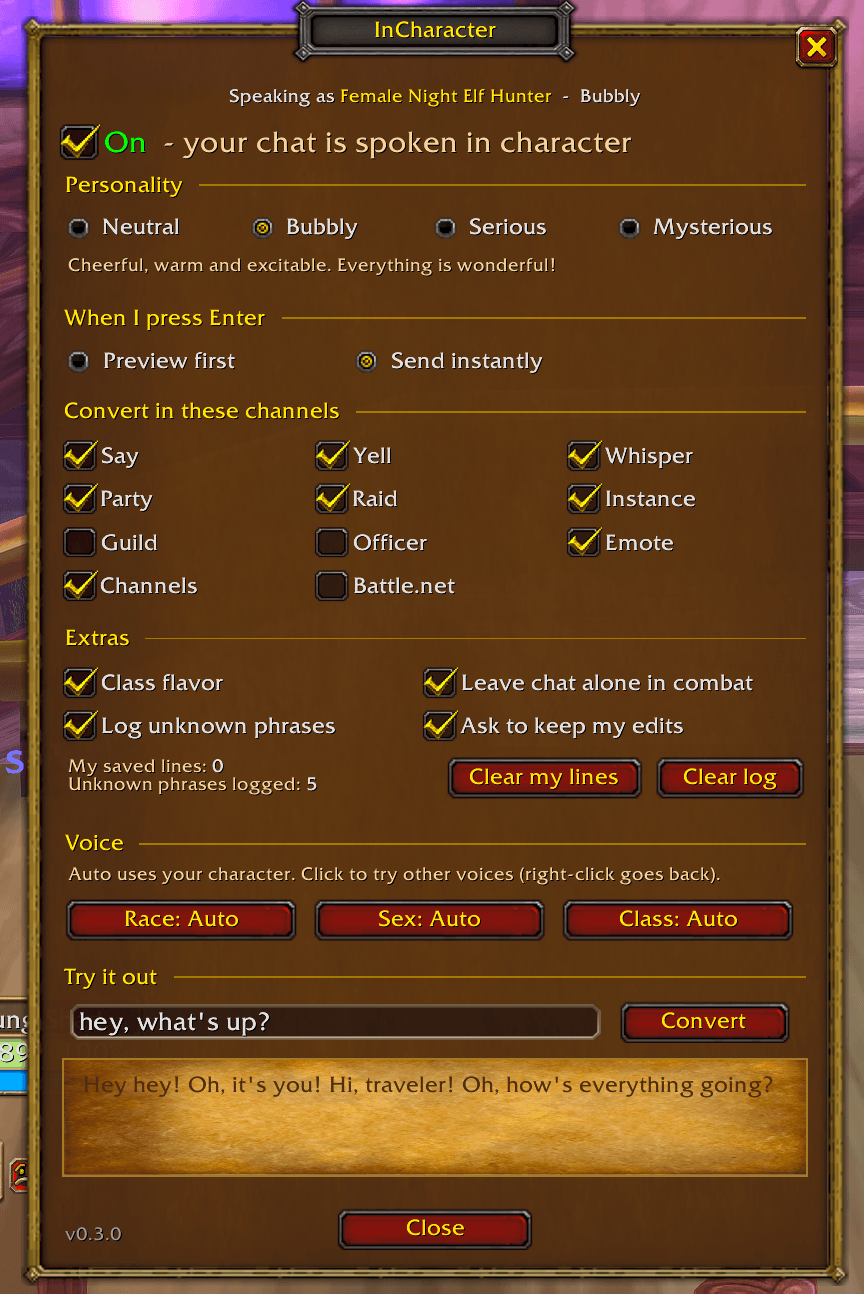
Screenshot 2026-11-13 084555.png
Description
InCharacter
Not great at RP speak? Type the way you normally would. Your character says it in their own voice.
InCharacter rewrites your outgoing chat into roleplay speech that fits your character's race, sex, class and chosen personality. A female Night Elf Hunter and a male Orc Warlock answer the same "hey what's up man" very differently:
You type: hey what's up man Night Elf: Ishnu-alah, friend. How does the night find you? Dwarf: Oi, friend! Good to see ye. How's the road treatin' ye? Orc: Throm-Ka, friend. What news? Troll: Hey, mon! What be happenin'?
It is not AI and never connects to the internet. Everything runs inside the game from phrase lists.
How it works
- Type in chat as usual and press Enter.
- Preview mode (default): the chat box reopens with your line in character. Edit it if you like, then press Enter to send or Esc to cancel.
- Instant mode: the converted line is sent right away.
- Start a message with ! to send it exactly as typed. Anything inside (( )) is treated as out of character and left alone.
- Item links, raid markers and URLs are never changed. Chat is left alone in combat.
Features
- Voices for Human, Dwarf, Night Elf, Gnome, Orc, Troll, Tauren and Forsaken, with lore-friendly greetings, farewells, oaths and accents.
- Class flavor for all nine classes. Hunters mention their pet by name, Warlocks smell faintly of brimstone.
- Lines that depend on your sex, plus Dwarven "lad" and "lass" based on who you are talking to.
- Four personalities: Neutral, Bubbly, Serious and Mysterious. They work on top of your race, so a Bubbly Troll still says "mon".
- If you have a friendly player targeted, your character will sometimes use their name.
- Hundreds of lines, and your character avoids repeating anything it said recently.
- Keep your edits: if you rewrite a preview before sending, InCharacter can save your version for that character to use again.
- Classic Blizzard-style options window with an On/Off switch, channel choices and a "Try it out" box.
Commands
/ic - open the options window /ic on, /ic off, /ic toggle - pause or resume without disabling the addon (great in a macro) /ic try <text> - see a conversion without sending /ic help - list all commands
Channels
By default InCharacter converts Say, Yell, Whisper, Party, Raid and Instance chat. Guild, Officer, Emote, numbered channels and Battle.net whispers are off, and each one can be switched on in the options window.
Feedback
Is there a phrase you use all the time that InCharacter doesn't understand? Leave a comment, and it may show up in the next content pack.
InCharacter RP Team