


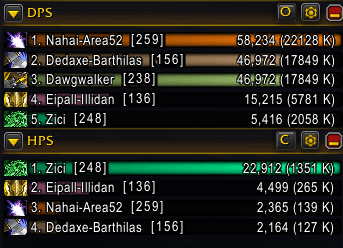
ilvlonbars_ss01.png
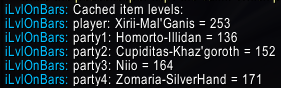
ilvlonbars_ss02.png

ilvlonbars_ss03.png
Description
What it does
Collects item level of players in an eligible group (TW, 5-man, raid...) over time and displays it in an overlay next to the matching player's name in the built-in Blizzard damage meters.
** Takes time to cache and sort (albeit this should be a lot quicker now)
** Your first pull or two will not have everything yet if you're still in combat. Wait until out of combat.
** Cannot read Blizzard's API during combat, so have patience. Item levels and alignment cannot possibly work properly during combat due to it being secret / protected.
Soon you will have a sorted list of item levels after combat ends and it can have a chance to scan/cache/work.
How to use
Upon starting a new dungeon run, you will start to see some item levels starting to get cached and display.
During combat however the API is entirely secret/unreadable so the item levels will not correct themselves until after combat ends and all the player ratings move around the bars then stop. By a few pulls in any dungeon, you should have a completed list of players and item levels next to them. This is cached and will look up again on next dungeon run.
Commands:
/ilvlonbars or /ilvlbars works.
/ilvlonbars refresh - preserve cached item levels but try to re-inspect stale entries
/ilvlonbars status - show the current status, and reasoning for status
/ilvlonbars show - show the Blizzard damage meter, if not already shown
/ilvlonbars cache - show the currently cached list of item levels and players
Gotchas
You will likely need to adjust your Blizzard bars horizontally wider than default. This is because the ilvl shows a few spaces next to the full "display name" such as "1. Reeder-Mal'ganis [800] 100,000 (10000 K)". If your UI is not currently displaying the full name of a long character name such as "Itendtomaxmycharactercount-EmeraldDream" showing as "Itendtomaxmych..." or "Itendtomaxmycharactercount-EmeraldDr..." then the [ilvl] is just going to mash itself into your row wherever it can and look ugly. Simply edit the window and make it wide enough to show everyone's full name-realm to avoid this.
Since the data is hidden in combat as mentioned above, multiple pulls of combat means the addon doesn't get to do it's thing yet. This is quite typical in M+ so I'm sure you'll see the issue more there. Fret not, at some point the addon will get it's chance to sort the cached Ilvl -> name -> horizontal width placement.
Simple explanation: If you were any combat addon nowadays, you would see damage meters just fine, then imagine the entire damage meters window(s) entirely disappear during combat. There is nothing you can do/sort/cache/show - anything, until combat ends and the API is readable again. I hope that explanation helps visual conception of it's workings.
Thanks!
Donations
If you would like to contribute to the development of iLvlOnBars, please buy me a coffee or send via Zelle QR code below:

iLvlOnBars Team

![Titan [Speed] Cont. project image](https://media.forgecdn.net/avatars/thumbnails/2009/384/256/256/639233876826437063.png)
