ilvl Forever
- By
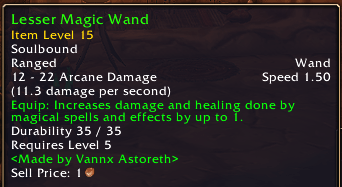
Shows item level on tooltips, in the game's item comparison and on the character frame, with your average item level.
1.png
2.png
3.png
Description
ilvl Forever
World of Warcraft: Forever doesn't show item level by default. ilvl Forever adds it back, fully integrated into the game's interface: its fonts, its colors and its own texts.
Features
Item level on tooltips
- Item Level N right under the name of every equippable item, on every tooltip.
- On recipes, the level is shown under the crafted item.
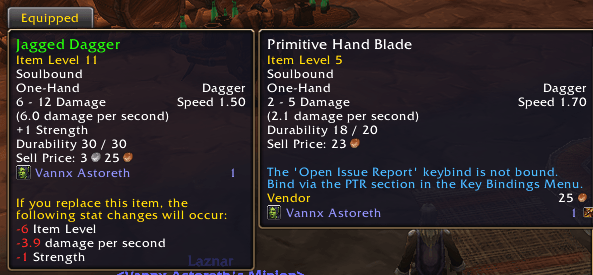
- Also shown on the game's comparison tooltips.
Item level difference when comparing
Forever already compares stats in its Equipped tooltips. ilvl Forever doesn't duplicate it: it just adds what's missing, the item level difference, as the first line of that block and in the same style (green if it goes up, red if it goes down).
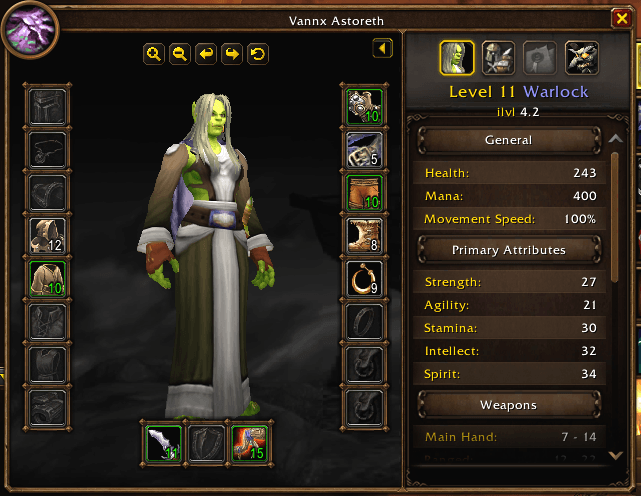
Character frame
- The item level of each equipped piece on its icon, colored by quality.
- Your average item level right under your level and class.
Inspect frame
- The item level of each piece of the inspected player on its icon, colored by quality.
- Their average item level next to the Talents button.
Bags
- The item level of every equippable item on its icon, in the default bags and in Bagnon.
- Upgrade arrows: green if an item has a higher item level than what you wear in that slot, red if lower. Only for items your class can use, never on gray junk.
Options
Esc > Options > AddOns > ilvl Forever. Every feature can be turned on or off separately:
- Item level on tooltips
- Difference when comparing
- Character frame
- Inspect frame
- Bags
- Upgrade arrows in bags
- Color by quality
- Language (Automatic / English / Español)
- Reset to defaults
/ilvlf tells you where the options are.
Good to know
- Lightweight: it only works when something changes (when a tooltip is drawn, your bags change or you change your gear). Nothing runs continuously.
- Languages: English and Spanish.
- Made for WoW Forever only.
If you like the addon, you can buy me a coffee on Ko-fi ☕
Español
World of Warcraft: Forever no muestra el nivel de objeto por defecto. ilvl Forever lo recupera, totalmente integrado en la interfaz del juego: sus fuentes, sus colores y sus propios textos.
Funciones
Nivel de objeto en los tooltips
- Nivel de objeto N justo debajo del nombre de cada objeto equipable, en todos los tooltips.
- En las recetas, el nivel sale bajo el objeto que se fabrica.
- También sale en los tooltips de comparación del juego.
Diferencia de ilvl al comparar
Forever ya compara las estadísticas en sus tooltips de Equipado. ilvl Forever no lo duplica: solo añade lo que falta, la diferencia de ilvl, como primera línea de ese bloque y con su mismo estilo (verde si sube, rojo si baja).
Ventana de personaje
- El ilvl de cada pieza equipada sobre su icono, con el color de su calidad.
- Tu ilvl medio justo debajo de tu nivel y clase.
Ventana de inspección
- El ilvl de cada pieza del jugador inspeccionado sobre su icono, con el color de su calidad.
- Su ilvl medio junto al botón de Talentos.
Bolsas
- El ilvl de cada objeto equipable sobre su icono, en las bolsas del juego y en Bagnon.
- Flechas de mejora: verde si un objeto tiene más ilvl que lo que llevas en esa ranura, roja si tiene menos. Solo en objetos que tu clase puede usar y nunca en la basura gris.
Opciones
Esc > Opciones > AddOns > ilvl Forever. Cada función se puede activar o desactivar por separado:
- ilvl en los tooltips
- Diferencia al comparar
- Ventana de personaje
- Ventana de inspección
- Bolsas
- Flechas de mejora en las bolsas
- Color según la calidad
- Idioma (Automático / English / Español)
- Restablecer valores
/ilvlf te dice dónde están las opciones.
A tener en cuenta
- Ligero: solo trabaja cuando algo cambia (al dibujarse un tooltip, al cambiar tus bolsas o al cambiarte de equipo). Nada se ejecuta de forma continua.
- Idiomas: inglés y español.
- Hecho solo para WoW Forever.
Si te gusta el addon, puedes invitarme a un café en Ko-fi ☕
ilvl Forever Team